56
EZweb
Accessing Sites
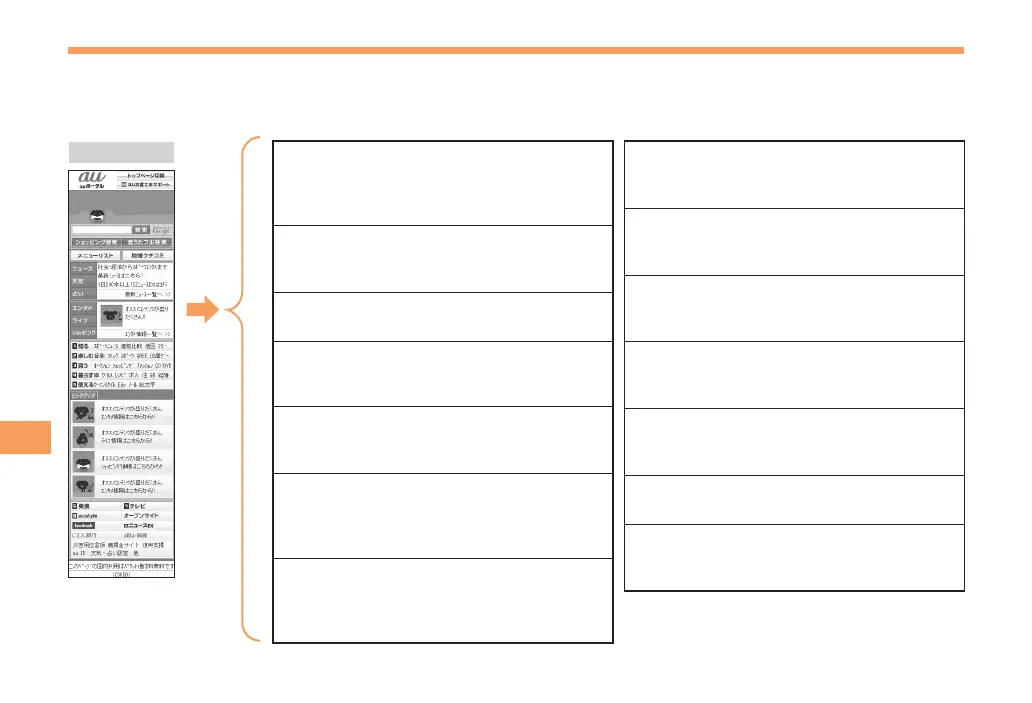
Viewing the au Portal
You can access EZweb from the au Portal. A variety of useful and fun sites are available on EZweb.
When the standby screen is displayed, press R, use j to select au Portal and then press c (Select).
au Portal
(au Customer Support)
Provides information about charges, various
applications, au online manual and notices
from au.
(Search by Keyword)
Provides a search function for searching for
information by keyword.
(Menu List)
Provides a list of various content provider sites.
(Top News, Weather
& Horoscope)
Provides direct access to the au one services.
(Latest News)
Introduces up-to-date information concerning
entertainment, daily life, etc.
(Tips & Tools)
Provides information on sports and stock
prices, as well as useful tools such as maps
and dictionaries.
(Hobbies & Culture)
Provides the latest information, such
as games, music, books, hobbies and
entertainment.
(Shopping & Auctions)
Provides a list of shopping and auction sites
available from your cell phone.
(Lifestyle)
Provides travel, restaurant and other
lifestyle-oriented information.
(Community & Communication)
Provides interesting and useful services
such as SNS, Emoji.
(Transportation & TV)
Provides direct access to the au one
services.
Introduces information and sites that au
recommends.
(Open Site)
Introduces open sites.
(Disaster Message Board)
Register and confirm safety information in
time of disaster.



 To Next Page