EasyManua.ls Logo

AU pt003 - Display Indicators

AU pt003
86 pages
Print Icon
To Next Page IconTo Next Page
To Previous Page IconTo Previous Page
Loading...
28
Getting Ready
Display Indicators
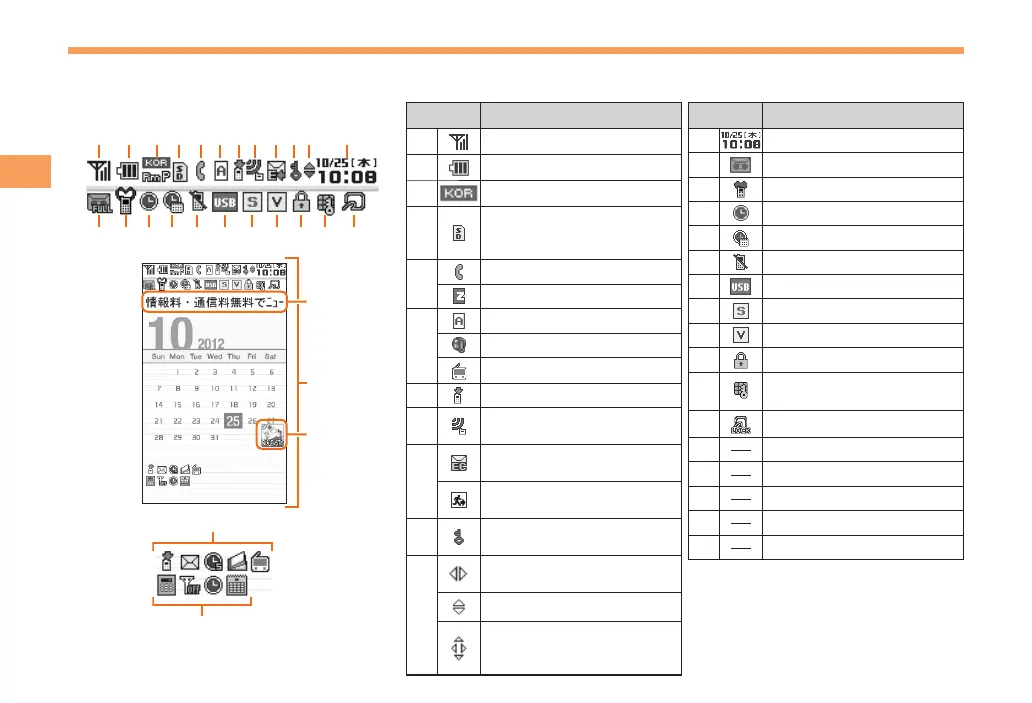
Display indicators inform you of mail arrival, current settings, etc.
Display

Indicator Description
Signal strength
Battery level
Roaming information
microSD memory card
(commercially available)
inserted
Making a call/During a call
Connecting to EZweb
EZapps activated
Connecting over SSL
TV (1seg) activated
Missed calls
Receiving EZ News
Flash information
New or unread e-mail/
C-mail
New or unread emergency
early warning mail
Displaying secret
informations
Movable to next/
previous screen
Scrollable
Conversion candidates
of up/down/left/right can
be selected
Indicator Description
Current date and time
Easy voice memo set
Manner mode set
Alarm set
Schedule alarm set
Signal off mode set
USB connected
Ring tone off
Vibrator on
Auto lock activated
Side key disable feature
on
FeliCa lock activated
Ticker field
Wallpaper
Info pane
Notification icon
Shortcut menu

Table of Contents

Related product manuals