26
Getting Ready
Learning the Basics
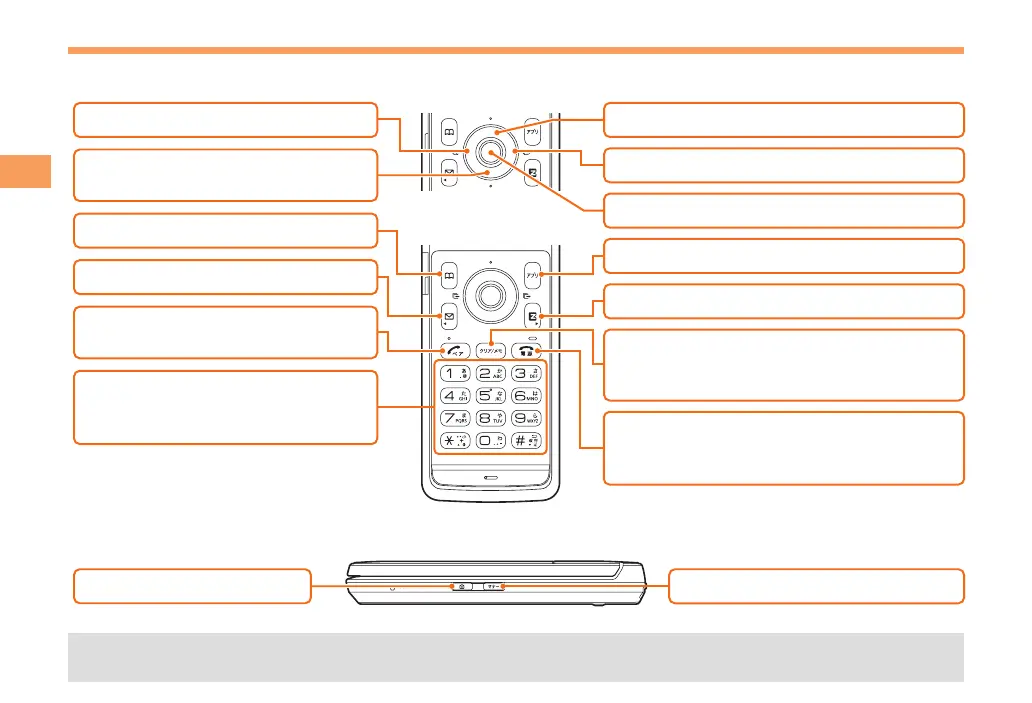
Key Assignments
d
: Display Notification window/
Shortcut menu.
N
: Make/answer calls.
Use the Pair function.
F
: Turn power on/off.
End call/communication.
Cancel operation.
l
: Display Incoming History.
u
: Display the ticker field, info pane.
c
: Display Menu.
R
: Display EZ Service menu.
C
: Set/cancel easy voice memo.
Delete characters.
Cancel operation.
0〜9*#
:
Input phone numbers and
characters.
r
: Display Outgoing History.
%
: Display EZapps menu.
&
: Use Address Book.
L
: Display E-mail/C-mail menu.
Side Key Assignments
(
: Set/cancel Manner mode.
)
: Activate Camera.
• If you lose track of where you are or if you make a mistake, press CC to return to the previous screen. Return to the
standby screen by holding down
FF for at least one second.



 To Next Page