57
EZweb
Basic Operations
Use j to select the site you want to access and then
press c (Select).
Press C to return to the previous screen. Hold down
C for at least one second to return to the au Portal.
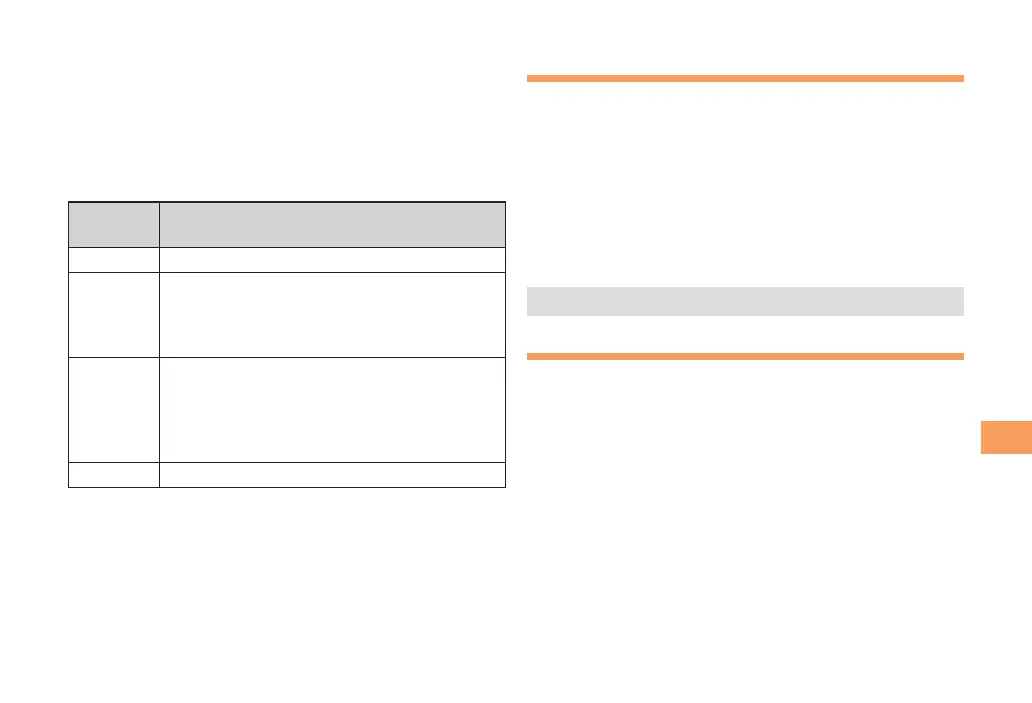
The following describes the basic operations that are
available while accessing sites.
Key
Operation
Description
F
Exits EZweb.
j
Moves the cursor up and down.
When there is data available above or below
the current screen, scrolls up and down the
screen one line at a time.
s
When there is data available above or below
the current screen, moves the screen page
by page.
l:Returns to the previous screen.
r:Moves to the next screen.
C
Returns to the previous screen.
Bookmarking Frequently
Accessed Pages
When the page you want to bookmark is
displayed, press % (Browser menu).
Use j to select New bookmark and then press
c (Select).
• Some pages cannot be bookmarked.
Press % (Reg).
The displayed page is bookmarked, and its title and
URL are added to the Bookmark.
• The Bookmark can contain up to 100 titles and URLs.
Viewing Bookmarked Pages
When the standby screen is displayed, press R
and then use s to select EZweb.
Use j to select Bookmark(s) and then press
c (Select).
Use j to select the bookmark for the page
you want to view and then press c (Select).
The cell phone connects to the site.



 To Next Page