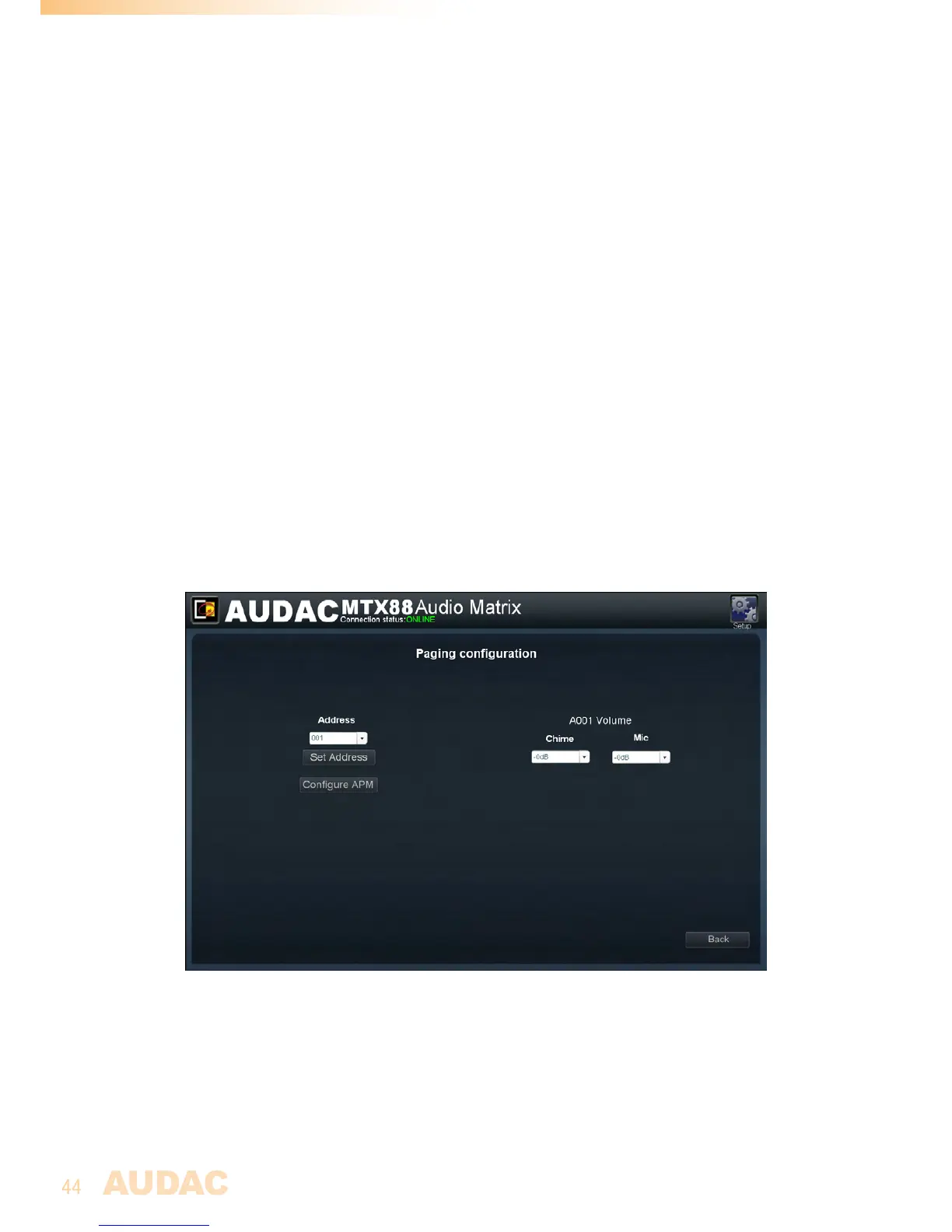
Theselectedaddressisimportanttosettheprioritieswhenmultiplepagingconsoles
arelinkedinparallell.Thepagingconsolewiththelowestaddressnumber(001)will
havethehighestpriorityinthesystem.Whenonlyonepagingconsoleisconnected,it
isrecommendedtoalwaysassigntheaddress‘001’.Whenmultiplepagingconsolesare
connectedinparallel,theaddress‘001’shouldbeassignedtothepagingconsolewith
highestpriority,andallotherconnectedpagingconsolesshouldgetincreasingaddresses
inorderofpriority.
Selecttheaddressbythedropdownbox,andclickthe“SetAddress”button.Nowthe
lightsonalltheconnectedpagingconsoleswillstartblinking.Afterpushingthe“PTT”
(PushtoTalk)button,theselectedaddresswillbeassignedtothepagingconsolewhich
hasbeenoperated.
Aftertheaddresshasbeenassigned,thebutton“ConfigureAPM”mustbeclickedandall
configurationdatawillbetransferredandstoredinsidethepagingconsole.
Repeatthisprocedureforeveryconnectedpagingconsolewithdifferentaddressesin
orderofpriority.
Ontherightsideofthisscreen,theratiobetweenthespeechandchimesignalcanbeset.
Whenbothspeechandchimeshouldbeannouncedatmaximumvolume,bothdropdown
listsshouldbesetto‘-0dB’.Ifthechimehastobeannouncedlouderthanthespeech
orviceversa,thisratiocanbeadjustedbythedropdownlistsinarangebetween-0dB
and-48dB.Thegeneralpagingvolumeforeachzone(bothchimeandspeech)willbe
dominatedbythegeneralpagingvolumesettings,describedlaterinthischapter.
MTXPagingconfigurationscreen
Paging volume
Thepagingvolumeforeachindividualzonecanbesetinthe“Setup”menuunder“Paging
volume”.Thevolumecanbesetbymeansofthedropdownboxesdisplayednexttothe
zonenames.Thepagingvolumecanbesetinstepsof-1dB,startingby0dB,goingto
-∞.Whenthevolumeissetto0dB,announcementsforthecorrespondingzonewillbe
madeonmaximumvolume.



 To Next Page