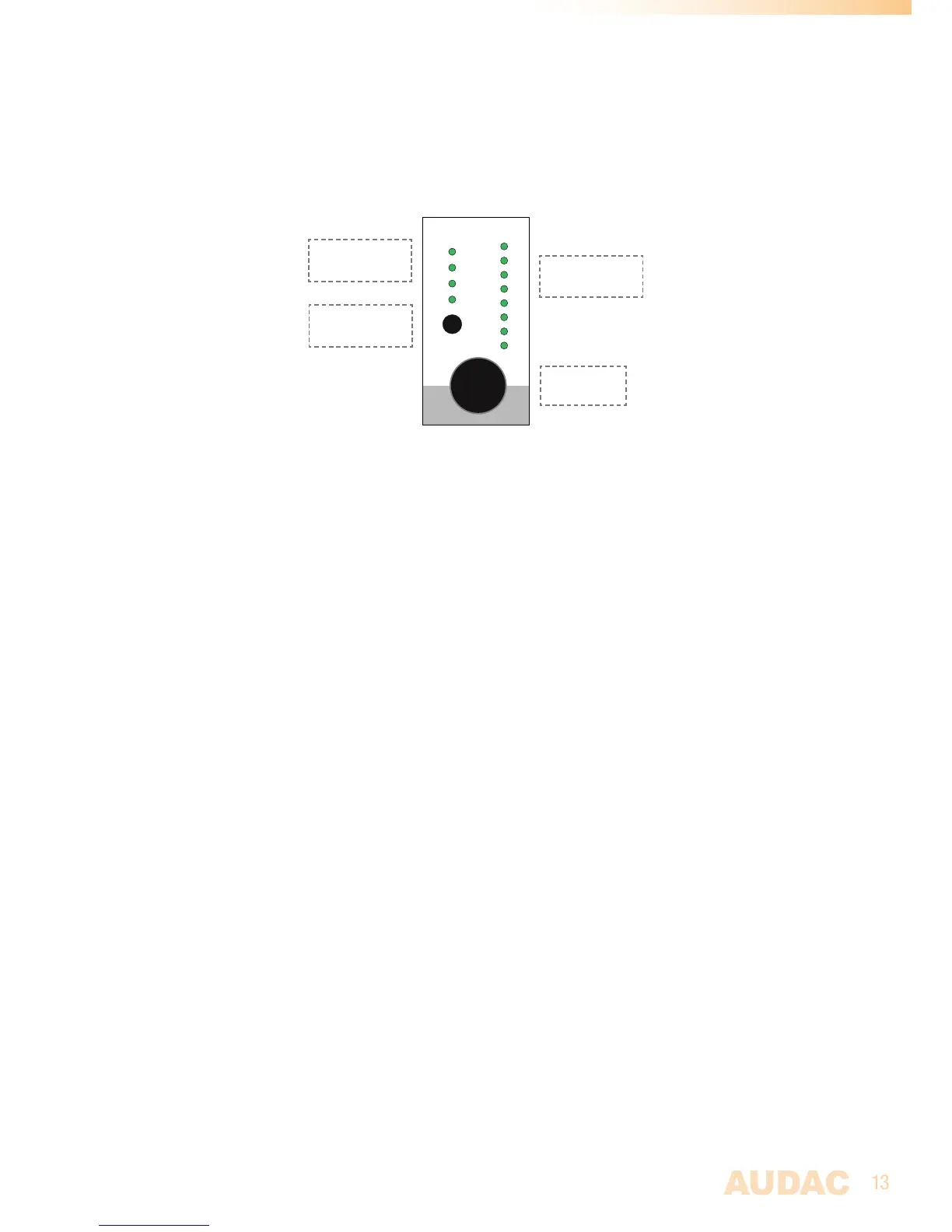
Front Panel functions
Thecontrolsectionforeveryzonecontainsonerotaryfunctiondial,fourfunctionindica-
tionLED’sandeightlevel/selectionindicationLED’s.
Zone 1
VOLUME
INPUT
BASS
TREBLE
8
7
6
5
4
3
2
1
PFL
BymeansofthefunctionindicationLED’s,thecurrentoperatingfunctionwillbeindicated.
TheupperLEDstandsforvolumeadjustment,thesecondLEDstandsforinputchannel
selection,thethirdLEDwillblinkwhenBasstoneadjustmentisenabled,andthefourth
LEDwillblinkwhenTrebletoneadjustmentisenabled.
Theselectionofwhichfunctionhastobecontrolledcanbedonebypressingtherotary
functiondial.Whenpressingtherotaryfunctiondial,the‘Volume’LEDwillilluminate.
Changingtothedesiredfunctioncanbedonebyrotatingthefunctiondial.Thecurrently
setlevel/selectionwillappearwhenthefunctionisselected.Whenanychangeneedsto
bemadetothelevel/selection,therotarybuttonshouldbepressedasecondtime.The
LEDoftheselectedfunctionwillstartblinkingnow,andanyrotationtothefunctiondial
willaffectthesetlevel/selection.
Whenthelevel/selectionischangedtothedesiredlevelandanyotherchangeneedsto
bemade,youcanreturntofunctionselectionbypressingtherotarybuttonagain.The
settingsmenuwillbequitautomaticallywhentherotarydialisnotoperatedforabout6
seconds.
Volume adjustment:
Whennofunctionisselected(MTXinidlestatus)andthefunctiondialisrotated,the
volumeadjustmentfunctionwillbeautomaticallyactivated.ThevolumeLEDwillstart
blinkingandthecurrentvolumelevelwillilluminateonthelevel/selectionLED’s.Manual
switchingtovolumemodecanalsobedone,bytheprocedureasdescribedabove.The
level/selectionLED’swillindicatethecurrentlysetvolumelevel.Onlyafewilluminated
LED’scorrespondwithalowvolumelevel,andmanyilluminatedLED’scorrespond
withahighvolumelevel.Rotatingtherotaryfunctiondialinclockwisedirectionresults
inanincreasingvolumelevelandrotatingincounter-clockwisedirectionresultsina
decreasingvolumelevel.
Input selection:
Thedesiredinputchannelforeveryzonecanbeselected.EveryLEDcorrespondswith
aninputchannel,andthecorrespondingLEDfortheselectedinputchannelwillilluminate
whenselected.Switchingbetweenthedifferentinputchannelscanbedonebyrotating
thefunctiondial.Thetabelshownbelowgivesanoverviewofwhichnumbercorresponds
withwhichinputchannel.
Rotary
Functiondial
Level/Selection
indicationLED’s
Function
indicationLED’s
PFLSwitch



 To Next Page