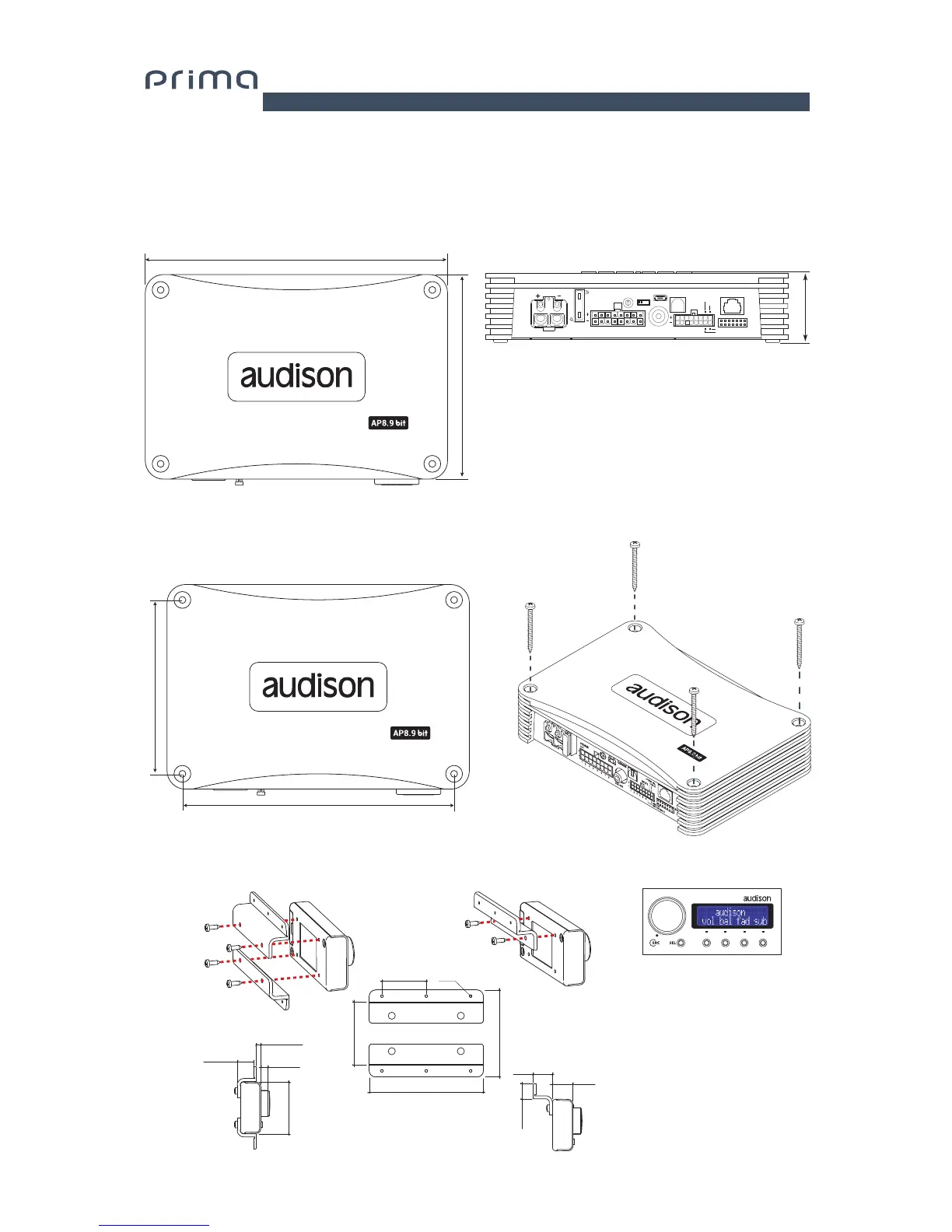
3. AP8.9 bit AND DRC INSTALLATION
External Size
Mounting Size
How to mount
DRC (optional)
Installation
Important: Do not use
aggressive cleaning agents
or abrasive cloths to clean
the display. Simply use a soft
cotton cloth that has been
lightly dampened with water.
134 mm / 5.2 7 in.
198 mm / 7.8 in.
114 mm / 4.5 in.
178 mm / 7 in.
45.50 mm / 1.8 in.
68 mm / 2.68”
90 mm / 3.54”90 mm / 3.54”
35 mm / 1.38”35 mm / 1.38” Ø 2 mm / 1/8”
50 mm / 2”
16 mm / 0.63”
17 mm / 0.67”
12.5 mm / 0.49”12.5 mm / 0.49”
43.5 mm / 1.71”
13.5 mm / 0.53”
3.5 mm / 0.14”
6 mm / 0.23”6 mm / 0.23”
0
1
2
3
4
5
6
7
POWER - 12V
USB
OPTICAL SEL.
1 2 3 4 5
1 2 3
4 5 6
76
8
UPGRADEPRESETS
SPEAKER
OUT
OPTICAL IN
DRC
SUB OUT
INPUTS
ASP
OFF ON
REM IN
REM OUT
MASTER ENABLE
30A
3


 To Next Page