6
USB to RS232 Driver Installation
Some Installer-Ready Products connect to the laptop using an RS232
(serial COM port) connection. If the computer is not equipped with such a
port, use the USB to RS232 connector provided in the Audyssey Installer
Kit.
A driver CD is provided with the cable, the driver for the USB to RS232
adapter is located on the RS232 cable Installation disc. Microsoft Vista
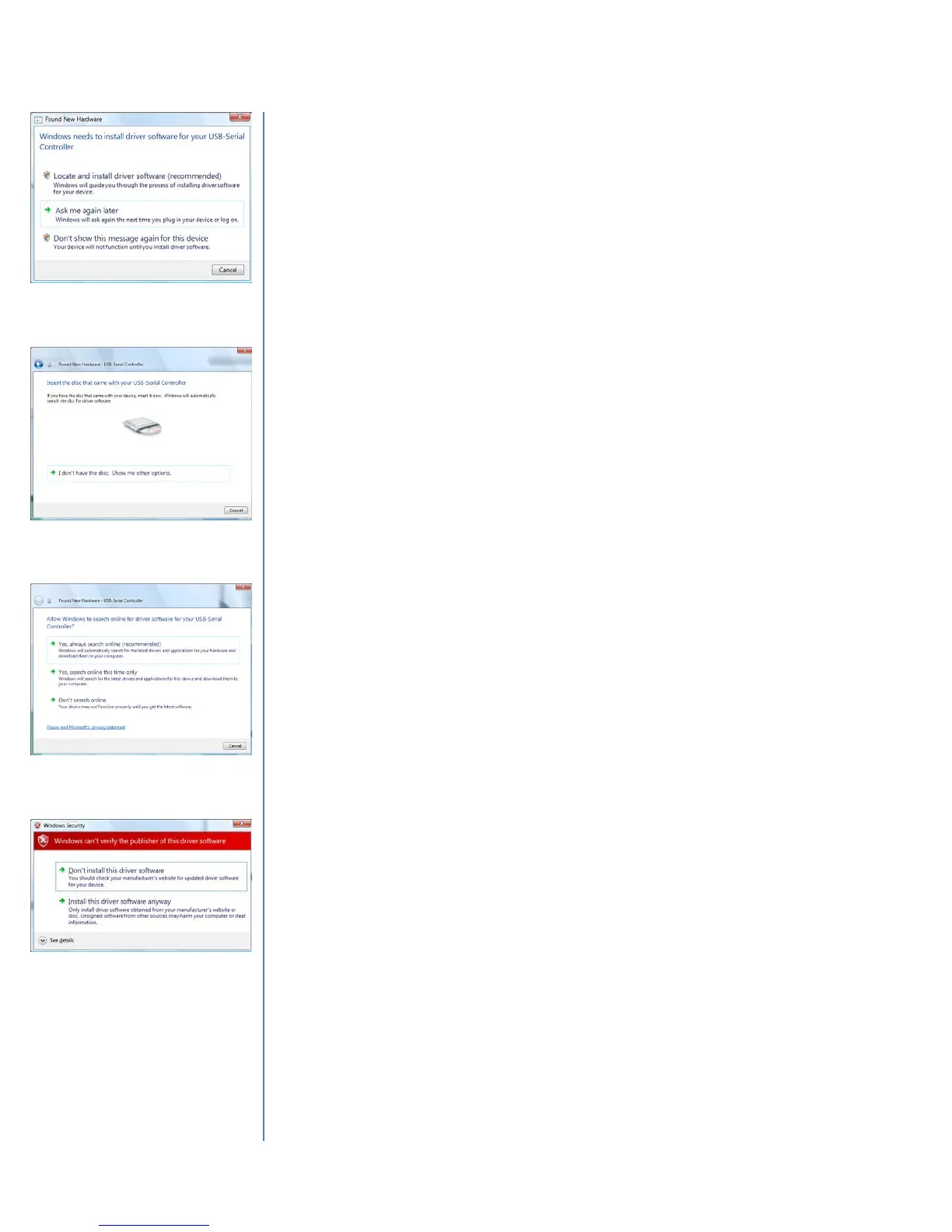
will display a prompt requiring installation of the driver (Figure 6).
Select the option, “Locate and install driver software (recommended)”.
A new window will prompt for the disc that came with the USB Serial
Controller (Figure 7). Insert the RS232 Cable CD. Choose the option,
“Don’t Search Online” (Figure 8) as the driver is included on the RS232
Cable CD and a driver found online may not be compatible.
If a Windows Security warning appears stating that the publisher cannot
be verified, select, “Install this driver software anyway” (Figure 9).
Once the installation is complete, MultEQ Pro may be used with the USB
to RS232 adapter. It is only necessary to perform this procedure once on
each PC.
Figure 6 - Locate and Install
Driver Software
Figure 7 - Insert the MultEQ Pro
Setup Disc
Figure 8 - Select "Don't search
online"
Figure 9 - Windows Security -
Select "Install this driver
software anyway"



 To Next Page