26
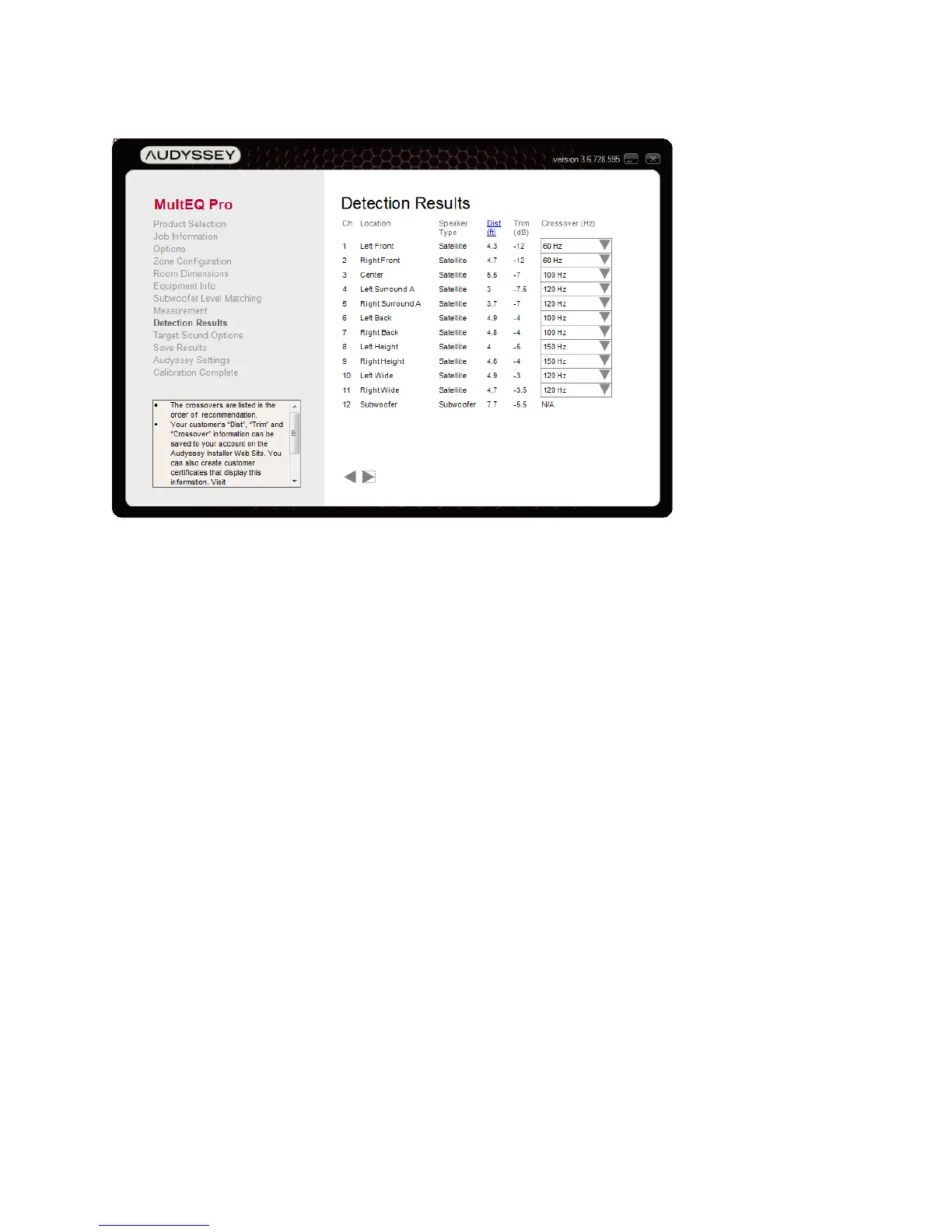
Detection Results
If calibrating an Audyssey Product (e.g. Sound Equalizer), enter the distance, trim and selected
crossover value for each channel into the preamplifier. MultEQ Pro transfers these values to all
other products automatically.
The Detection Results Screen displays the following values calculated from the measured data.
• Speaker Type indicates whether the detected loudspeaker is a satellite or subwoofer.
• Distance may be displayed in either English (feet) or Metric (meters) units by clicking
the “Dist” heading (in blue). The preamplifier or receiver will calculate delays to apply to
each channel to time-align all speakers so they are effectively equidistant from the first
measurement position.
• Trim is displayed in dB. This number is an absolute Trim – the adjustment required such
that movies will play at reference level with the volume knob at “0 dB” or the reference
volume setting appropriate to the specific product.
• Crossover options are displayed in a drop-down selection box if a subwoofer was
detected. If no subwoofer was detected, the front left and right speakers will reflect large,
while the satellite speakers will allow bass management frequencies starting with their
natural cutoff detected by MultEQ Pro.
When a subwoofer has been detected the crossover recommendations are optimized for
the best blend between satellite and subwoofer. These are listed in the drop-down menu
starting with the most recommended crossover setting at the top.
For every crossover frequency option, MultEQ Pro calculates a satellite filter that will
best blend it with the subwoofer. For this reason, it is extremely important that the bass



 To Next Page