24
2. Click “Measure.”
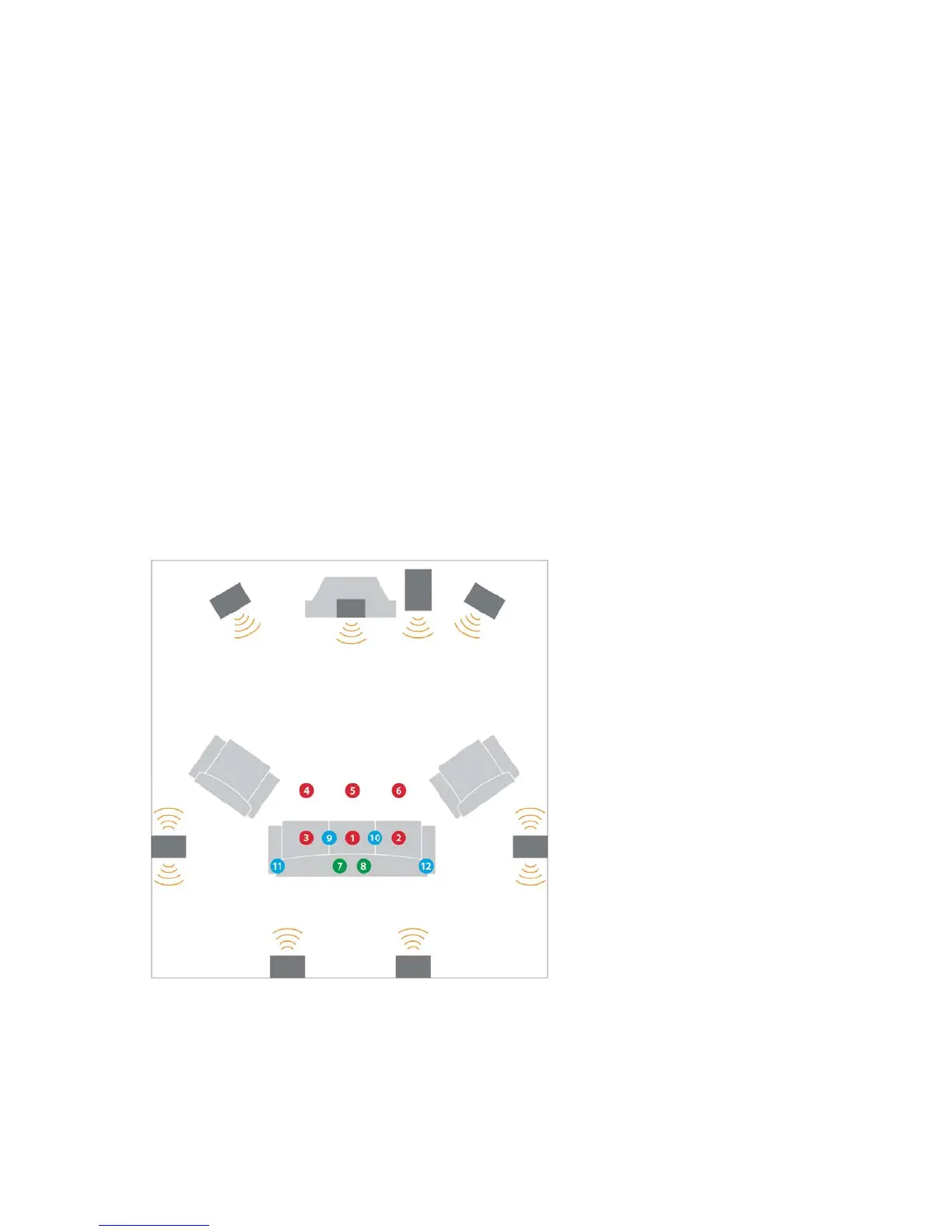
3. Audyssey recommends measuring at least 8 positions. A minimum of 3 positions must
be measured in order to continue past the “Measurement” screen.
Tips for Taking Measurements
1. Refrain from talking, during or between measurements or within several seconds of the
last speaker measurement.
2. Make the room as quiet as possible. Background noise can disrupt the room
measurements. Close windows and turn off cell phones, televisions, radios, air conditioners,
fluorescent lights, home appliances, light dimmers or other devices.
3. Do not sit or stand directly between any of the speakers and the microphone during
the room measurements.
4. Measure only locations around the center of the listening area.
5. Avoid measuring near corners, walls, doorways or in extreme off-axis positions
unless listeners will normally be situated in these locations.
6. Measure at least 8 positions. Taking measurements in more positions increases the data
that MultEQ Pro can use to calculate the equalization filters. This improvement comes with
diminishing returns. Measuring more than 8 or 10 positions in a small room rarely improves
the quality of the calibration. The maximum number of measurements supported by MultEQ
Pro is 32.
7. Vary the height of the microphone by a few inches between measurement positions to
account for standing waves between the floor and ceiling.
8. Creating a sweet spot. If only one seating position will ever be used for listening, 6 or
more measurements should still be taken. MultEQ requires information from the entire



 To Next Page