EMX-CDD User’s Manual
EMX-CDD User’s Manual 49
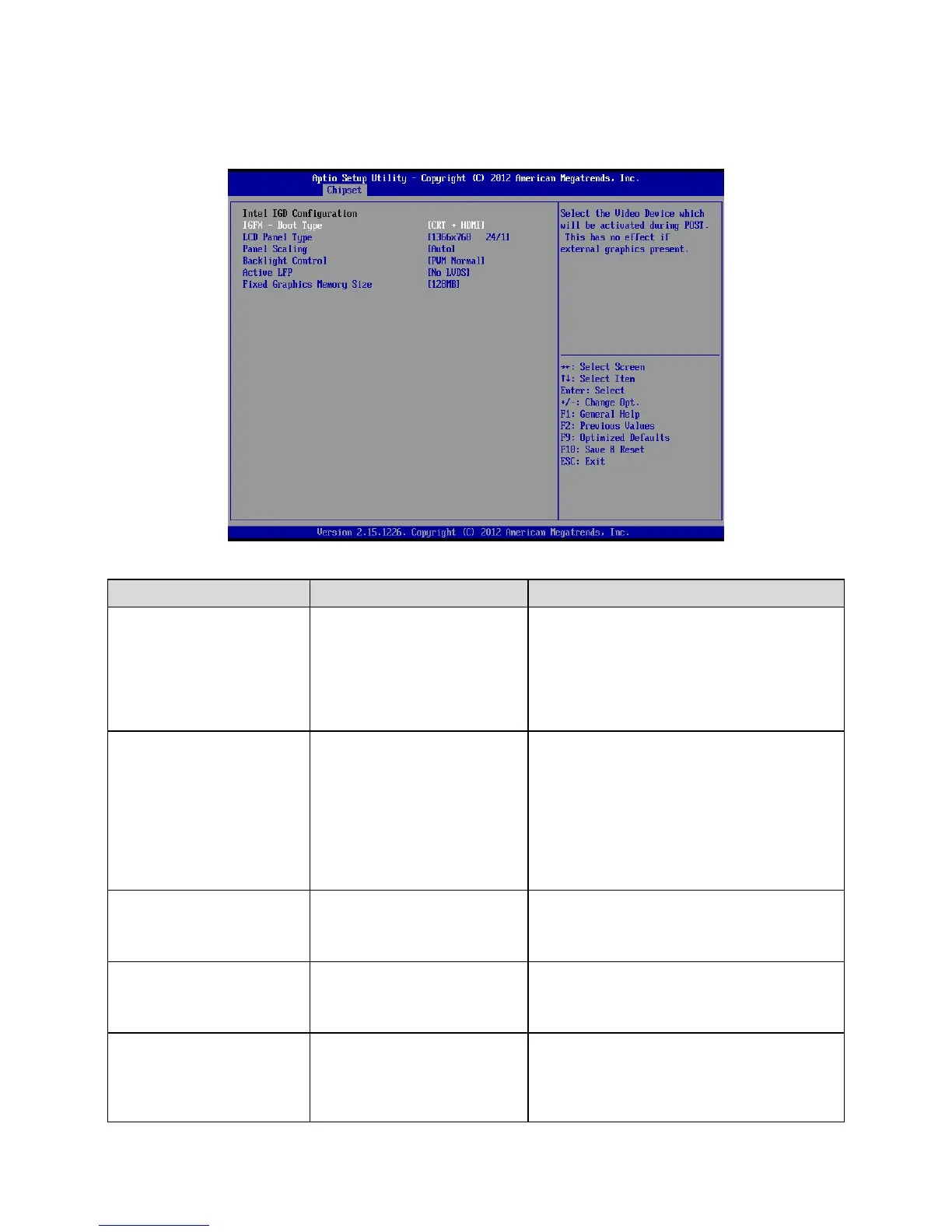
3.6.3.1.1 Intel IGD Configuration
VBIOS Default[Default]
CRT
LVDS
HDMI
CRT+LVDS
CRT+HDMI
HDMI+LVDS
Select the Video Device which will be
activated during POST. This has no effect if
external graphics present.
VBIOS Default[Default]
640x480 18/1
800x600 18/1
1024x768 18/1
None use
1366x768 24/1
1366x768 18/1
1024x600 18/1
1280x800 18/1
Select LCD panel used by Internal Graphics
Device by selecting the appropriate setup
item.
Auto[Default]
Force Scaling
Off
Maintain Aspect Ratio
Select the LCD panel scaling option used by
the Internal Graphics Device.
PWM Inverted
None use
PWM Normal[Default]
None use
Back Light Control Setting.
No LVDS[Default]
LVDS
None use
Select the Active LFP Configuration. No
LVDS:VBIOS does not enable LVDS.
Int-LVDS:VBIOS enables LVDS driver by
Integrated encoder. SDVO LVDS:VBIOS
enables LVDS driver by SDVO encoder. eDP













 To Next Page