EMX-CDD User’s Manual
EMX-CDD User’s Manual 51
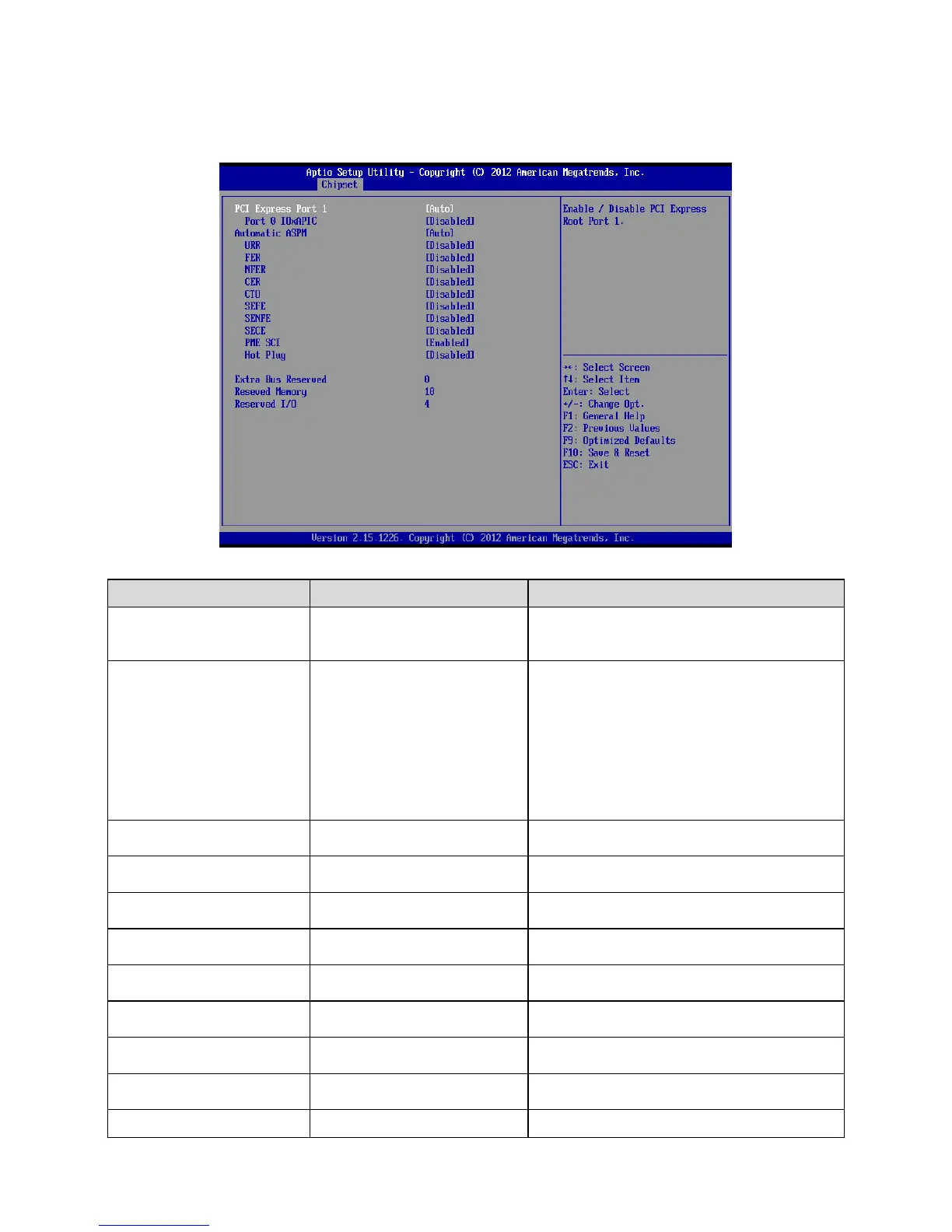
3.6.3.2.1 PCIE1X Configuration
Disabled
Enabled
Auto[Default]
Enable/Disable PCI Express Root Port 1.
VBIOS Default[Default]
640x480 18/1
800x600 18/1
1024x768 18/1
None use
1366x768 24/1
1366x768 18/1
1024x600 18/1
1280x800 18/1
Select LCD panel used by Internal Graphics
Device by selecting the appropriate setup
item.
Automatically enable ASPM based on
reported capabilities and known issue.
Disabled[Default]
Enabled
PCI Express Unsupported Request Reporting
Enable/Disable.
Disabled[Default]
Enabled
PCI Express Device Fatal Error Reporting
Enable/Disable.
Disabled[Default]
Enabled
PCI Express Device Non-Fatal Error
Reporting Enable/Disable.
Disabled[Default]
Enabled
PCI Express Device Correctable Error
Reporting Enable/Disable.
Disabled[Default]
Enabled
PCI Express Completion Timer TO
Enable/Disable.
Disabled[Default]
Enabled
Root PCI Express System Error on Fatal Error
Enable/Disable.
Disabled[Default]
Enabled
Root PCI Express System Error on Non-Fatal
Error Enable/Disable.
Root PCI Express System Error on













 To Next Page