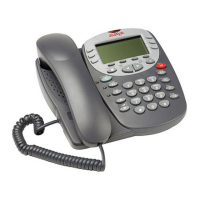
Page 12 - Overview of the Feature Key Feature Key
Apear - Appearance
Add a display line for call appearances with symbols being displayed for Incoming
Calls, Connected and On Hold. See Call Appearance Keys on page 6.
This function is currently not supported on the 5402 telephone.
AutCB - Automatic Callback
Sets a callback when free on busy extensions and callback when next used on
unanswered extensions.
When a called extension does not answer or is busy, pressing
Feature and then
the relevant dial pad digit will set the automatic callback feature. Hence, when the
extension becomes free or after it is next used, callback is initiated and a flashing bell
icon ( ) appears against a Call Appearance key. Pressing Speaker starts a call
to the called extension.
[User | Digital Telephony | Emulation | Automatic Callback]
See also:
• RBak - Cancel Ringback When Free on page 26.
• RBak+ - Ringback When Free on page 26.
Busy - Busy
Sets the extension as being busy.
This function does not require any data entered when programmed. Pressing
Feature and then the relevant dial pad digit will set the extension as busy to callers. If a
forward on busy number is set, it is followed. Otherwise calls go to voicemail if on or
receive busy tone if internal and ringing if external.
To return the extension from busy, press
Feature and then the relevant dial pad
digit again.
[User | Digital Telephony | Advanced | Busy | Busy]
BusyH - Busy On Held
Switch the users busy on held status on/off.
This function requires data entered when programmed. Enter either 0 for off or 1 for on.
Pressing
Feature and then the relevant dial pad digit switches the user's 'busy on
held' state to either on or off as indicated by the data value. When on, if the users has a
call on hold, then new callers receive busy tone (ringing if analogue) or are diverted to
voicemail if enabled, rather than ringing the user. This also overrides call waiting
indication when the user has a call on hold.
Page 12 - Feature Key IP Office (R3.0) 5402 User’s Guide
Overview of the Feature Key 40DHB0002UKFC – Issue 1 (5th February 2005)



 To Next Page