65
Use AVer PTZApp to Setup the Speakerphone
After installing the AVer PTZApp, run the PTZApp on your laptop/PC.
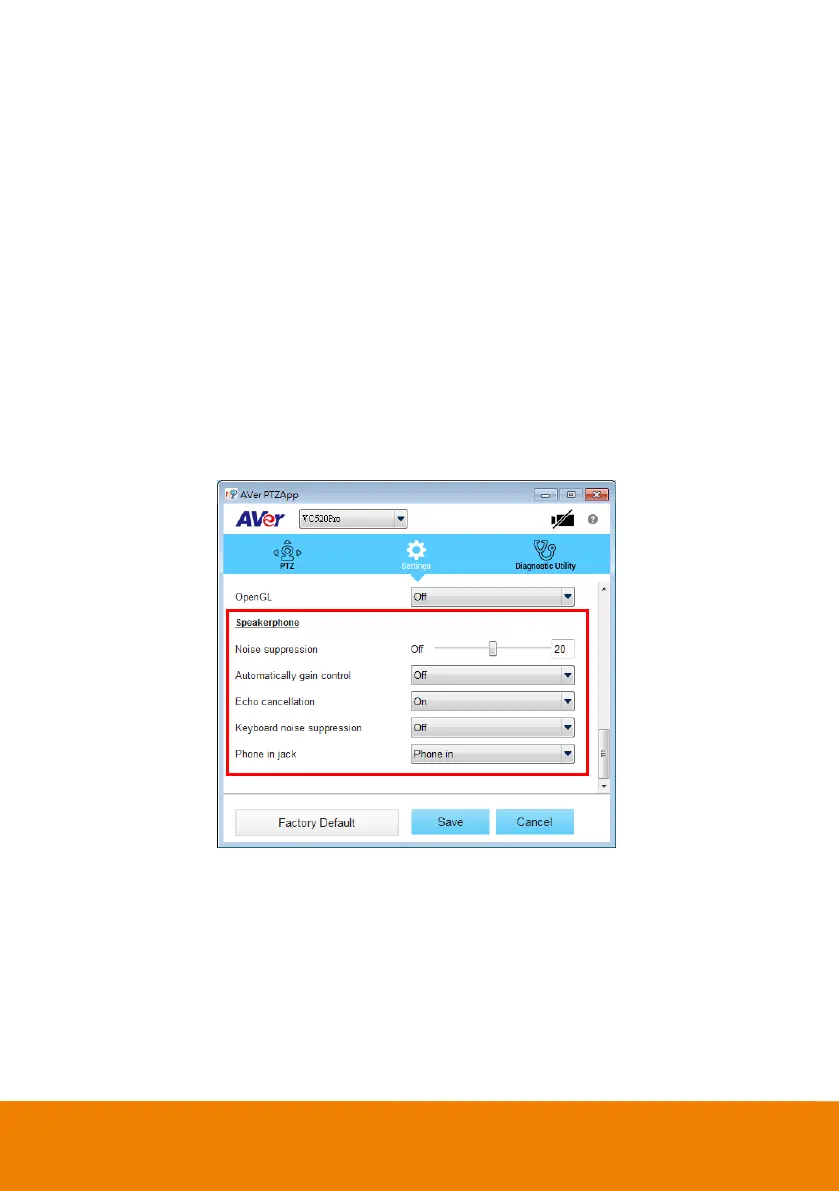
Select “Settings” > scroll down to “Speakerphone” section.
You can adjust the following settings of the speakerphone.
Noise suppression: Reduce ambient noise.
Automatic gain control: Enable/disable the automatic gain control.
Echo cancellation: Enable/disable echo situation.
Keyboard noise suppression: Enable/disable keyboard noise reduction.
Phone in jack
Phone in: When the mobile phone is connecting to Phone in port, please select “Phone in”
option.
3.5mm microphone only: The speakerphone will transfer the sound that it receives from the
external microphone (connected on phone in port) to far site.
3.5 mm microphone mix in: The speakerphone will transfer the sound that it receives from
the external microphone (connected on phone in port) and speakerphone to far site.



 To Next Page