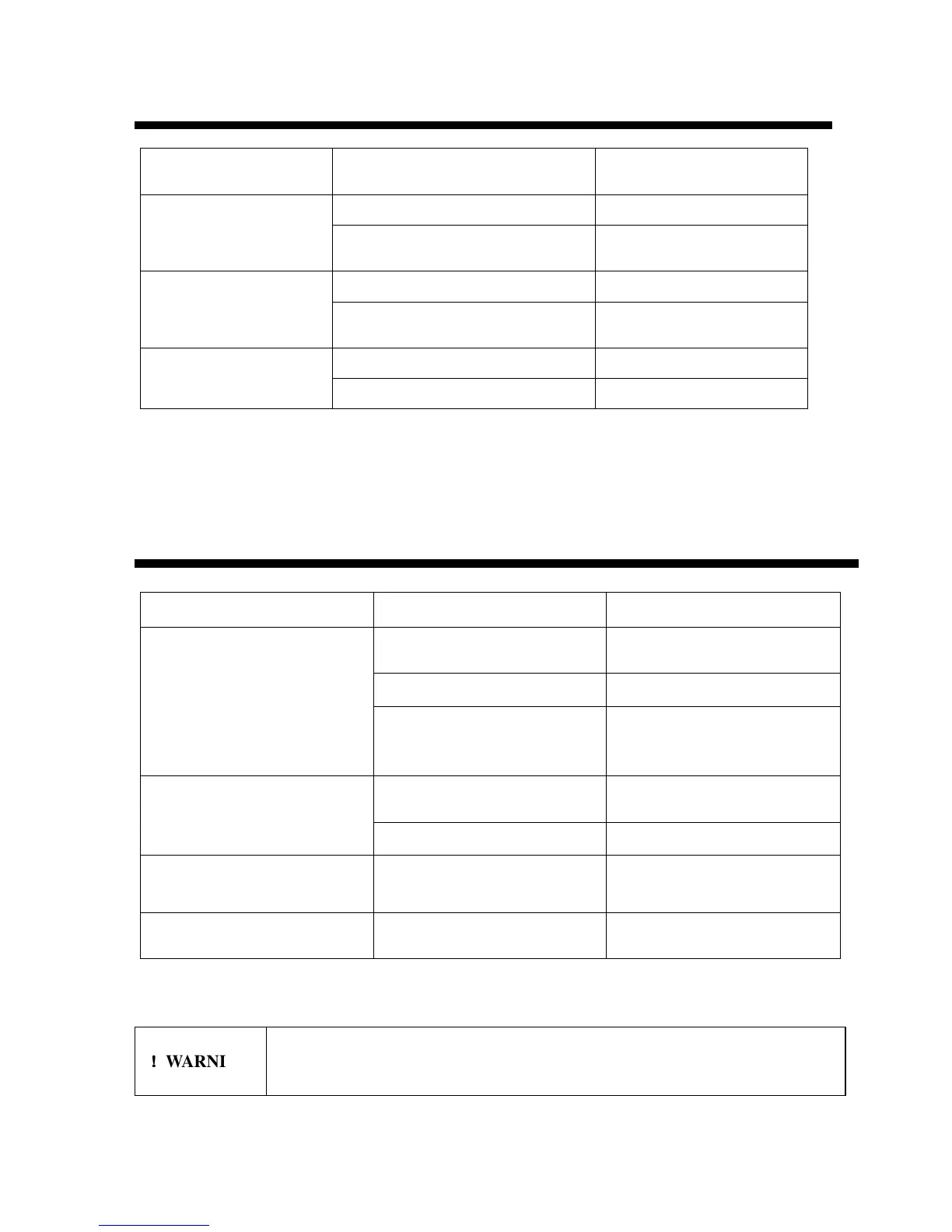
Host Software Application Doesn’t Function Properly
Symptom
Probable Cause
Action
RS232 connector loose Check the connection
Serial Port (RS232)
cannot get connected
Wrong COM port selected
Select a correct COM
port
Network connector loose Check the connection
Network cannot get
connected
IP address not setup or wrongly setup
Check and make sure the IP
address is properly setup
RS232 or network connection loose
Check the connection
Host software
Firmware issue Re-start the machine
Fastener Problems
Symptom
Probable cause
Action
Bad fastener cut
Back out and re-cut fastener end.
Then re-feed fasteners.
Not feeding one fastener pitch Adjust feed screw.
Feed jam of fasteners
Contamination of the feed guide,
needles, or needle holder
Clean the fastener path with
compressed air. (See Warning
below.)
Knife incorrectly installed or dull
Make sure the flat edge of the
knife is facing up. Replace knife.
Fastener not being cut
Broken knife cam spring Replace spring.
More or less than one fastener
feeding each cycle
Feed screw out of adjustment Adjust screw.
Fastener not being cut in center Feed knob out of adjustment Adjust by pushing in feed knob.
!
!!
!
WARNING Always wear eye protection when using compressed air.


 To Next Page