9
A320 PersonAl Mixer User GUide
Basic A320 Features
11 12
Function
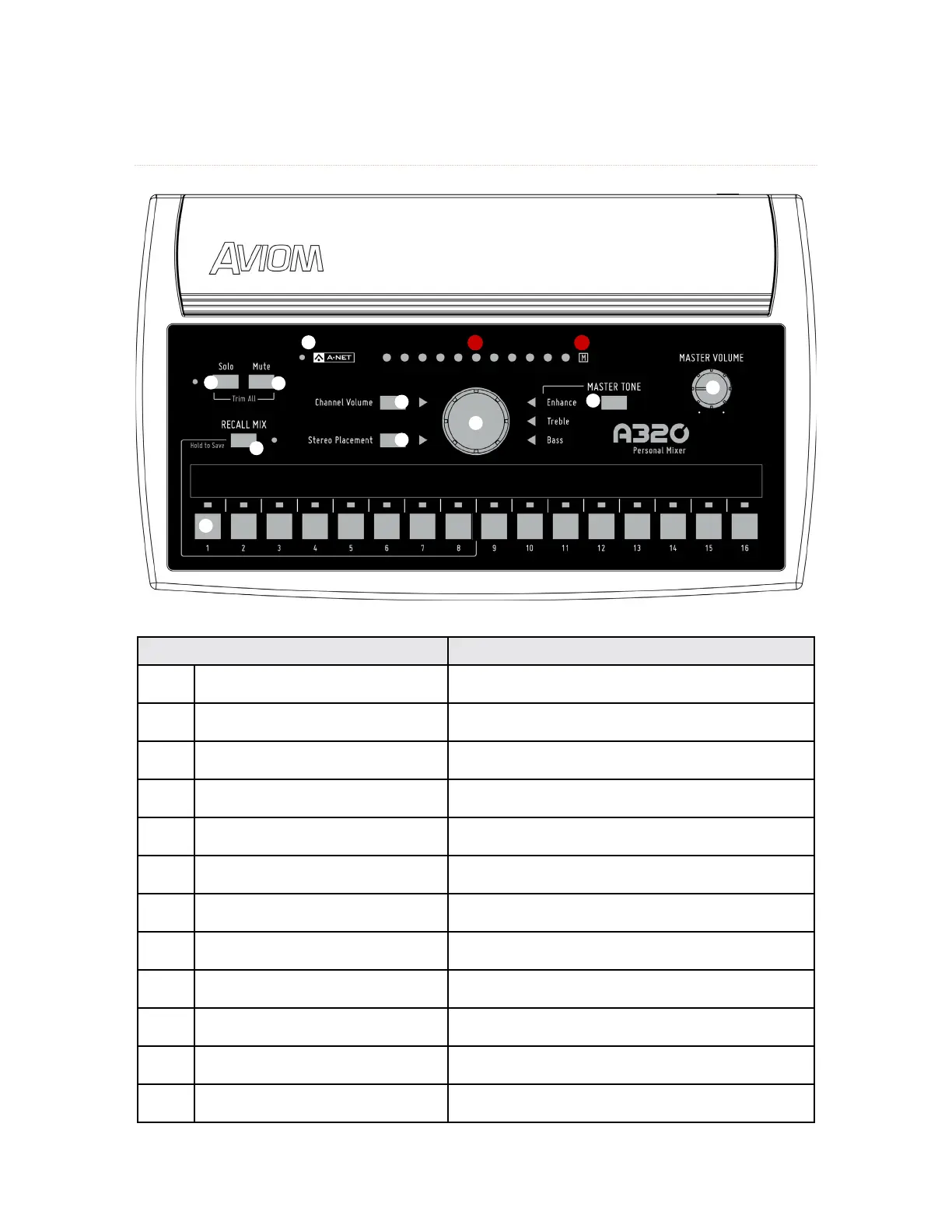
1 Mix Channel Buttons, with LED
Press to select a channel and make it active for
editing.
2 Channel Volume Button
When pressed, the green LED lights. Sets the central
control knob to change volume.
3 Stereo Placement Button
Sets the central control knob to change stereo
placement. The green LED lights when active.
4 Master Tone Button
Toggle to select Enhance, Treble, Bass, then turn the
central control knob. The LED lights when active.
5 Central Control Knob
Changes the value for the selected function—
Volume, Stereo Placement, Treble, Bass, or Enhance.
6 Master Volume Knob
Sets the level of the stereo mix in the headphones
or earbuds.
7 Solo Button and LED
Press to activate Solo mode; isolates the selected
channel from the mix; Solo LED blinks when active.
8 Mute Button
Press to mute the selected channel in the mix. The
M icon flashes.
9 Recall Mix Button
Press and release to recall a mix; press and hold to
save a mix preset.
10 A-Net LED
Lights green for Pro16 A-Net and red for Pro16e
A-Net.
11
Volume, Stereo Placement, and
Tone LEDs
Shows the value for the selected function being
edited.
12 Mute LED Flashes when the selected channel is muted.



 To Next Page