42
A320 PersonAl Mixer User GUide
Slot Range Setup
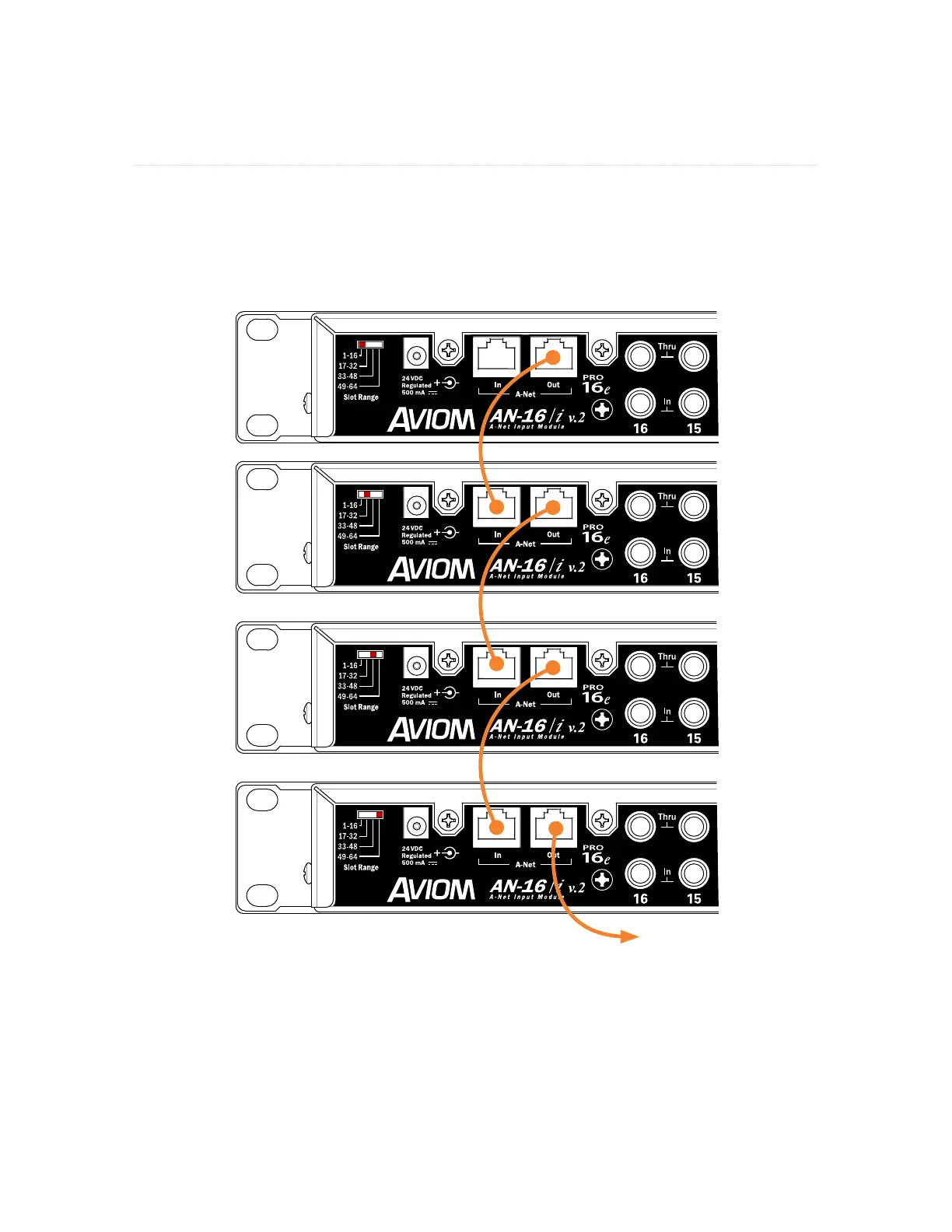
Each input device in a Pro16e-based personal mixing system supplies one bank of 16 channels to the
network. The Slot rANge switches on the AN-16/i v.2 are used to set the assignment for each; the physical
location of the device within the daisy chain does not matter as long as the Slot Range switch settings are
correct. Each input module is daisy chained, connecting a Cat-5 cable from its A-Net out to the A-Net IN of
the next input device in the chain.
Slot Range switches for each input device in a 64-input system are shown. A legacy Pro16 device may be substituted
for the rst bank of 16 channels.
Connect the A-Net out of the last input device in the chain to the A-Net IN of the A-Net Distributor. The
A320 Personal Mixers are then connected to the distributor’s A-Net out ports. Remember that an A320
Personal Mixer can only use the first 32 slots of an expanded network.
A legacy Pro16 device may be substituted for the first bank of 16 slots in a daisy chain of input devices. It
will automatically default to supplying the first 16 slots to the network pool.



 To Next Page