38
A320 PersonAl Mixer User GUide
Parallel Connections
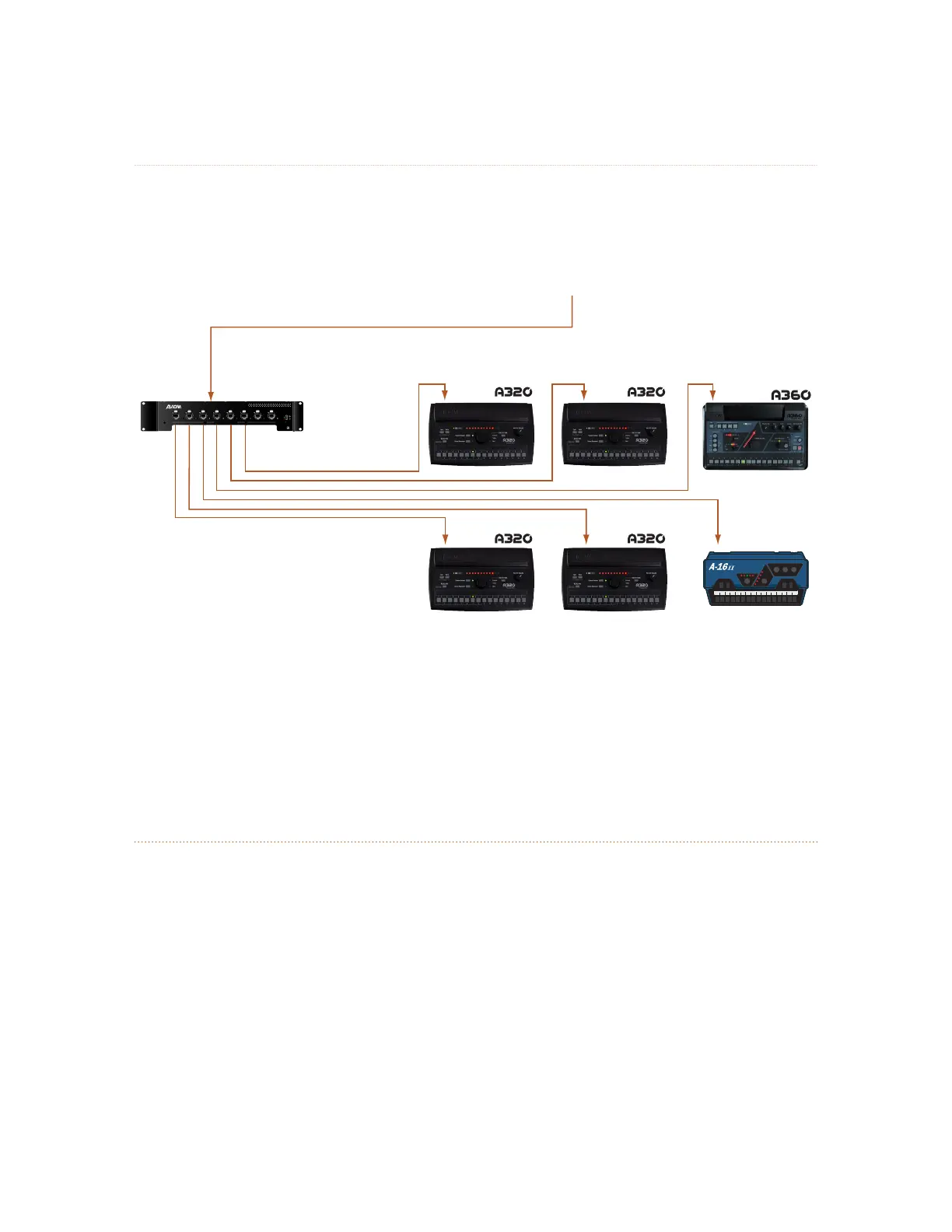
Using one or more A-Net Distributors allows any number of Personal Mixers to be integrated into a
personal mixing system.
D800
e
to/from Personal Mixers
Load
Power
Sync
12345678
D800
I II I II I II I II I III II I III II
A-16
II
A-Net from analog input module
or digital console card
An A-Net Distributor allows Personal Mixers to be connected in parallel.
In addition to Pro16 analog devices and console cards, the Pro64 ASI A-Net Systems Interface may be
substituted for the input devices seen in the diagrams that follow. Any of the ASI’s four Pro16 A-Net outputs
may be used.
Adding the A320 to an Existing System
The A320 Personal Mixer can be added to existing 16-channel personal mixing systems that use the A360
and/or A-16II Personal Mixers and contain at least one A-Net Distributor. (The A320 gets its power from an
A-Net Distributor and cannot be used in a system without an A-Net Distributor.)
Most 16-channel personal mixing systems use the same basic setup—an input device (analog or a digital
console card) is used to generate an A-Net digital signal which is connected to an A-Net Distributor.
Personal Mixers are connected to the ports on A-Net Distributor. Remember that when using a D800 or
D800-Dante, the front panel switches need to be in the “ I ” position when connecting an A320.



 To Next Page