2.2 Control Button Locations and Explanations
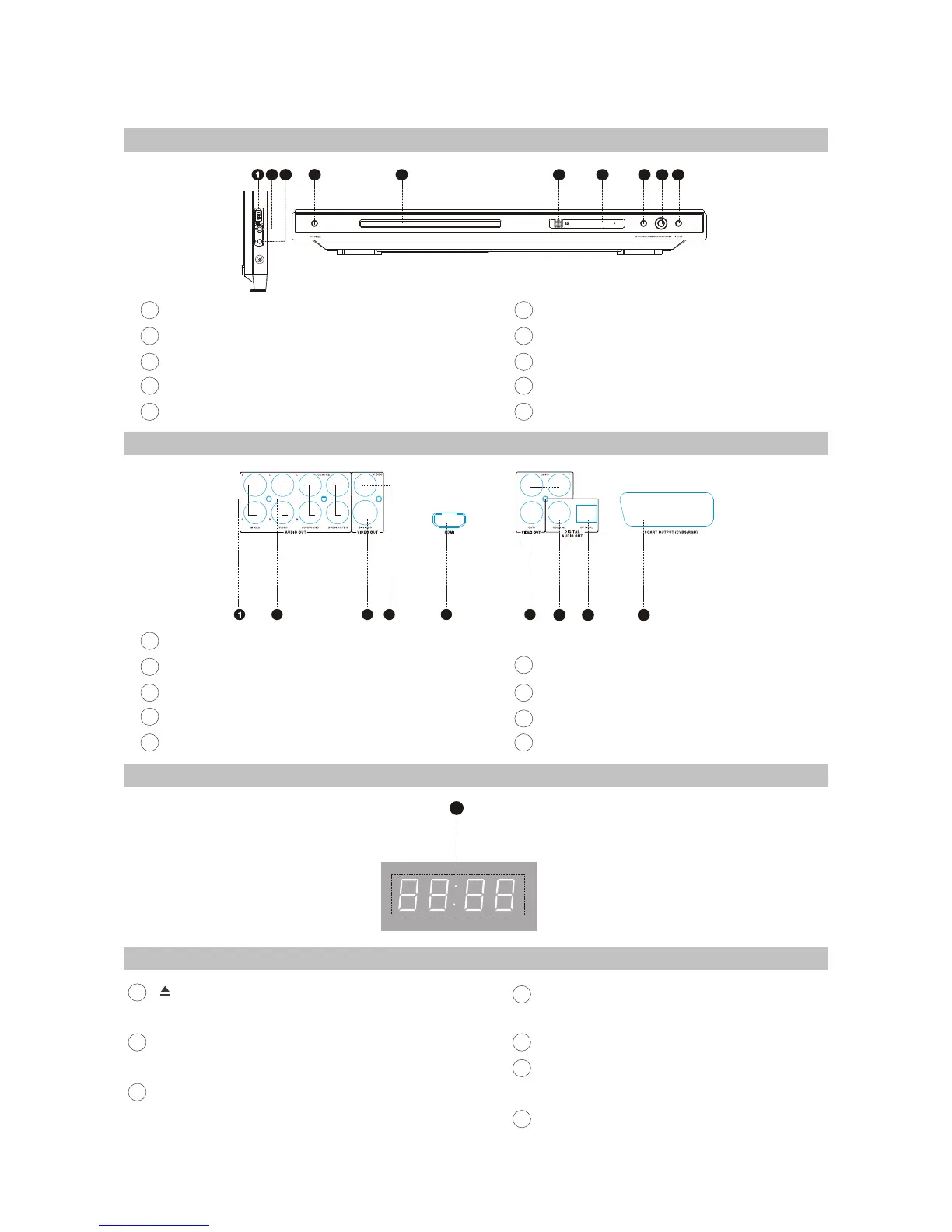
2.2.1 Front Panel Illustration
1
2
3
4
5
6
7
8
9
10
32
4
4 5
6
7 8
9
10
Slot flap for USB
MIC jack
Headphone jack
POWER switch
Disc tray
IR SENSOR
Display window
OPEN/CLOSE button
PLAY/PAUSE button
STOP button
Playback time
1
42 3
7
5 6
8 9
2.2.2 Rear Panel Illustration
1
2
3
4
5
7
8
9
Mixed Audio out jack
5.1CH Audio Out jack
S-Video
Video Out jack
HDMI Out jack
Video Component /Y Pb Pr out jacks
Digital Audio Coaxial Out jack
Digital Audio Optical Out jack
SCART out jack
6
2.2.3 LED Display Window Illustration
2.2.4 Remote Control Illustration
Button
Open or close the disc tray.
LANG Button
Change the audio language or audio channel.
MEMORY Button
Save the playing point or jump to the saved point .
DISP Button
Display or hide disc information.
NUMBER Buttons
BROWSE Buttons
switch new user interface.
CURSOR Buttons
[ ]
1
2
3
4
5
6
7
- 5 -



 To Next Page