22
System
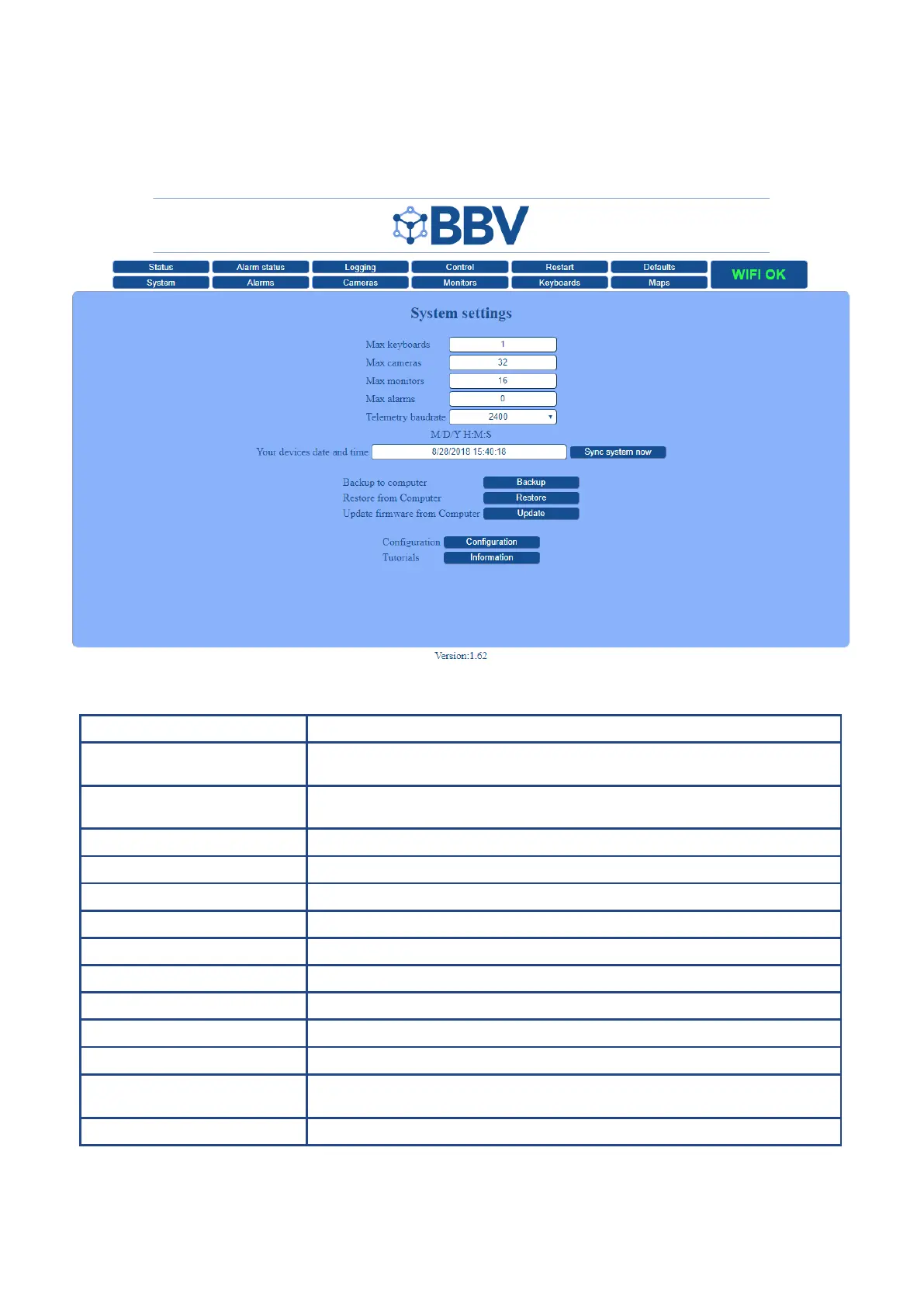
The System screen shows all the key information relevant to your setup. See below for a detailed breakdown of each section.
The below example shows a 10U Setup
(as shown on page 9).
Function Description
Monitor card address 1 Monitor card 1 will be shipped with a default address of: 192.168.0.60
- This address should not need to be changed.
Monitor card address 2 Monitor card 2 will be shipped with a default address of: 192.168.0.61
- This address should not need to be changed
Max keyboards This limits the maximum number of keyboards the system has to switch to & control
Max Cameras This limits the maximum number of cameras the system has to switch to & control
Max Monitors This limits the amount of monitors you can control
Max Alarms This limits the maximum number of alarms the systems looks for
Telemetry baudrate Select the baudrate to match your system protocol
Date and Time This device’s date and time sync to your PC’s time
Backup to computer Download current system settings (binary format) on to USB device (ideal for backup)
Restore from computer Upload system settings (binary format) from a USB device (ideal for restoring a backup)
Update Firmware from computer Update to the latest rmware version to ensure optimum functionality
Conguration
IMPORTANT NOTE - These are dangerous settings to alter - please contact BBV
before changing anything
Tutorials View a range of video tutorials to help you set up your system



 To Next Page