31
Cameras
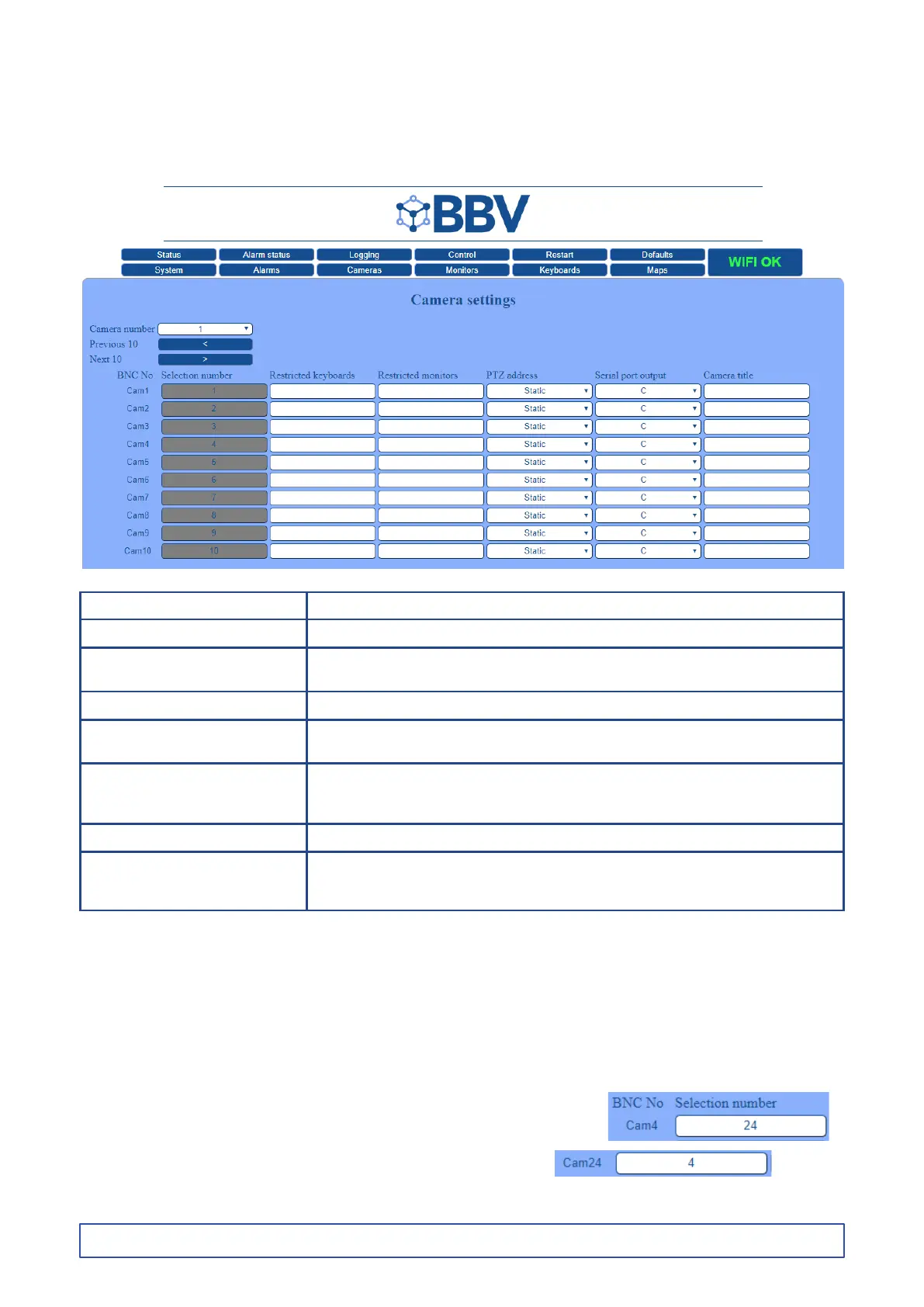
The Camera Settings screen is used to setup individual cameras.
Please note: the Selection Number eld will be greyed out until the mapped addressing is enabled within
System > Conguration (see page 23).
Function Description
BNC No. Physical BNC input on the matrix
Selection number Choose the number of your mapped address that will be using to select this camera,
if not greyed out. See the ‘Mapped Address’ note, below the table, for further info
Restricted keyboards This option prevents the selected keyboards from moving this camera
Restricted monitors This option allows you to select the monitor numbers that you wish to restrict from
viewing this camera. By default, all cameras can be viewed by any monitor
PTZ address of this camera The PTZ mapping section allows a telemetry receiver with a different address to the
camera number to be assigned. However, it is recommended where possible to match
the PTZ address with the camera number
Serial port output Select the port number used to select this camera
Camera title This option allows the individual title of the camera to be edited. The text will be
displayed on the monitor along with the camera image. The maximum number of
characters allowed is 15
Mapped Addressing
Before mapped addressing can be edited, you will need to enable this function within ‘System > Conguration’,
by entering ‘1234’ in the ‘Mapped Addressing’ eld and then restarting the system (see page 23).
Only one camera address can be assigned to each camera; therefore, if two camera addresses are congured the same,
only the rst address will work (i.e. if camera BNC1 has a mapped address of ‘1’ and camera BNC12 also has a mapped address
of ‘1’, only BNC1 will work, as it is the rst camera that is actioned.
So when a BNC is allocated a new ‘mapped’ number, best practice would be to go and assign an equivilant number to the used number.
For example, if BNC4 is to be referred to as 24 <cam>
• Go into camera screen and alter entry 4 to read ‘Cam4’ = ‘Selection Number 24’
• Then go to entry 24 and alter to ‘Cam24’ = ‘Selection Number 4’
The reason for this is that the system will complain if 2 addresses are the same in the mapped column.
The system will only accept numbers upto the ‘Max Cameras’ entry on the System page.



 To Next Page