39
Alarm Card Setup
If you require assistance to connect an Alarm Card, please refer to page 8.
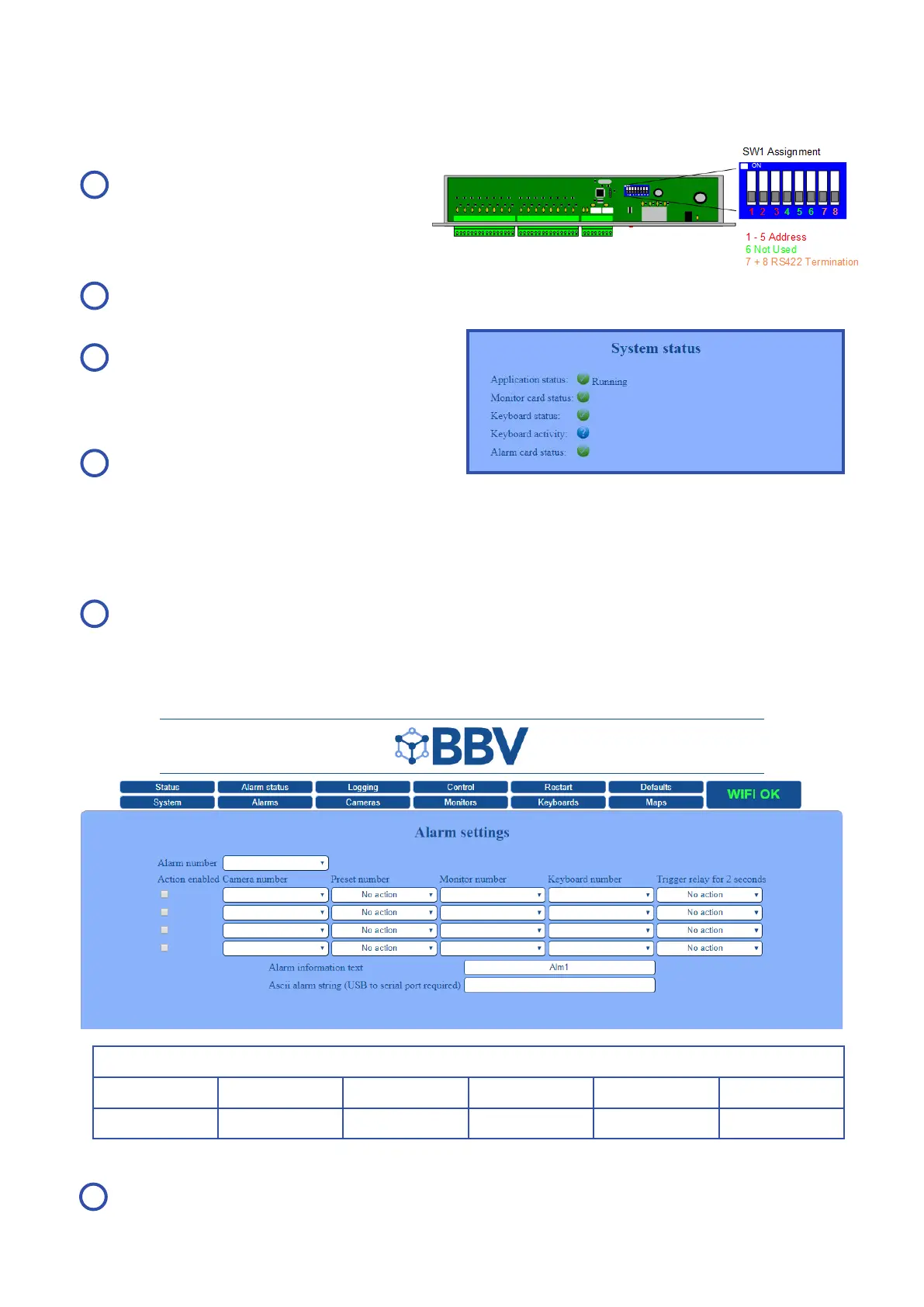
Set switches on SW1
to the correct address
(see full guide on page 31)
Connect the Alarm Card (see full guide on page 8)
The FBM should detect
the Alarm Card
(as shown in the
‘System status’ diagram to the right)
Ensure the number of
alarms on the ‘Status’ page
corresponds to the number of Alarm Cards
E.g. Each Alarm Card supports 16 alarms, so if you have one Alarm Card connected you should have 16 alarms
active and if you two Alarm Cards connected you should have 32 alarms active, and so on.
A
B
C
D
Go to Alarm Status, where the enabled alarms
should be displayed and enabled
As shown in the screenshot below: Alarm 1 is set and enabled. When triggered, Camera 1 on Monitor 1 will go to
Preset 2, Keyboard 1 alarm key will beep until disabled and Relay 2 will close (on Alarm Card 1).
Save & Restart.
E
F
Alarm Number 1
Action Enabled Camera Number Preset Number Monitor Number Keyboard Number Trigger Relay
1 2 1 1 2



 To Next Page