BD Accuri C6 Flow Cytometer Instrument Manual
10 7820018-01 Rev-2
This section provides details on installing BD Accuri C6 Software and the BD Accuri
C6 flow cytometer driver. In most cases, BD Accuri C6 Software will be pre-installed.
If software is installed, skip to section 3.5.
1. Ensure the USB cable is not connected between the computer and cytometer.
2. Start up the computer and monitor.
3. Insert the provided BD Accuri C6 Software CD. In the CD directory, double-click
on BD Accuri C6 Software Installer.exe.
4. Follow the instructions in the installation wizard.
1. Check fluid levels in all bottles, ensuring that the Waste is empty and the Sheath,
Cleaner and Decontamination bottles are full.
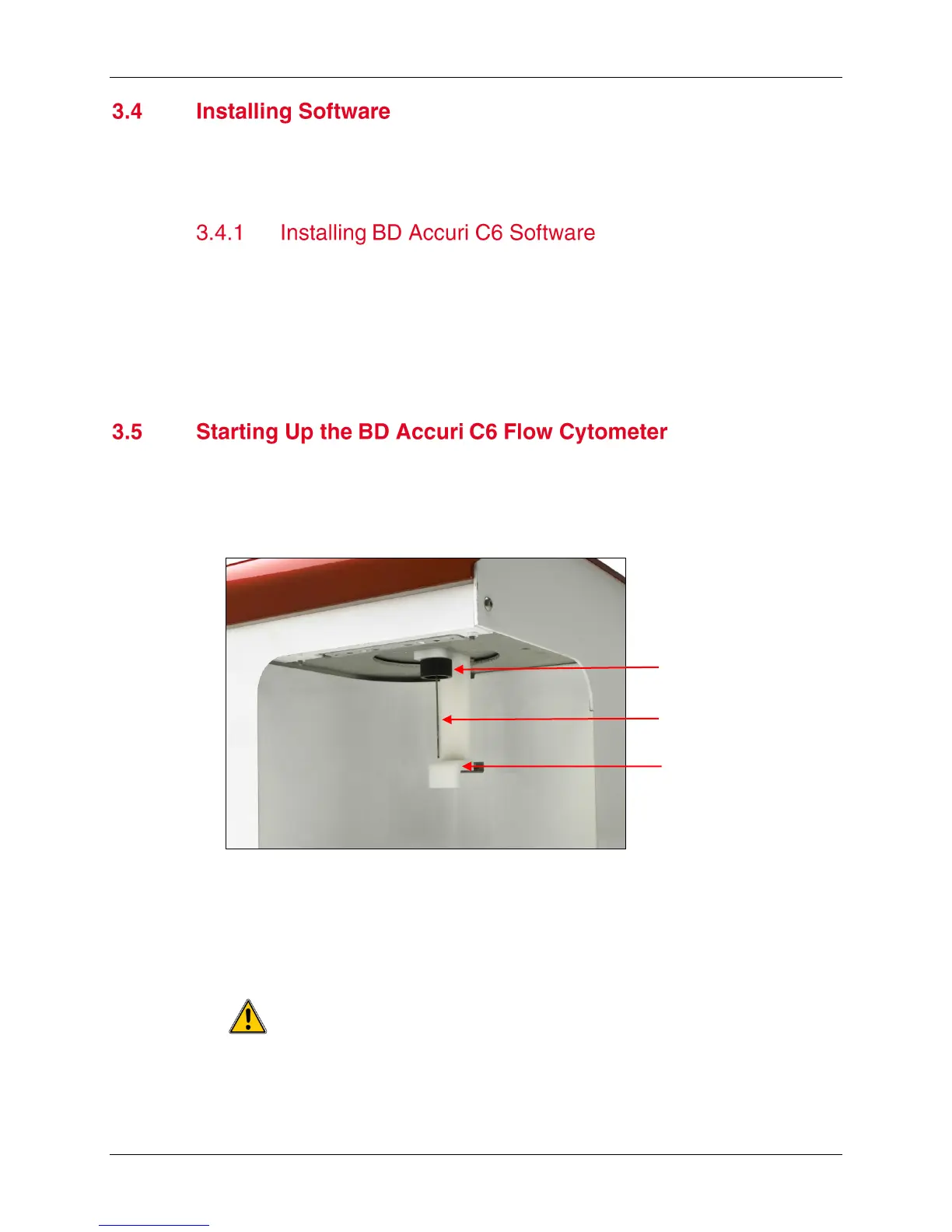
2. Gently push the sample stage back, remove and discard the SIP cover and place
a tube containing at least 2 mL of 0.22 µm filtered, DI water on the SIP.
Figure 3-7 SIP and Sample Stage
NOTE: The sample stage can accommodate several types of tubes, including
any brand of 12x75 mm tube and most microcentrifuge tubes
3. While holding the sample tube in place, pull the sample stage forward to support
the tube. The stage clicks into place.
The sample tube does not form a seal at the top of the SIP. While
inserting the SIP in the tube, be careful not to bend or catch the SIP on the
outside of the tube.
Sample Stage












 To Next Page