BD Accuri C6 Flow Cytometer Instrument Manual
14 7820018-01 Rev-2
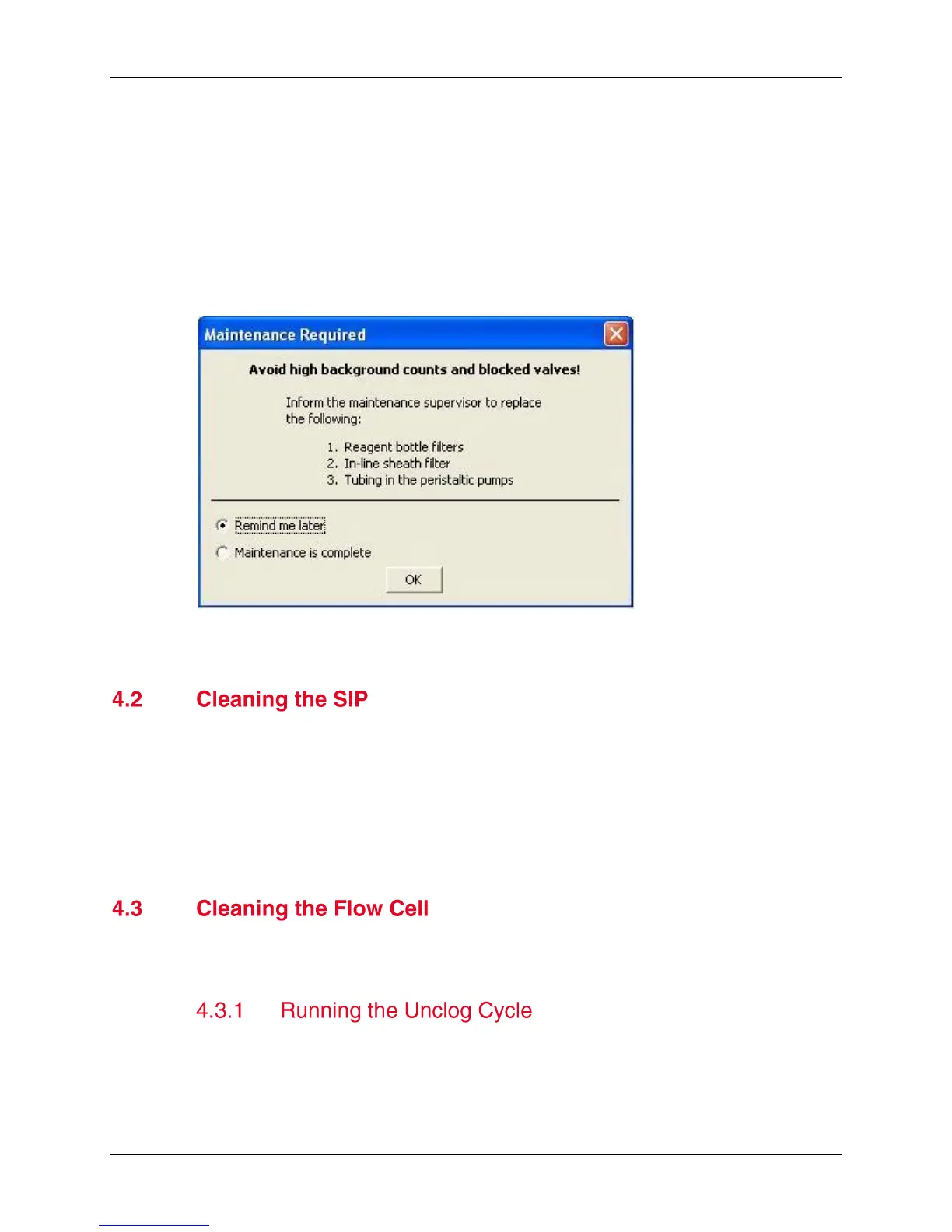
BD Accuri C6 Software will trigger the notification based on the volume of sheath run
through the system or on the date since maintenance was last performed. BD Accuri
C6 Software will display this notification based on whichever trigger is reached first.
The notification appears as a pop-up window that allows the user to choose between
‘Remind me later’ or ‘Maintenance is complete’.
Selecting ‘Maintenance is complete’ will re-start both triggers.
Selecting ‘Remind me later’ will set the notification to remind the user in 5 days.
Figure 4-1. Automated Preventive Maintenance Notification Window
Run the backflush cycle as needed to clean the SIP and remove clogs at the base of
the SIP.
1. Place a blotter or empty sample tube under the SIP to catch dripping fluid.
2. Do one of the following:
Click on the Backflush button in the Collect tab.
Select Instrument > Run Backflush Cycle
Clean the flow cell as a part of regular maintenance or to correct performance issues
of the cytometer.
The unclog cycle purges the flow cell of debris.
1. Remove the sample tube from the SIP and place a blotter or empty sample tube
under the SIP to catch dripping fluid.
2. Do one of the following:












 To Next Page