12 Overview
Certain remote control functions might not work under MHL operation because the MHL device
being used may not support these functions. Please check your MHL device for available
functions.
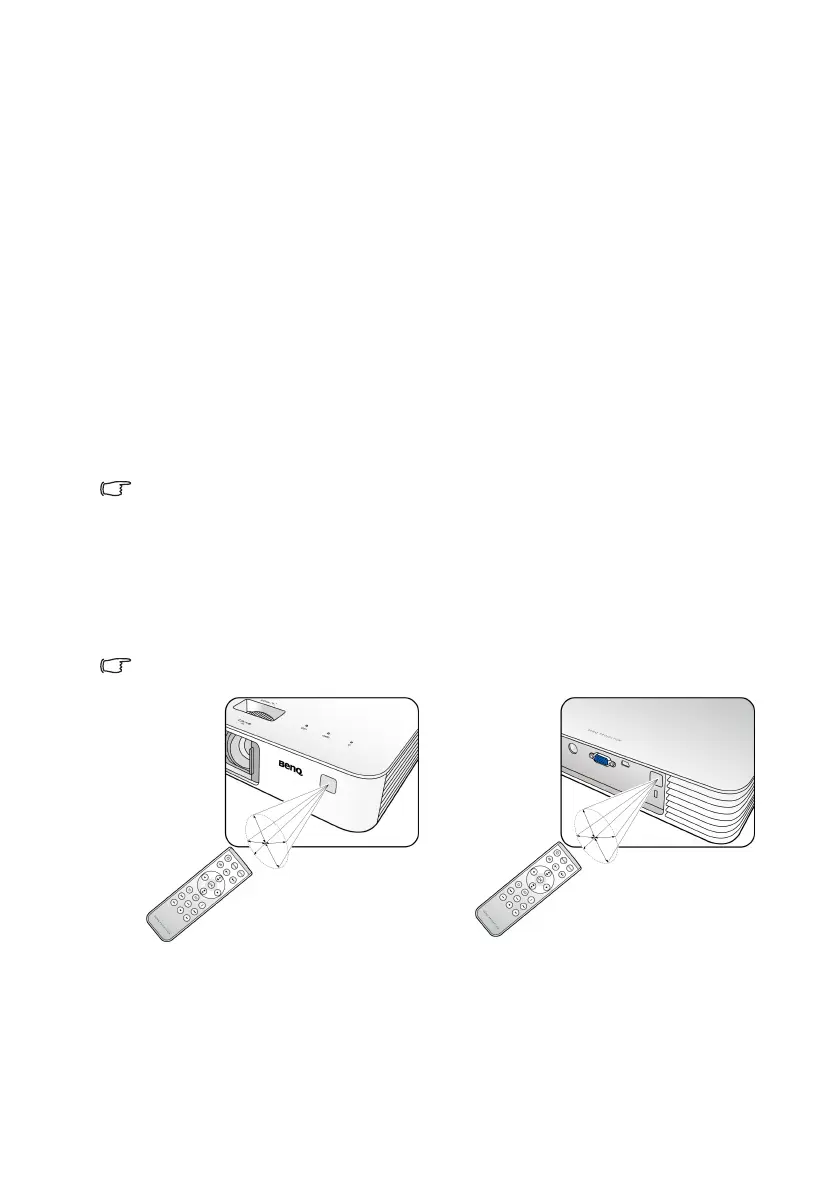
Remote control effective range
The remote control must be held at an angle within 30 degrees perpendicular to the
projector’s IR remote control sensor(s) to function correctly. The distance between the
remote control and the sensor(s) should not exceed 8 meters (~ 26 feet).
Make sure that there are no obstacles between the remote control and the IR sensor(s) on the
projector that might obstruct the infra-red beam.
13. Volume up key
Increases the projector audio
volume.
14. Volume down key
Decreases the projector audio
volume.
15. Right arrow key
When the On-Screen Display
(OSD) menu is on:
- Navigates right to select the
desired menu items.
- Makes adjustments, such as
brightness, contrast, etc.
16. OK
Confirms a selected function when
a menu is displayed.
17. Menu
Opens/closes the On-Screen
Display (OSD) menu.
18. Next
Plays next video, audio, photo
slideshow, or document (working
with MHL only).
19. Fast-forward
Fast-forwards video and audio
playback (working with MHL only).
20. Stop
Stops video and audio playback.
(working with MHL only).
A
p
p
r
o
x
.
3
0
°
Operating the projector from the
front side
Operating the projector from the
rear side
A
p
p
r
o
x
.
3
0
°
CH100_EN.book Page 12 Wednesday, March 2, 2016 11:54 AM










 To Next Page