61Maintenance
Setting Lamp Power
Setting the projector in Economic mode extends the lamp life.
Using Economic mode reduces system noise and power consumption by 30%.
1. Under the Advanced OSD menu, go to Picture > LED Mode.
2. Press to display the Lamp Power window.
3. Press / to move to your desired mode, and press to save your changes
and exit.
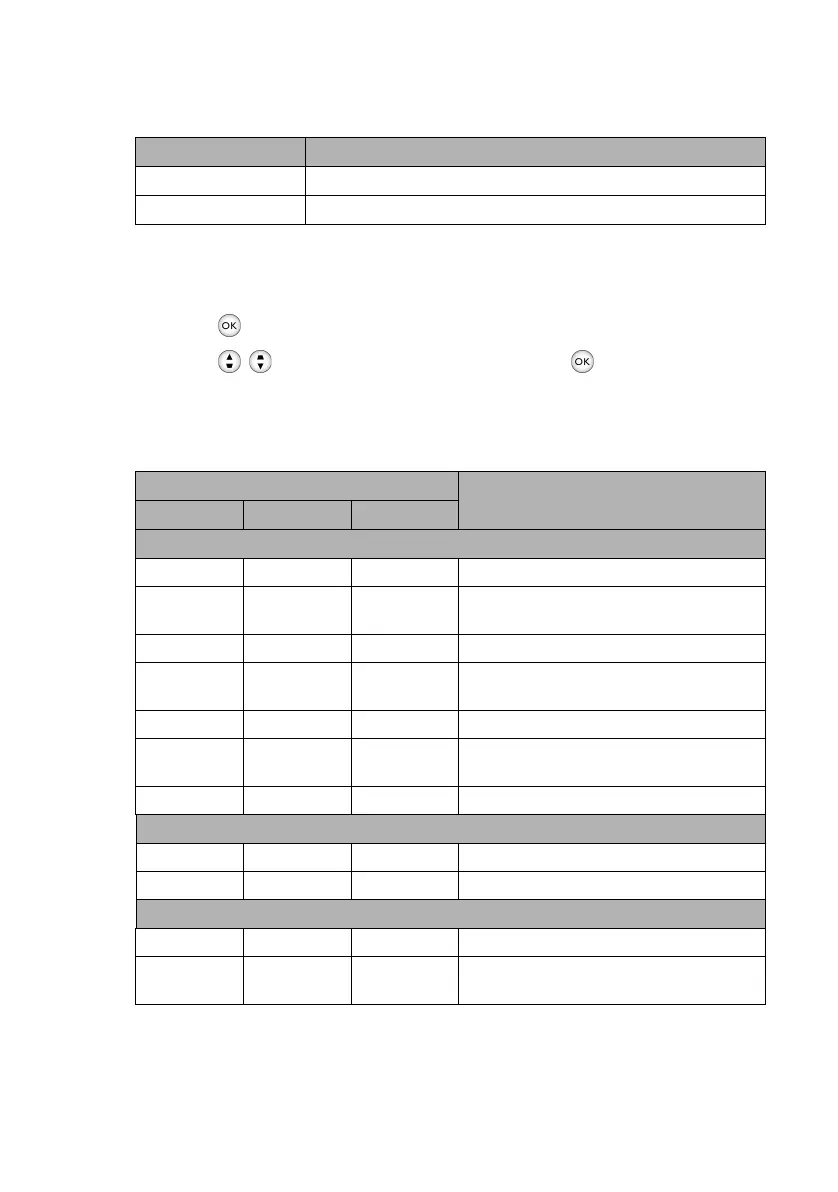
Indicators
Lamp mode Description
Normal 100% lamp brightness
Economic Saves 30% lamp power consumption
Light
Status & Description
POWER TEMP LED
System messages
Orange Off Off Stand-by mode
Green
Flashing
Off Off Powering up
Green Off Off Normal operation
Orange
Flashing
Off Off Normal power-down cooling
Red Off Off Downloading
Red
Flashing
Off Off Scaler shutdown fail
Red Off Red Scaler reset fail
Burn-in messages
Green Off Off Burn-in On
Green Green Green Burn-in Off
Lamp events
Off Off Red Lamp1 error in normal operation
Off Off
Red
Flashing
Lamp is not lit up.
CH100_EN.book Page 61 Wednesday, March 2, 2016 11:54 AM










 To Next Page