35Operation
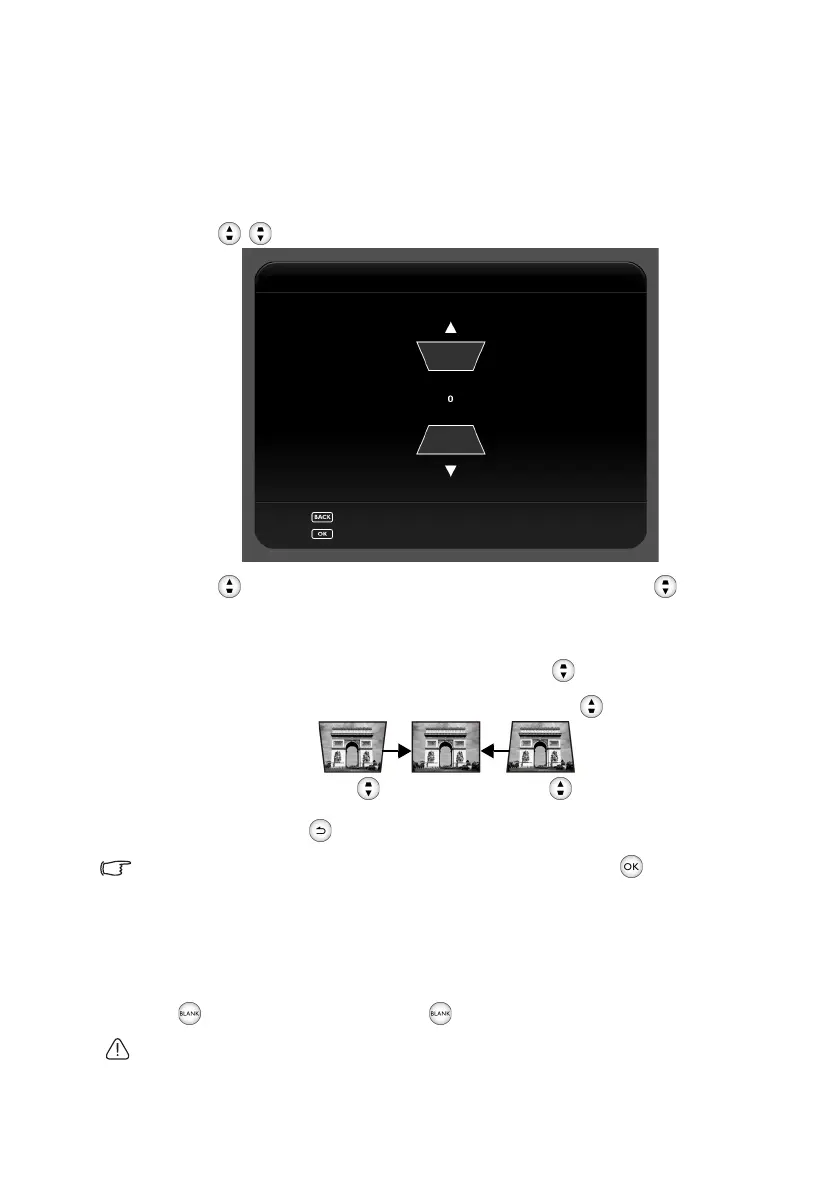
Correcting keystone
Keystoning refers to the situation where the projected image is noticeably wider at either
the top or bottom. It occurs when the projector is not perpendicular to the screen.
To correct this, besides adjusting the height of the projector, you will need to manually
correct it following these steps.
1. Press / to display the Vert ical Keystone window.
2. Press to correct keystoning at the bottom of the image or press to correct
keystoning at the top of the image.
The illustrations below show how to correct keystone distortion:
• To correct keystoning at the top of the image, use .
• To correct keystoning at the bottom of the image, use .
3. When done, press to save your changes and exit.
If you want to correct the image by using “Auto Vertical Keystone”, press for 2 seconds to
enable this function.
Hiding the image
In order to draw the audience’s full attention to the presenter, you can:
Press to hide the screen image. Press again or any keys to restore the image.
Do not block the projection lens from projecting as this could cause the blocking object to
become heated and deformed or even cause a fire.
Vertical Keystone
Press for 2 seconds to reset
Press for 2 seconds to enable Auto Vertical Keystone
CH100_EN.book Page 35 Wednesday, March 2, 2016 11:54 AM










 To Next Page