9Overview
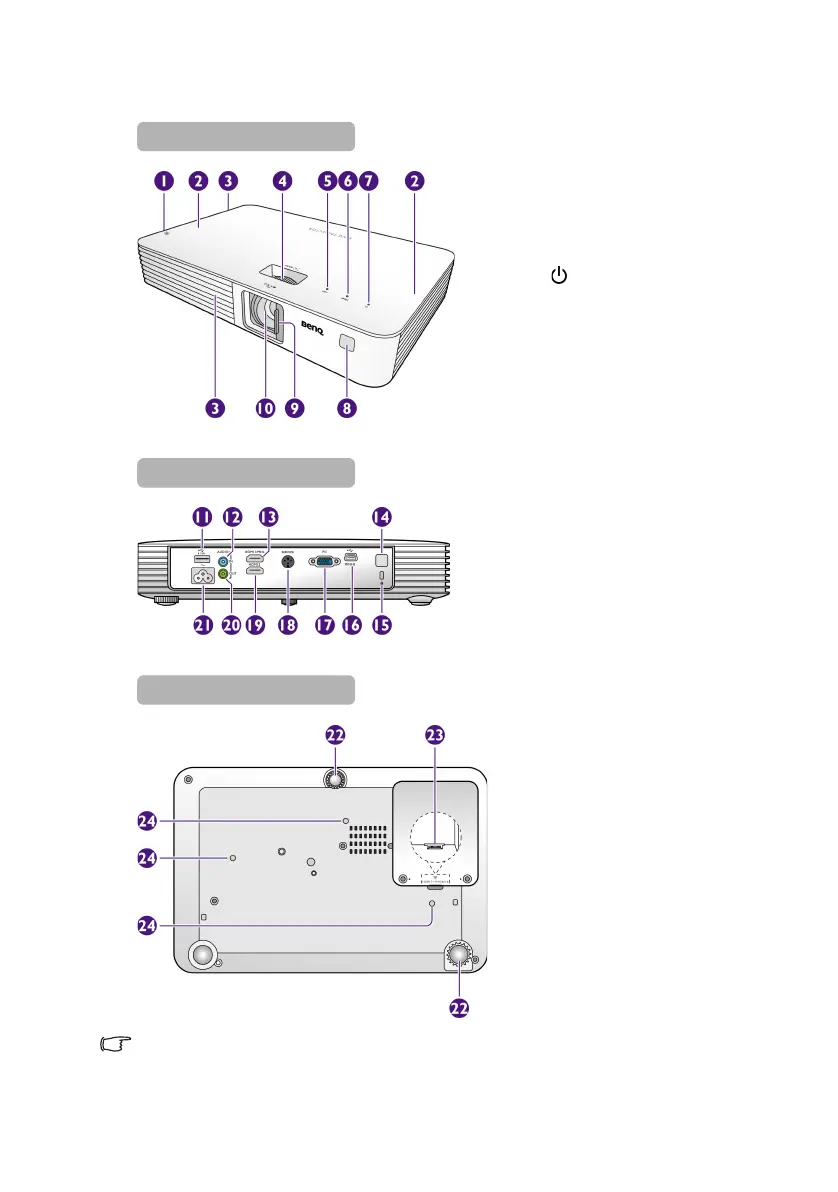
Projector exterior view
• Do not block the ventilation openings. Blocking the ventilation openings can cause your
projector to overheat and may cause it to fail.
• Make sure the lens cover is always open when the projector lamp is on.
1. Vent (heated air exhaust)
2. Built-in speakers
3. Vents (cold air intake)
4. Focus ring
5. LED indicator
6. TEMP (Temperature) indicator
7. POWER button/POWER
indicator
8. Front IR remote sensor
9. Lens cover
10. Projection lens
11. USB Type-A port
- Provides power for charging
an HDMI/MHL dongle, such
as BenQ QCast (purchased
separately). See page 22 for
details.
12. Audio input jack
13. HDMI 1/MHL input port
14. Rear IR remote sensor
15. Kensington anti-theft lock slot
16. Mini-B USB port
- Used for service.
17. RGB (PC)/Component Video
(YPbPr/YCbCr) signal input
jack
18. SERVICE port
- Used for service.
19. HDMI 2 input port
20. Audio output jack
21. AC power jack
22. Adjuster feet
23. HDMI 3/MICRO-B input port
- See page 23 for details.
24. Ceiling mount holes
CH100_EN.book Page 9 Wednesday, March 2, 2016 11:54 AM










 To Next Page