44 Menu functions
Using the Advanced OSD menu
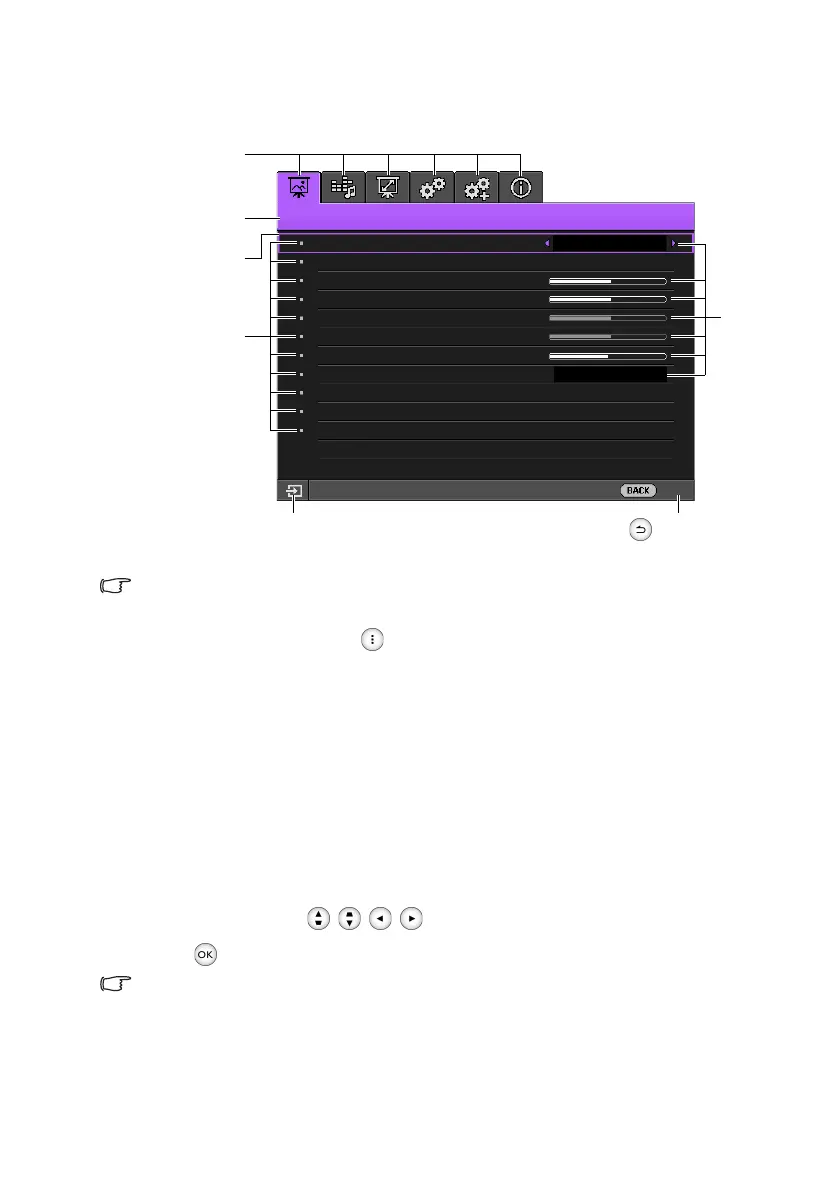
The Advanced OSD menu offers complete menu functions.
The Advanced OSD menu overview above is for reference only and may differ from the actual
design and the projector model you are using.
To access the OSD menu, press . It consists of the following main menus. Check the
links after the menu items below to learn more details.
1. Picture menu (see page 45)
2. Audio Setup menu (see page 51)
3. Display menu (see page 52)
4. System Setup : Basic menu (see page 53)
5. System Setup : Advanced menu (see page 54)
6. Information menu (see page 56)
Available menu items may vary depending on the connected video sources or specified
settings. Menu items that are not available will become grayed out.
•Use the arrow keys (///) to move through the menu items.
• Use to confirm the selected menu item.
To switch from the Advanced OSD menu to the Basic OSD menu, see page 37.
Submenus
Press to go back to the
previous window or to exit.
Main menu name
Selection bar
Main menu icon
Status
Current input source
Picture
Picture Mode
Graphic (sRGB)
User Mode Management
Brightness
50
Contrast
50
Color Enhancer
50
Tint
50
Pixel Enhancer
7
Color Temperature
Normal
LED Mode
Advanced...
Reset Current Picture Mode
PC / Component
Exit
CH100_EN.book Page 44 Wednesday, March 2, 2016 11:54 AM










 To Next Page