19Operating instructions
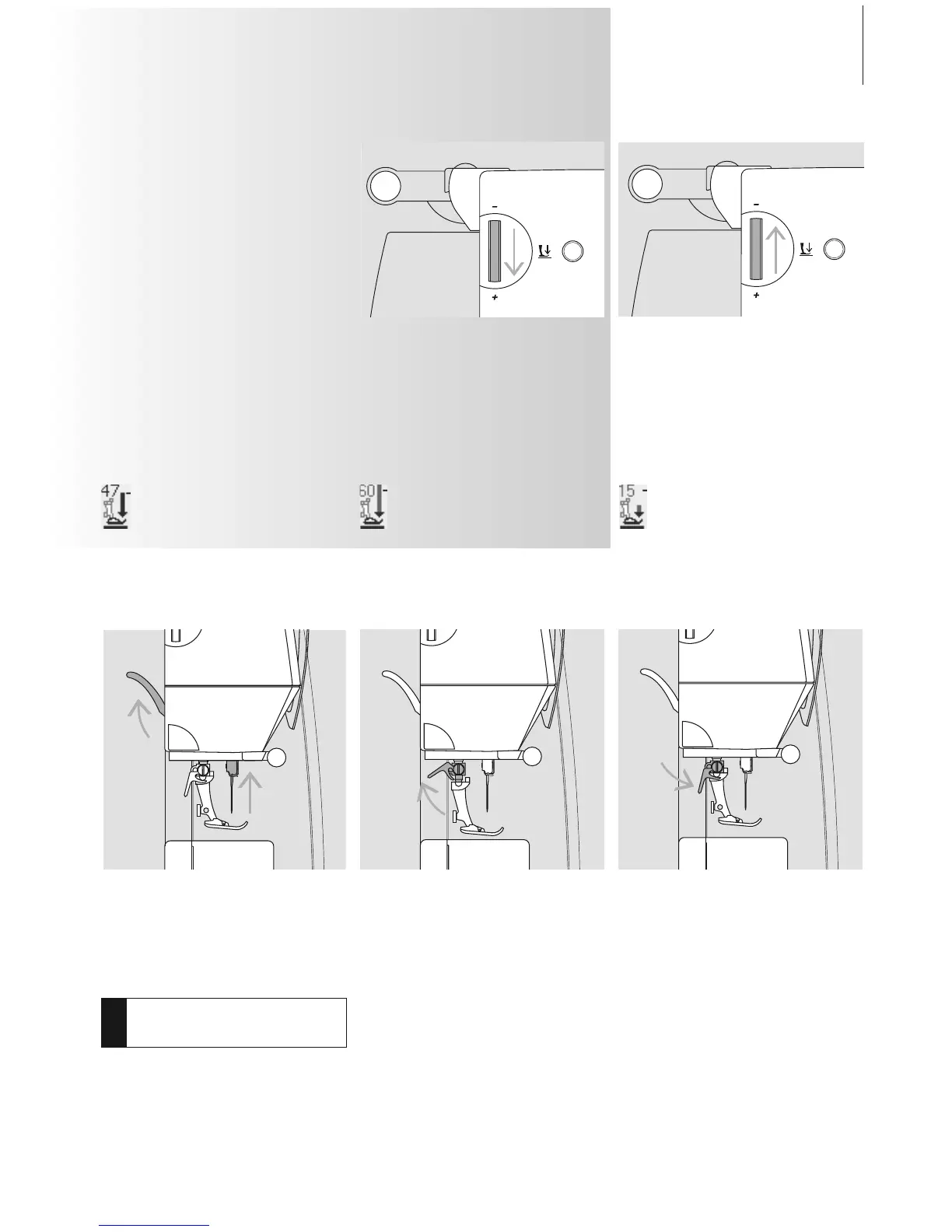
Presser Foot Pressure
Dial on Head Frame
• the pressure is adjusted at the left side of
the head frame
• the original setting (47) will be indicated
on the screen in blue
• an adjusted presser foot pressure will be
indicated by a red blinking number and a
red bar
• the original setting (47) will be indicated in
black alternately with the adjusted setting
• the original setting is displayed by a
blinking black line on the right side of the
red bar
Standard Pressure
• for normal sewing work
Reduced Pressure
• for jerseys and loose knits
• to prevent fabric from stretching
• adjust pressure so that the fabric still feeds
correctly
Increased Pressure
• for firm fabrics
• improves fabric feed
Changing the Presser Foot
• raise the needle and presser foot
• turn power switch to «0» (off)
Attaching the Presser Foot
• guide the foot upwards over the cone
•press the clamping lever down
Raising the Lever
• raise the clamping lever
•remove the presser foot
Changing the Presser Foot
!
Refer to the
safety instructions!



 To Next Page