My BERNINA
10
BERNINA SEWING MACHINE WORKBOOK
PRESSER FOOT SELECTION
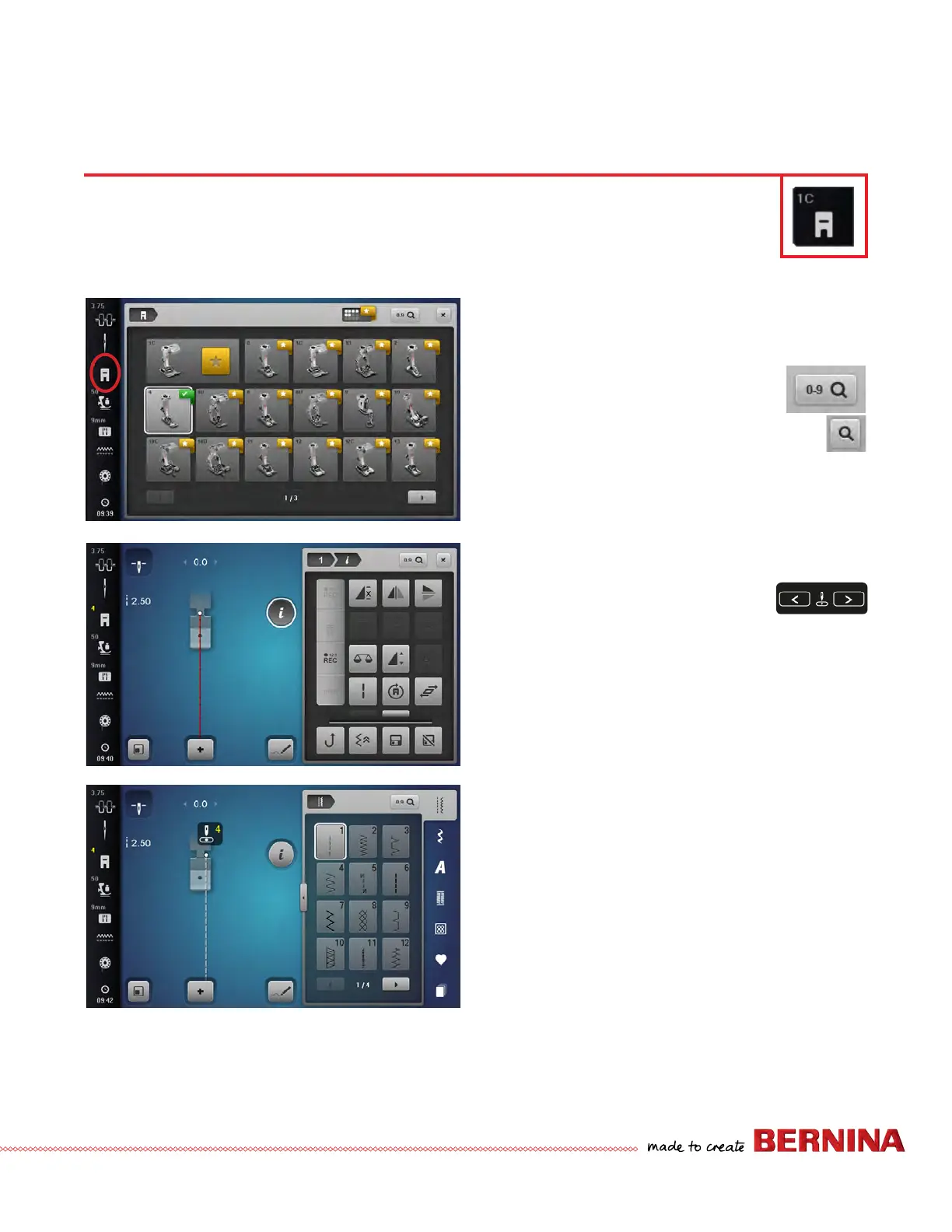
1. Select the Straight Stitch.
2. Select the Presser Foot Selection icon from the Status
Bar.
3. Select Zipper Foot #4 by nding the
foot on the screen. You can also use the
Search icon and type 4 using the keypad.
Notice that the programmed foot is
reected on the status bar in yellow.
4. Close the Presser Foot Selection menu.
5. The Straight Stitch is displayed in red indicating that the
needle would strike the foot. If you have this feature set
and attempt to stitch, you will get a message indicating
that the needle will strike the foot.
6. Use the Needle Position Button
to adjust the needle to the left or the
right. When the stitch becomes white,
it is safe to sew.
7. To clear Presser Foot Selection, touch the Presser
Foot Selection on the Status Bar and either select the
programmed foot or press CLR on the System Settings
Bar. Close the Presser Foot Selection screen.
8. To return the needle to the center position, touch CLR
again.
For more information on BERNINA Presser Feet, refer to
Reference-BERNINA Presser Feet on Page 52.
B 880 PLUS, 790 PLUS, 770 QE PLUS, 735, 590, 570 QE
Presser Foot Selection applies limitations and security with the use of certain feet in embroidery and sewing.
For example, programming the machine that the zipper foot is attached prevents the needle from striking
the foot. However, it is not required to set the Presser Foot Selection to be able to sew.
Notes:
• The Gold Star tabs indicate a recommended accessory for
the stitch that is currently selected.
• The Presser Foot Selection feature on the B 770 QE, 740,
480, 475 QE and 435 gives suggested feet for certain
stitches, but this is for informational purposes only. It
does not limit the stitch properties.



 To Next Page