My BERNINA
44
BERNINA SEWING MACHINE WORKBOOK
CONNECTING STITCHES
Using Drag & Drop with Combinations
1. Open Combi-Mode and delete by swiping any stitches
that are present.
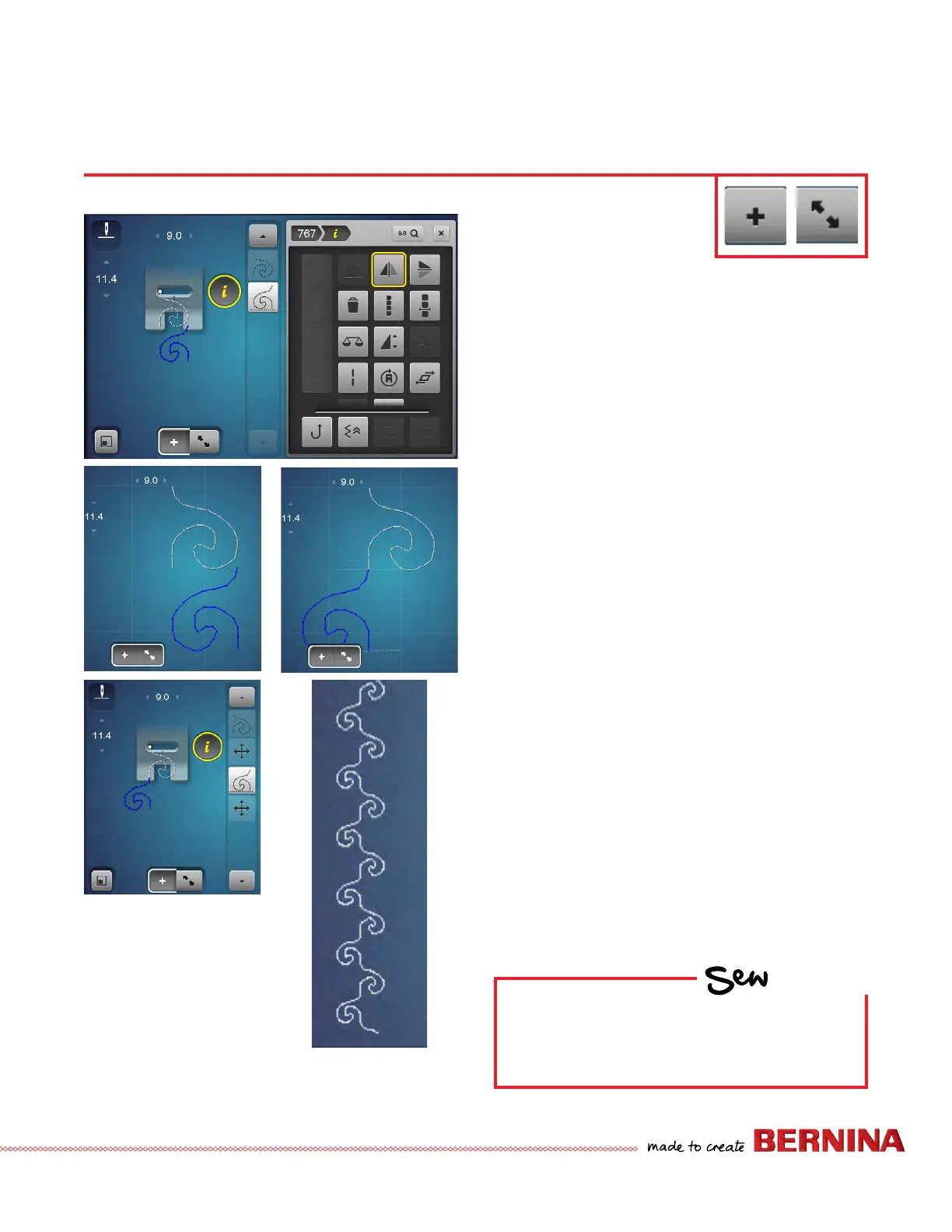
2. Select Decorative Stitches; select Menu 701. Select
Stitch 767 two times.
3. Select ‘i’ and engage Mirror Image Left/Right on the
second pattern. The needle stop and start points are
not the same for the 2 stitches, and a jump stitch will
be sewn joining them.
4. Select Overview Combi Mode to create a continuous
stitch. Move (Drag & Drop) the second pattern (blue) to
line up with the rst one as shown. Use the stylus and
‘drag & drop’ on screen or use the Stitch Width multi-
function knob.
5. The new combi shows as a continuous stitch in the preview.
6. Select Overview Combi Mode to return to the stitch
out screen. The combination will display the sideways
motion icon between the stitches. This indicates the
machine calculation of the move motion required to
stitch what was drawn on the previous screen.
7. To stitch, attach Foot #40C (as recommended by the
Presser Foot recommendation icon if there is not a foot
set previously). Use the fabric swatch from previous page.
8. Clo se "i".
9. To Save the combination, select Personal Program.
Select Save and select the highlighted combination.
10. To delete the entire combination from the screen view
with a single command, select ‘i’, and select all (Editing
the Complete Combination) and Delete (trashcan).
Conrm and close the menu.
11. Try the same exercise with Sideways Motion Stitch #237.
HOW
Do you know how to:
• Eliminate jump stitches between
patterns?
• See a preview of the combination?
B 880 PLUS, 790 PLUS Only
.



 To Next Page