My BERNINA
6
BERNINA SEWING MACHINE WORKBOOK
PROGRAM THREAD CUTTER AND SECURING STITCHES
PERSONALIZE THE SCREEN
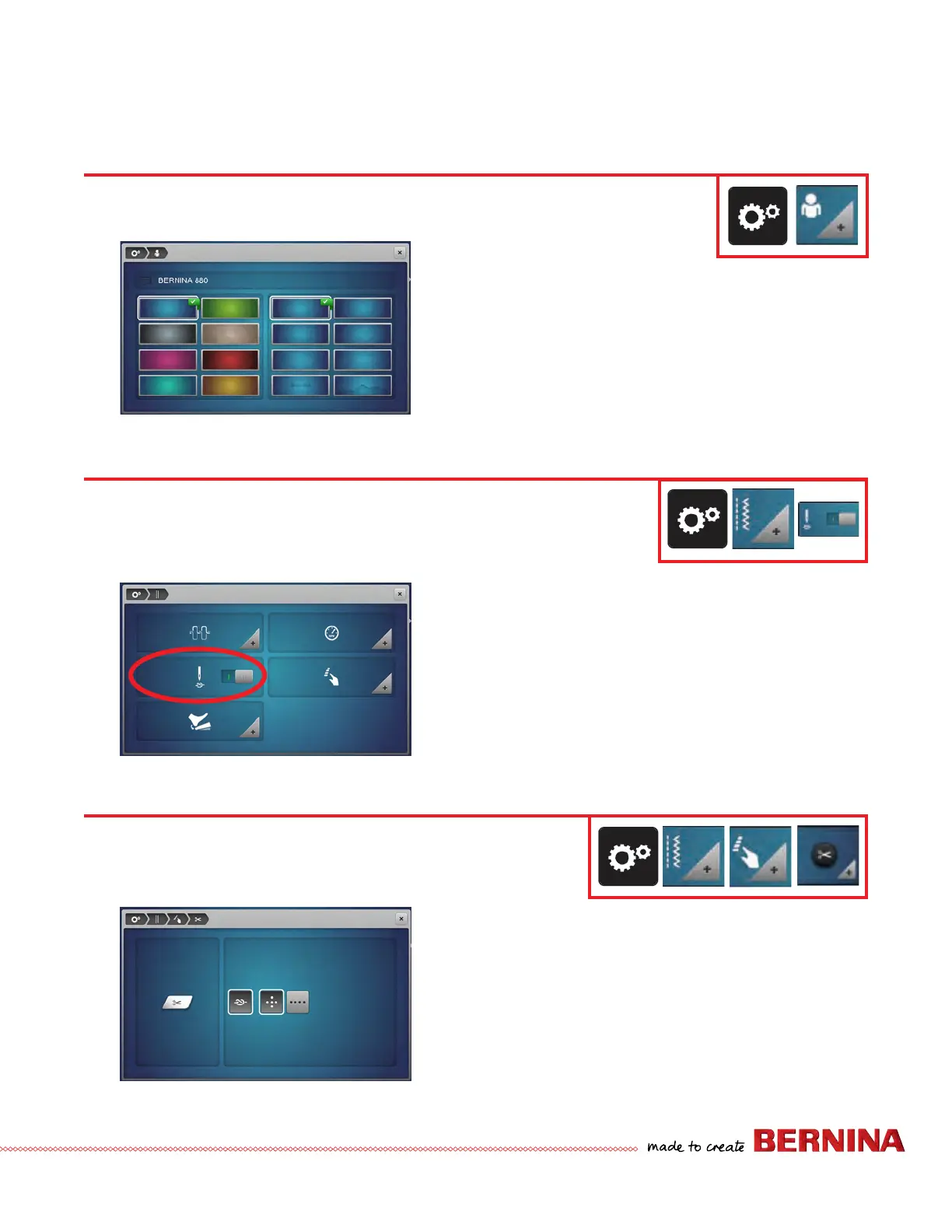
1. Touch the Setup icon.
2. Select Personal Settings and a display appears.
3. Select the color and texture.
4. Close the screen (or use the Setup Breadcrumb to navigate
back to Setup).
You can personalize the display and wallpaper color to suit your individual tastes. Change the color as
well as the texture in the Setup Program. A welcome text can also be programmed.
ACTIVATE/DEACTIVATE BEGINNING TIE OFF
1. Select Setup.
2. Select Sewing Settings.
3. The slider next to the Securing Stitches at Pattern Begin
will activate or deactivate the tie off at the beginning of
the stitch. (This is a switch for on/off.)
4. Toggle the switch to off.
5. Close the screen (or use the Setup Breadcrumb to navigate
back to Setup).
B 880 PLUS, 790 PLUS, 770 QE PLUS, 770 QE, 740, 735, 590, 570 QE,
535, 480, 475 QE Only
Activate or deactivate the securing stitches at the beginning of every stitch/stitch type. If
activated, the securing stitches are sewn when either the Thread Cutter or the Threader have
been used.
1. Select Setup.
2. Select Sewing Settings.
3. Select Programmable Buttons.
4. Select the Automatic Thread Cutter and Securing Stitches
(scissors) icon.
5. Reprogram as desired per project.
6. Leave this screen open and proceed to the next page.
B 880 PLUS, 790 PLUS, 770 QE PLUS, 770 QE, 740, 735, 590, 570
QE, 535, 480 Only
The number and type of the securing stitches the machine makes after the
Thread Cutter has been engaged can be programmed in a number of ways.



 To Next Page