My BERNINA
34
BERNINA SEWING MACHINE WORKBOOK
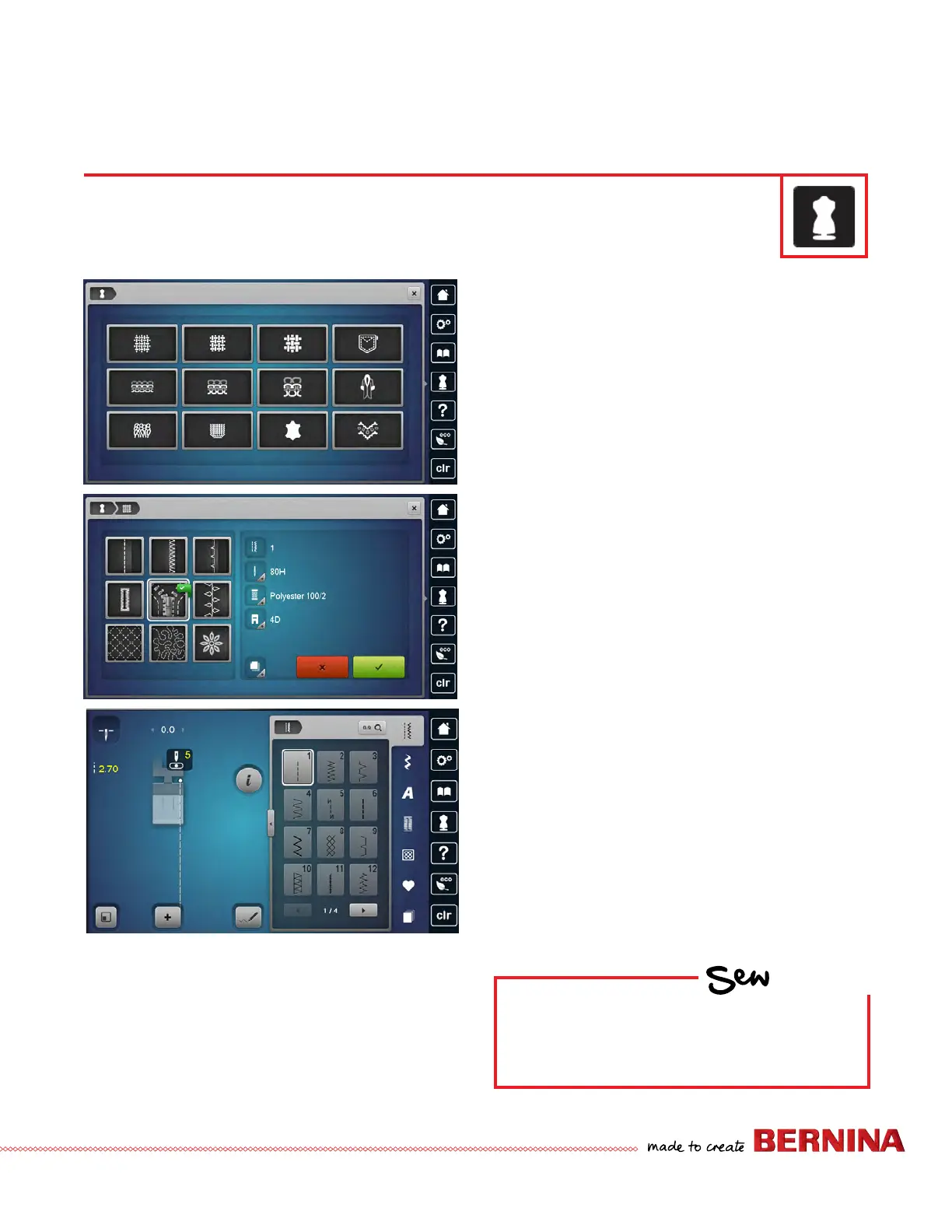
CREATIVE CONSULTANT–ZIPPER INFORMATION
1. Touch the Creative Consultant icon.
2. Choose the fabric.
• Select the Help Program icon.
• Select the Medium-weight woven icon. A list of
medium weight fabrics is displayed.
• Close the help screen.
3. Select the Medium-weight icon again and the Sewing
Techniques Screen will open.
4. Choose the desired Sewing Technique.
• Choose Zipper. Recommendations for the selected
material and the desired sewing technique are
displayed.
• Any icon with a + in the lower right corner can be
selected and more information will be displayed.
• To commence sewing with the program suggestions,
select the green check box to conrm and the display
with the programmed stitch patterns appears on the
screen.
• Otherwise, select the red x box to close the screen
without making changes.
The Creative Consultant provides information and help with various sewing techniques, including zippers.
After selecting the fabric and the desired sewing technique, suggestions for suitable needle, Presser Foot,
etc. are displayed.
HOW
Do you know:
• How to access Creative Consultant?
• When to use the Help Program?



 To Next Page