My BERNINA
48
BERNINA SEWING MACHINE WORKBOOK
Creating New Stitches--Snap to Grid
(cont.)
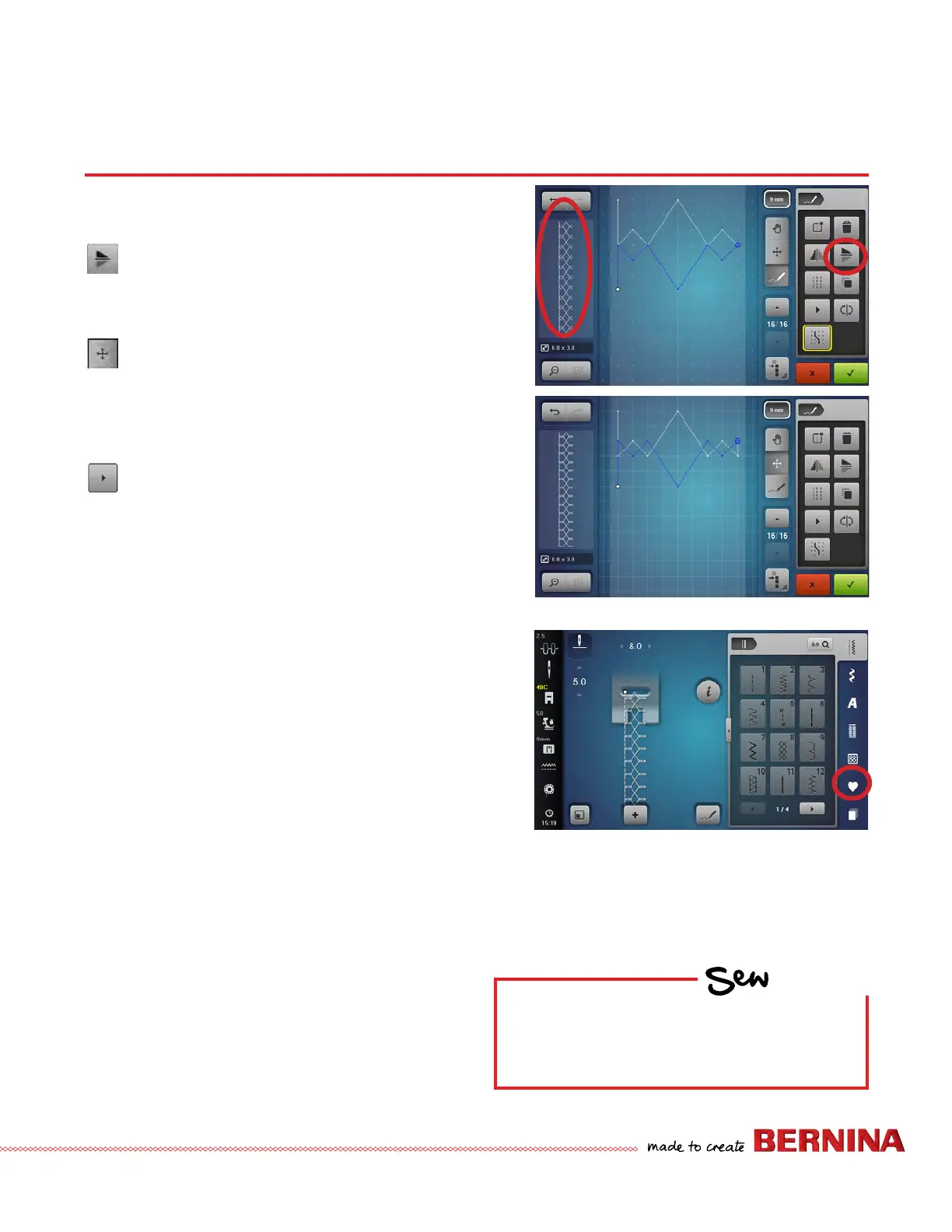
7. Select Mirror Image Up/Down.
The preview window shows what the design will
look like when it is stitched.
8. Deselect Snap to Grid. With the duplicated part of
the design still selected, select the Move Icon.
• Use the Stitch Length knob to move the design to
overlap the rst part of the design.
• The Stitch Width knob may also be used to move
the design left and right if desired.
9. Play Stitch Preview (acts like Slow Redraw).
10. Touch the green check box to conrm the stitch
pattern and return to the sewing screen.
11. Stitch out the new stitch if desired.
Save the New Stitch to Personal
Program
1. From the Sewing Screen, select the Personal
Program icon to save the custom stitch pattern.
2. Select the Save icon, and choose one of the 4
yellow folders.
3. Save the stitch by touching the new stitch (outlined
in yellow), or by touching the green check box.
STITCH DESIGNER
HOW
Do you know how to:
• Freehand draw a new stitch?
• Create a stitch by tapping points?



 To Next Page