25
IRIS
Fig. 7.1
7.0 PROGRAMMING
With the programming procedures described in this section it is
possible to set all the parameters relative to the configuration of
the machine, to the setting of the single doses, the prices of the
drinks and extract all the vending statistical data.
The dialogue between the operator and the machine occurs by
means of the 32 digit liquid crystal display and the use of the
selection key touc pad.
The distributor is regulated with standard values from the testing
stage with Coffee temperature, soluble drink temperature,
selections combined with price number 1.
Product regulation = quantity of water and powder, for improved
results it is possible to regulate the degree of grinding and dosing.
7.1 General description and preliminary operations
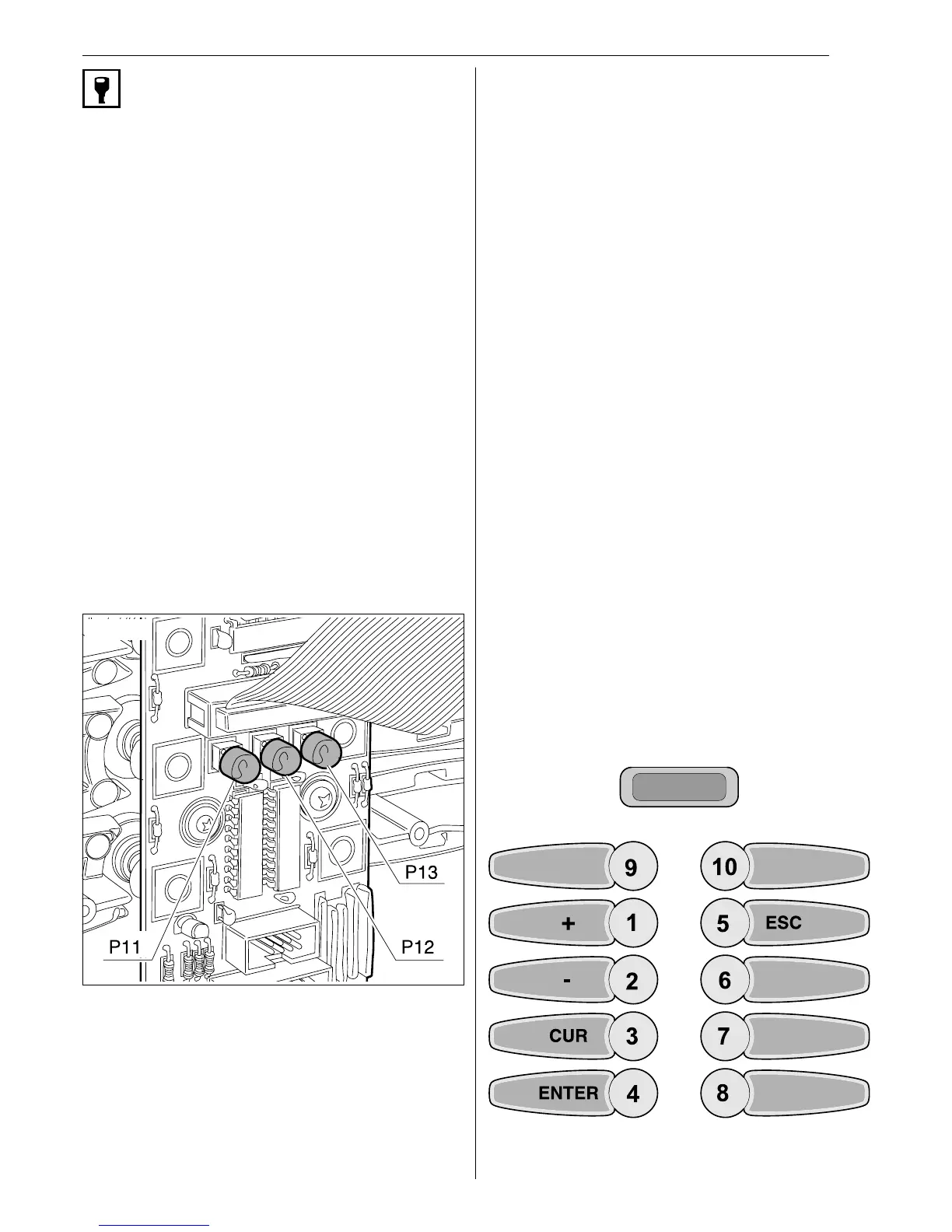
PROGRAMMING KEY
You access the programming function by pressing P11 key placed
on the component side of the keyboard card (Fig.7.1). The display
will request the access code to be entered via the keyboard.
The display messages are in four different languages that can
be selected at choice by the operator during the installation
phase (Fig.7.2) (suitable for hardware with potential for
expansion to eight languages).
The programming data can be of two kinds:
l NUMERICAL DATA
This is all the data that refers to the water , powder, prices, time
and date settings.
l LOGICAL DATA
This is all the data that refers to the logical status of the OPTION
menus that describe the status (enabled or disabled ) of a specific
function.
On entering the correct code one enters the true programming
mode.
Default code is 00001.
If the slave is missing to which the menu heading refers, the
corresponding parameter is nit displayed and line 2 appears empty.
In general keys 1 and 2 modify the parameters or scroll menu
entries displayed in line 2.
For programming part of the keys of the selection keyboard are
used which are namely:
n key 1 +
Increments the flashing digit or sets YES or sets ON.
n key 2 -
Decrements the flashing digit or sets NO or sets OFF.
n key 3 CUR
Cursor: when flashing, it shows the digit to be modified.
n key 4 ENTER
Is used to confirm the changes done.
n key 5 ESC
Comes from the current programming submenu, and returns to
the sub-menu of origin.
n push button P11 on the board ESC
Comes from the current programming submenu, and returns to
the sub-menu of origin.
The functions of the above keys will be valid throughout this
manual unless otherwise specified.
In this status the LCD contrast can be digitally adjusted. The
keys to be used are:
7 to increment contrast
8 to decrement contrast
4 to confirm value
The other keys have no effect in this status.
PROGRAMMING
1=+ (increase)
2=- (decrease)
3 = CUR (cursor)
4 = ENTER (confirm)
5 = ESC
push button P11 = ESC
Programming panel


 To Next Page