50
IRIS
Fig.8.1
8.0 MAINTENANCE
IMPORTANT ! This operation is to be undertaken with
the machine on, and therefore is only permitted to the
technical staff authorized to carry out such operations.
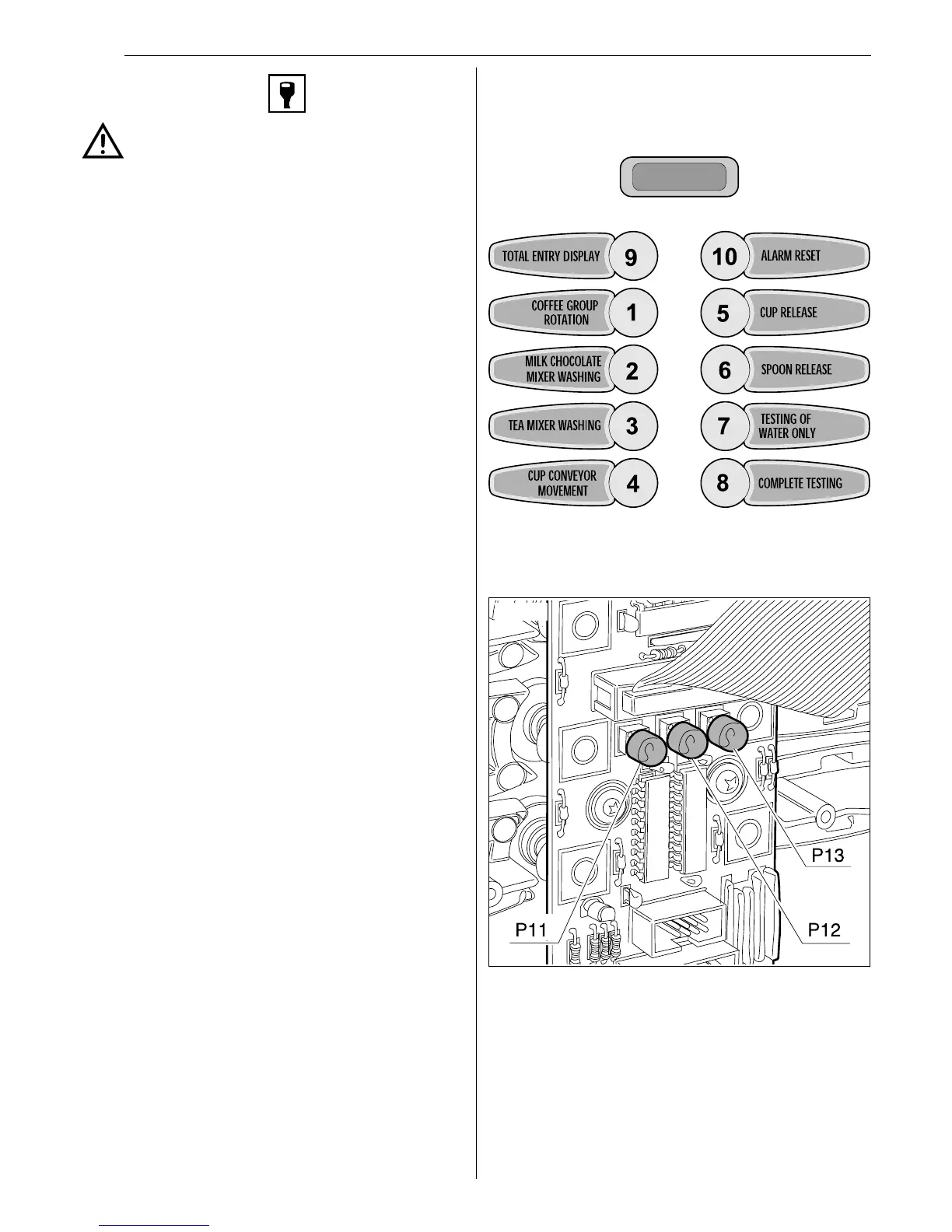
Press key P12 for access to this maintenance menu which is
positioned on the components side of the keyboard card (Fig.8.1).
On entering this maenu the coin box function is deactivated, the
wording maintenance xxx will appear on line 1, in which xxx stands
for the heater temperature, while line 2 is blank.
In this state the keyboard keys assume the following significance:
Espresso version:
● Key 1: Carries out a coffee group rotation or alarm
scrolling (if any).
● Key 2 : Milk/chocolate mixer washing. On pressing this
key the milk/chocolate solenoid valve is operated and the pump
and after 1" the milk/chocolate mixer with the equivalent of
100 cc of water, after which there is a 6" wait period. During
which time the washing message is displayed and on line 2 the
wording Message wait. At the end of which we escape from the
washing condition and return to maintenance state.
● Key 3 : Tea mixer washing. On pressing this key the tea
solenoid valve is operated and the pump and after 1" the tea
mixer with the equivalent of 100 cc of water, after which there
is a 6" wait period. During which time the washing message is
displayed and on line 2 the wording Message wait. At the end
of which we escape from the washing condition and return to
maintenance state.
● Key 4 : Translator movement, at every key pressing, the
translator is activated and moves one position forward (pos.
1→pos.2→pos.3→pos.1).
l Key 5 : Cup release
l Key 6 : Spoon release
● Key 7: Testing of the water of a selection. On line 2
the wording Water test appears and the machine awaits
selection. Selection will be made by placing all the solubles at
zero, and at the end of the delivery operation the machine
escapes from its testing state and return to its maintenance
state. To return to maintenance state without making any
selection, simply press key P9.
● Key 8: Complete testing of a selection. After pressing
this key on line 2 the word TEST appears and the machine
awaits a selection, at the end of the delivery function the
machine escapes from its testing condition and returns to a
maintenance condition. To return to the maintenance state,
without any selection, simply press key P9.
● Key 9: The total number of non-cancellable entries are
displayed for a period of 2 seconds after which we return to
maintenance state.
● Key 10 Alarm reset. All alarms are set to zero and the
diagnosis of the group and translator is carried out. Line 2
shows the Reset message for 2 seconds.
● Push button 11: not used.
● Push button 12: Return to normal status or exit from test or
water test.
● Push button 13: not used.
Washing
Key 13 installed on the component side of the keyboard card
(Fig.8.1) carries out the consecutive washing of the coffee group
(group rotation), of the milk/chocolate solenoid valve and relevant
blender, and of the tea solenoid valve and relevant blender.
This key is active only when the machine is in normal status and
not during maintenance or programming.
Maintenance panel (espresso version)


 To Next Page