KBF / KBF P (E5.2) 02/2012 page 46/103
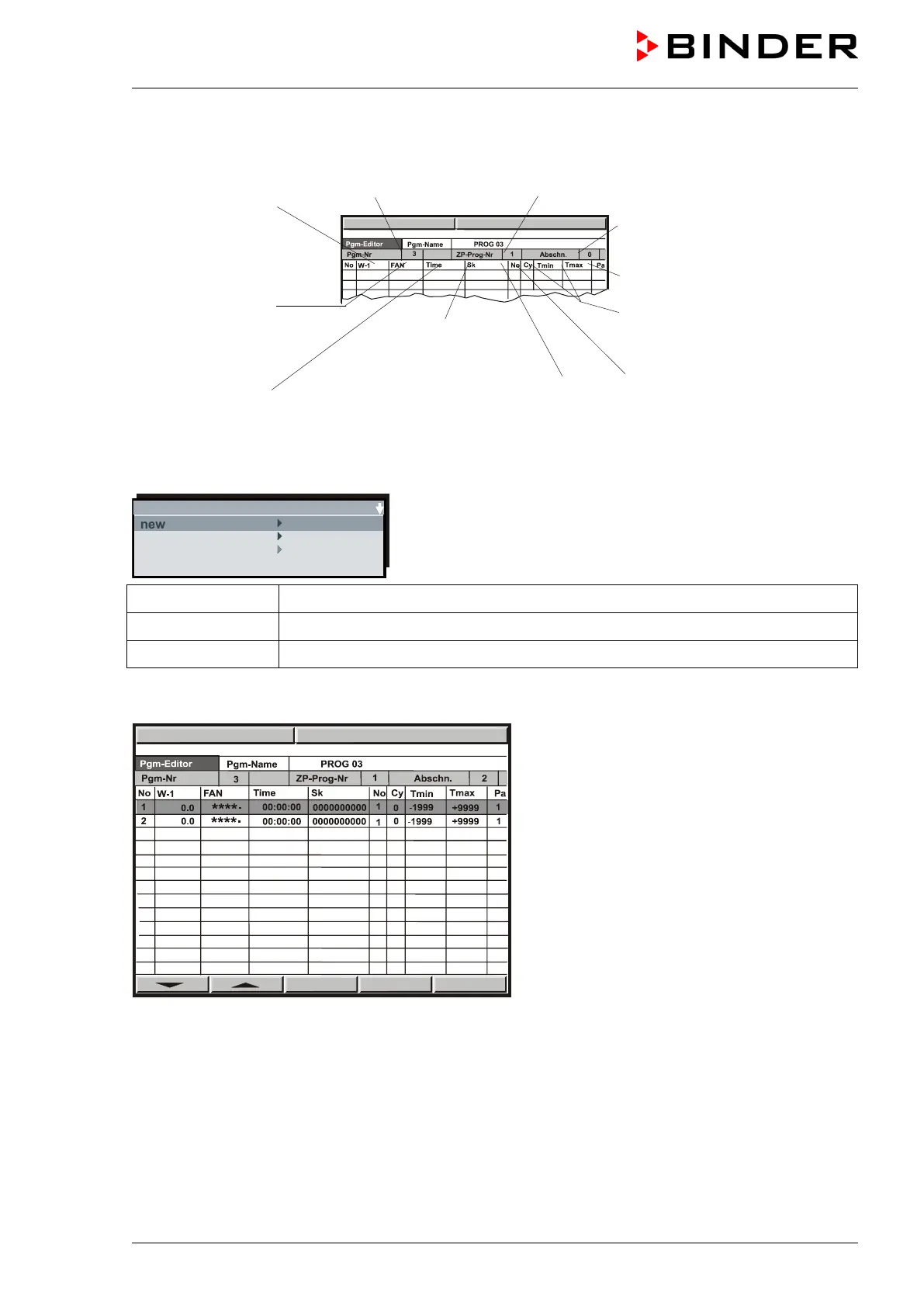
A program table will appear, which is initially empty until you enter the temperature values. You can now
enter the temperature program.
beginning of the
program section
Fan speed in %
Factory setting:
50% in Idle Mode
100% in Manual Mode and
Subprogram TP-Program No. 1
sections
Parameter set (preselected)
Tolerance band limits tempera-
ture (maximum and minimum
temperature)
Number of duplicates in case
Operation lines
(no function)
Duration of program
section
Number of start section in case
of repeat cycles
You can enter Program sections into this program table.
Hit the “PGM” button. An inquiry display appears allowing you to enter or delete individual program sec-
tions.
In this view, new program lines can be entered or deleted:
new New lines are added below in the table
insert New lines are added above a previously selected line
delete Individual lines that have been selected previously are deleted
Create as many lines, i.e. program sections, as desired. As a next step, values can be entered into these
lines. It is possible to add supplementary lines later or to delete individual lines at any time.
To enter values, select the corresponding line via
the arrow keys.
Hit the “ENTER” button. The program editor
appears.



 To Next Page