EasyManua.ls Logo

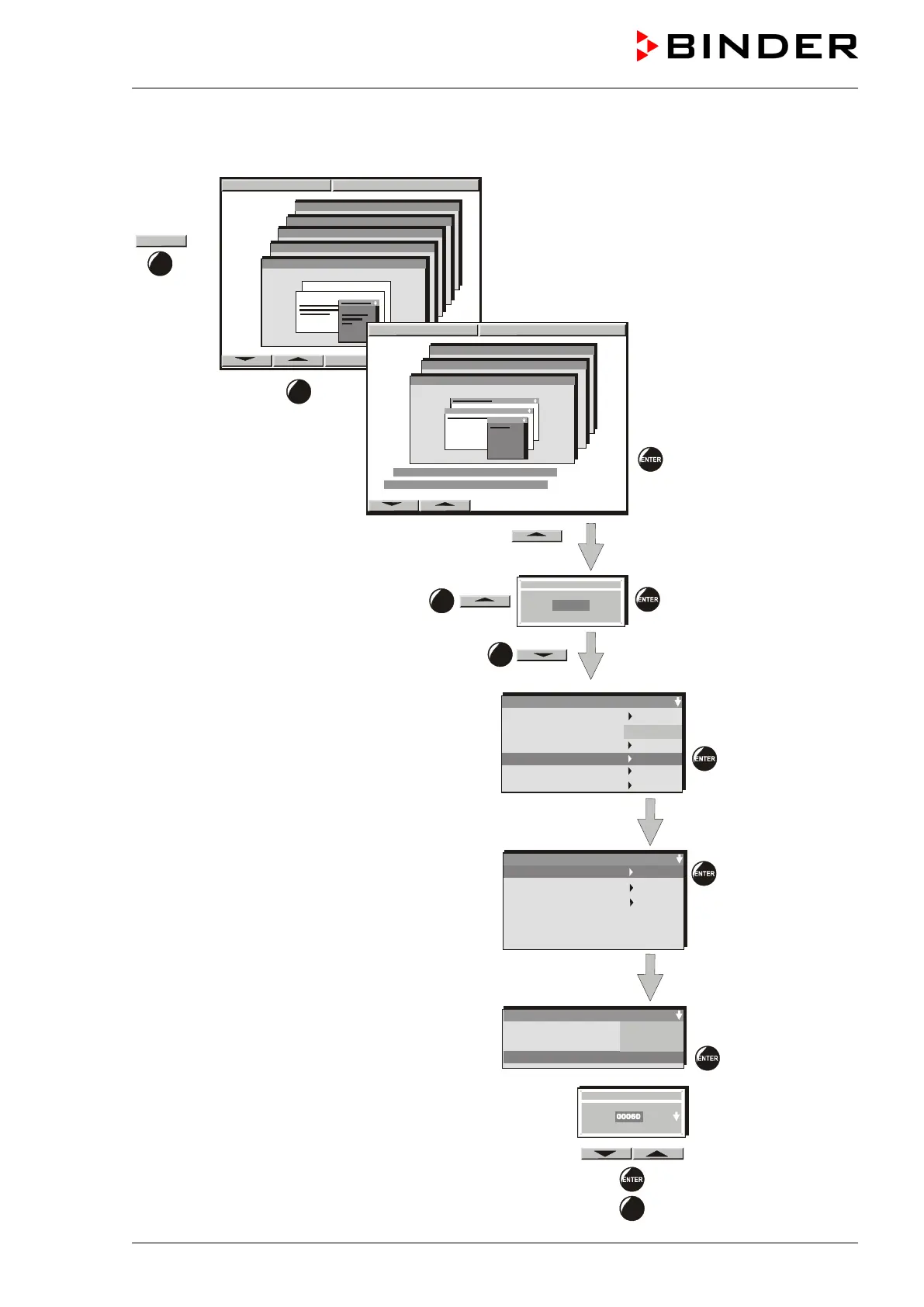
Binder KBF 720 (E5.2) - Setting the Storage Rate

Default Icon
103 pages
Print Icon
To Next Page IconTo Next Page
To Previous Page IconTo Previous Page
Loading...
KBF / KBF P (E5.2) 02/2012 page 41/103
7.1 Setting the storage rate
Enter the storage rate with the arrow keys and
confirm by pressing “ENTER”.
To leave this menu press the “EXIT” button several
times
Configuration 1
Diagram view
Feed view
Event tracks
Datalogging
Interface
Analog view
Time/div
Sollwert Art
Storage rate
EXIT
Datalogging
Normal operation
Event operation
Timed operation
Normal operation
Store status
Store value
s
Storage rate
Actual val.
60s
On
CONFIG
User-Settings
Configuration 2
Configuration 1
Parameters
Choose variation
Parameters
Choose variation
2 X
3 X
11:44:17 20.12.09
11:44:17 20.12.09
2 X
User-Settings
Configuration 2
Configuration 1
Grenzwert
Offset
User-Code ?
+00001
1 X

Table of Contents

Related product manuals