V 1.31
2021. 05 80 / 171 Doc. # : BN-OP-C7
Network Setup
When connecting the equipment with LAN to interface with the outside PC, network
setup is needed. Network IP is required, and DNS is not used.
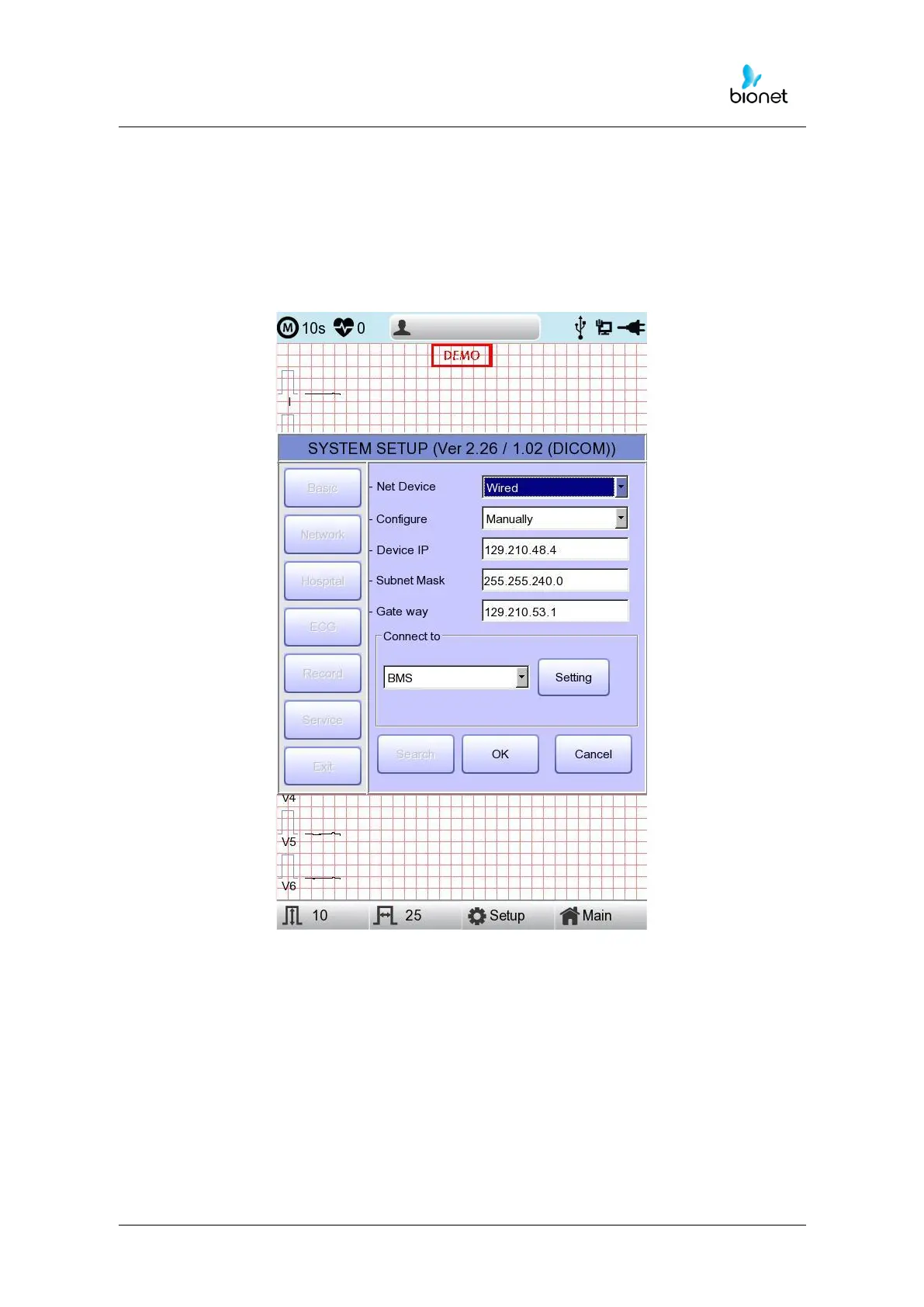
When selecting the Network menu at the left side of the System Setup page, Network
Setup page will show up at the right side.
The mode of network connection can be selected as Wired or Wireless in ‘Net Device’
setup.
The automatic IP(DHCP) or fixed Manually) can be selected through the 'Configure'.
If the Configure is setup as automatic IP(DHCP), the Device IP, Subnet Mask, Gateway
value is received automatically from the DHCP server on your network. If the Configure is
set to manually, the user has to enter the Device IP, Subnet Mask, Gateway directly.
When selecting one of the ‘Device IP’, ‘Subnet Mask’, ‘Gate Way’, the keypad will show
up. Then, input the information required and press 'OK' button to save or 'ESC' to cancel the
information.



 To Next Page