23
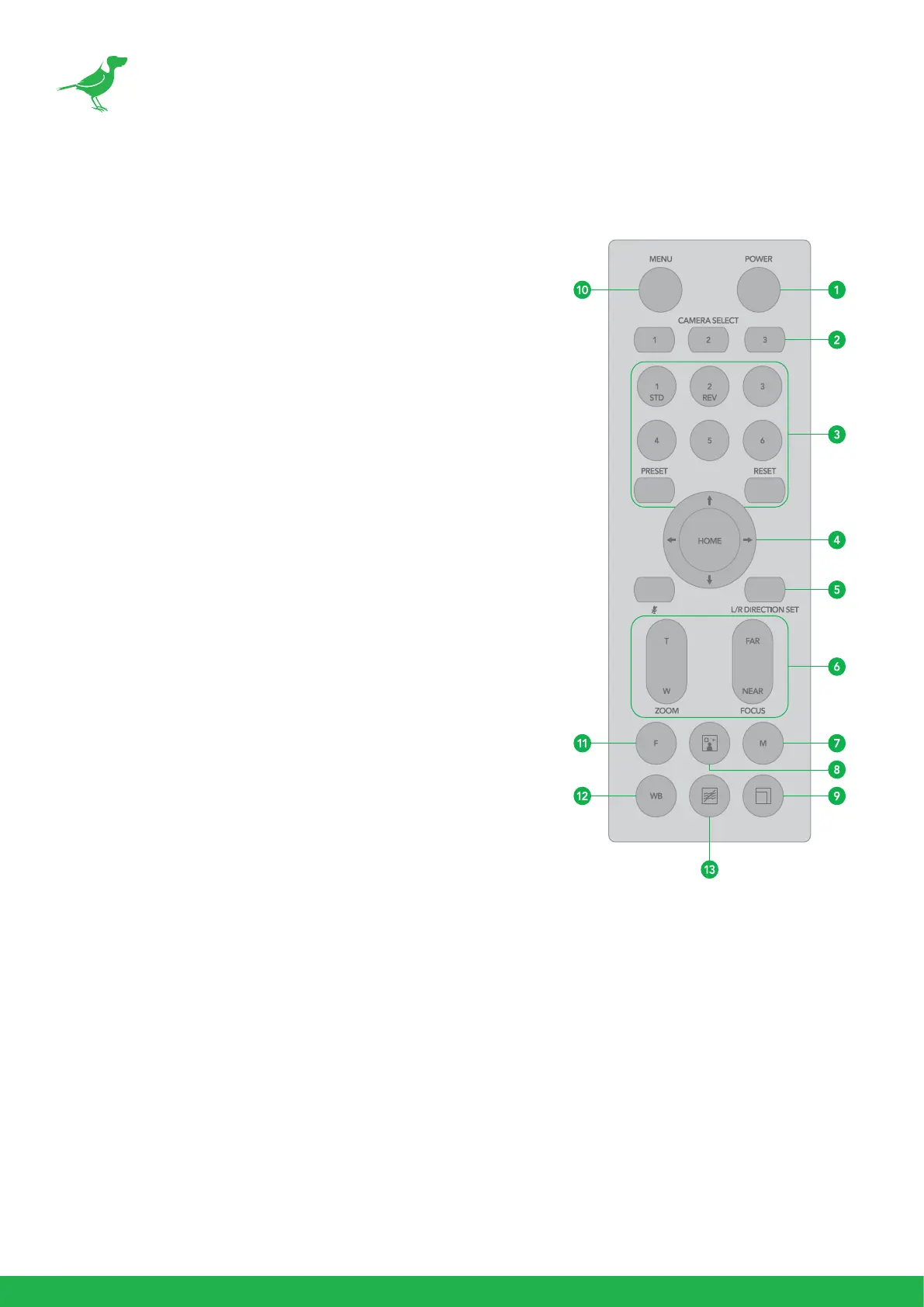
Remote Controller
1. Power
• Power ON the camera to set the camera to operational
status.
• Power OFF the camera to set the camera to standby
status.
• When the camera is powered OFF, the camera turns to
the rear.
• When the camera is powered ON, the camera turns to
the front.
• Powering the camera ON/OFF would not restart the
camera.
2. Camera ID (Total 3) Selector
3. Preset Position (Total 6) Calling and Setting
4. PAN-TILT
• Pan and Tilt direction control.
• HOME: Home position, Resolution reset.
5. L/R Direction Set
• Left and right orientation setting.
6. ZOOM/FOCUS
• Far - for objects further from the camera.
• Near - for objects closer to the camera.
7. Auto/Manual Focus
8. Back Light
9. Video Format Switching
• You can change the video format by keep pressing the button. (When video format is changed, the
camera would restart and the screen turns black for few seconds.)
10. MENU
• On screen menu display ON/OFF.
11. Fast/Slow Zooming Speed Switching
12. White Balance
• Change the White Balance setting by pressing the button.
13. De-Flicker
• Can reduce image icker caused by interaction between your camera shutter speed and the lights in
the space.


 To Next Page