30
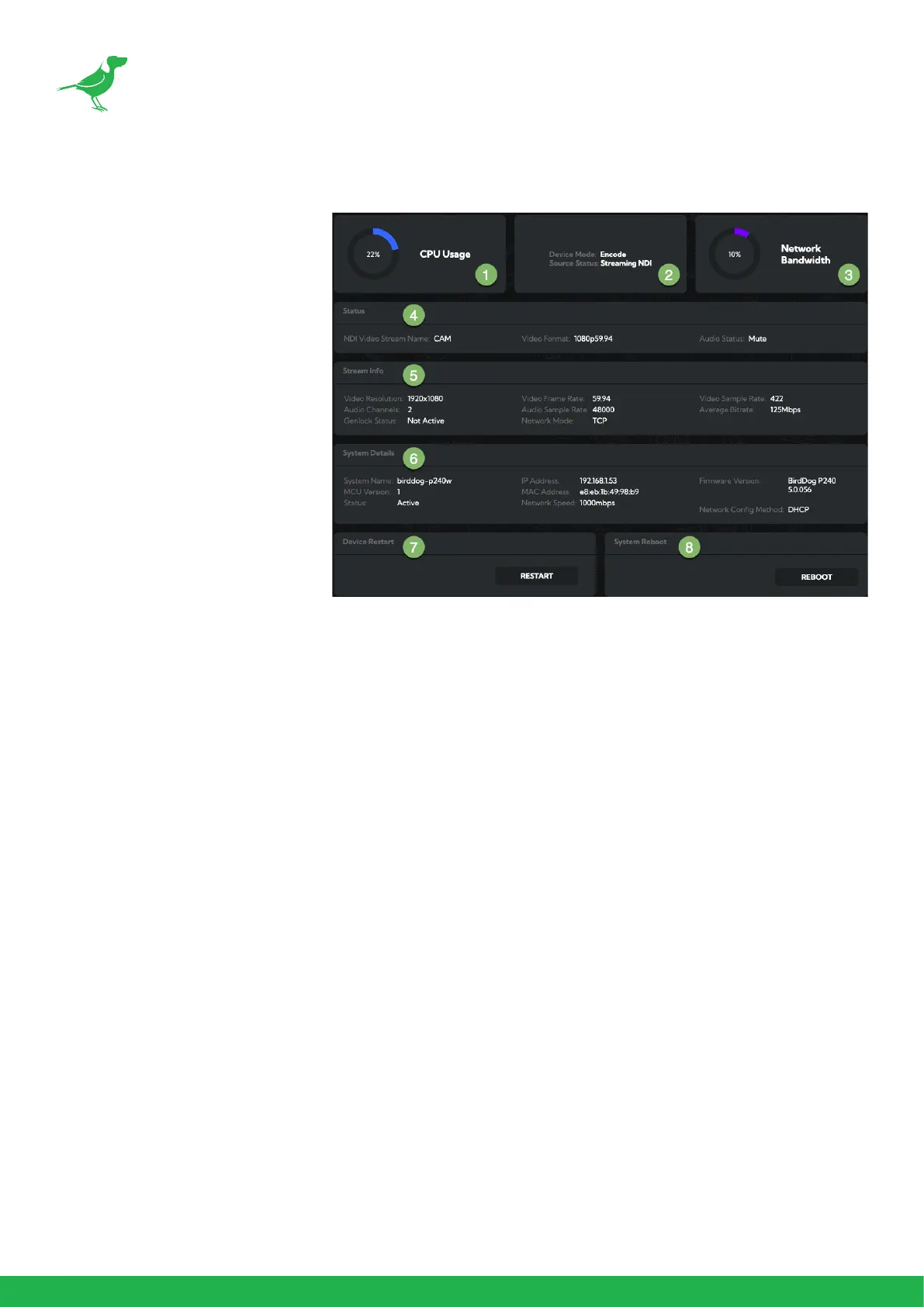
Dashboard
The Dashboard displays an overall
view of important information.
1. CPU Usage
Current computer system CPU
utilization.
2. Device mode
Encode or Decode. For a cam-
era this is xed at Decode.
3. Network Bandwidth
Network bandwidth consump-
tion of the current NDI® output
stream(s).
4. Status
a. NDI video stream name
b. Selected video format.
c. NDI audio status.
5. Stream Info
a. Video resolution. Number of audio channels of the camera.
b. Video frame rate. The audio output sample rate of the camera.
c. Video chroma subsample rate and average NDI® bitrate of the camera.
6. System Details.
a. Camera name.
b. Network details.
c. Online status of the camera.
d. MAC address and current rmware version of the camera.
7. Device Restart
Click this button to restart the NDI
®
stream. This may be necessary after changing key image settings e.g.,
resolution.
8. System Reboot
Click this button to reboot the unit after changing key network settings or the BirdDog name.



 To Next Page