56
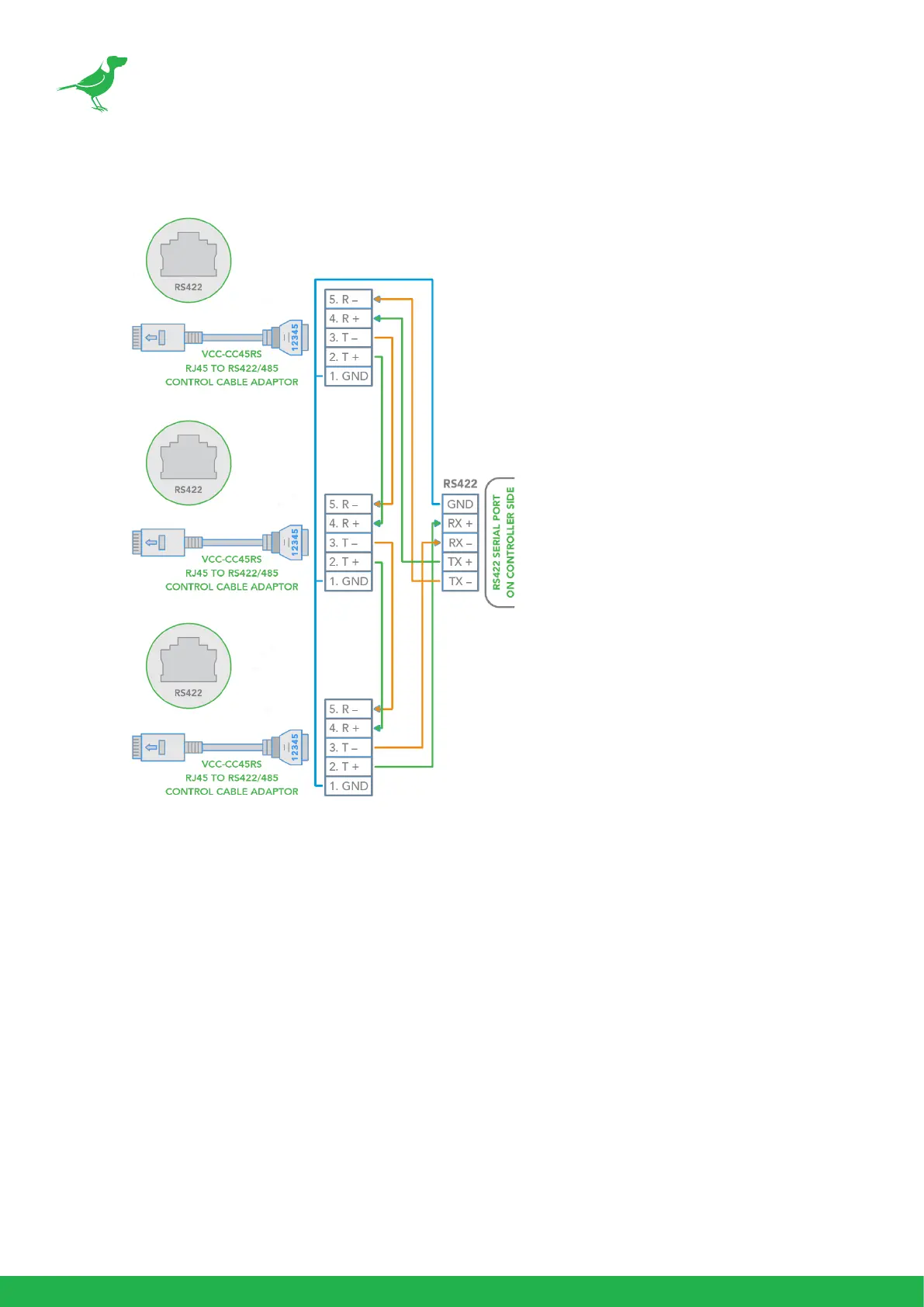
c. Make an RS422 daisy chain multiple camera connection with an RS422 standard serial port controller.
PELCO P/D Keyboard RS485 Connection
NOTE: Use the RS422 port for RS485 connection. Only use TX+ and TX- for RS485 connection.
1. For base DIP switch:
• Set to RS422 control.
• Set the Baud Rate to match the Baud Rate setting on the controller keyboard.
2. Set the camera ID on OSD menu by remote controller
3. Reboot the camera by turning it O and then On after the DIP switch has been set.
4. Use a PELCO P/D compatible keyboard.
5. Use preset #95 on the keyboard to display and exit the camera OSD menu.
6. Use joystick and button “OPEN” or “CLOSE” to navigate the OSD menu.
7. To operate the keyboard, please refer to the keyboard user manual.



 To Next Page