53
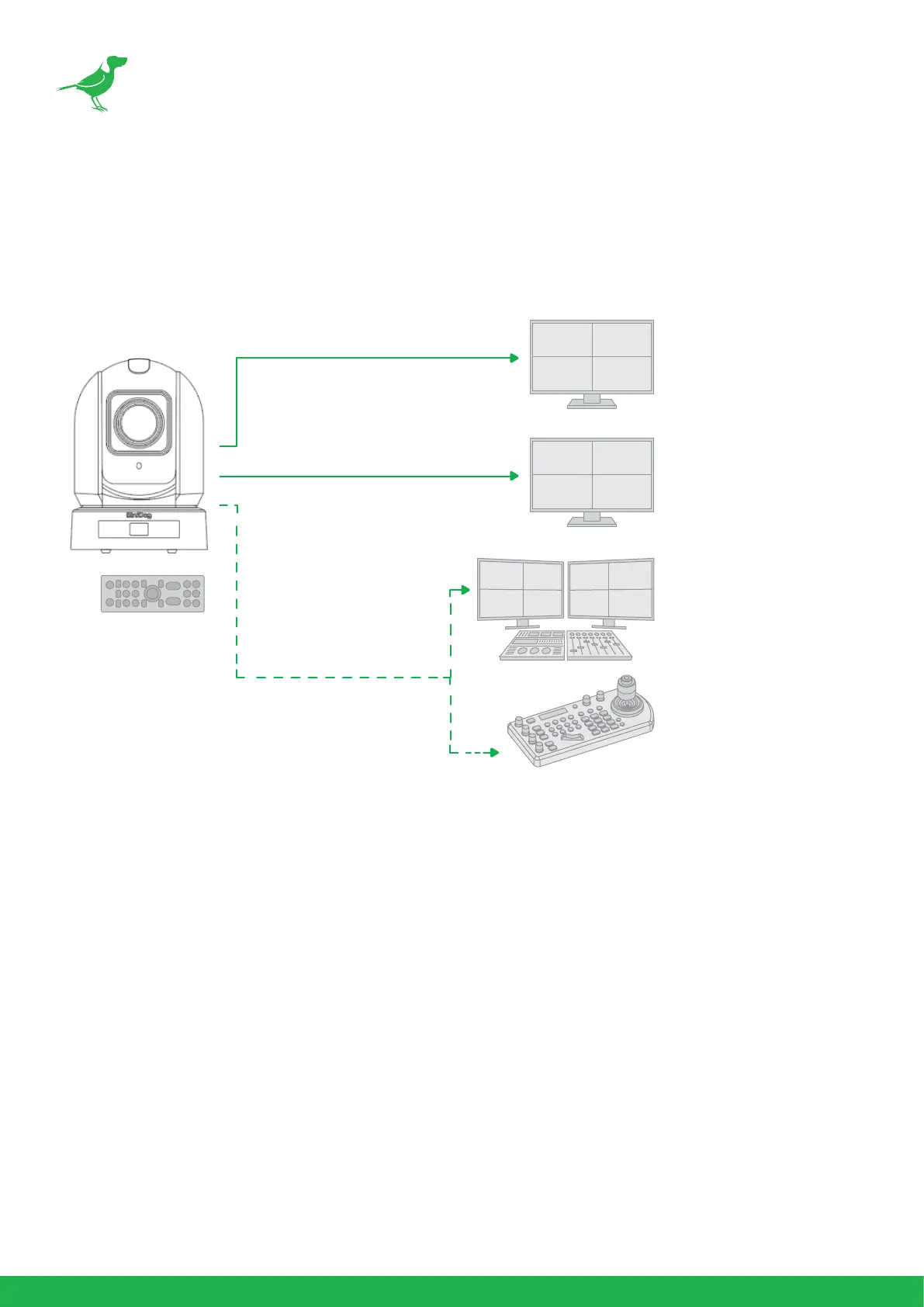
Using RS422 (VISCA)
You can use the RS422/485 port to connect to optional controllers, such as a joystick control keyboard, or control
PC station, to operate the camera, perform pan, tilt and zoom operations and to use the Preset function using the
control buttons.
An application software that supports this unit is needed if you use a PC station.
RS422 (VISCA) connection
1. For base DIP switch:
• Set to RS422 control.
• Set the Baud Rate to the same Baud Rate setting as the keyboard you are using.
• Set the specic address for the controlled camera.
• If you want to have the camera address to be automatically assigned by VISCA controller, set the DIP
switch 1 address to 0.
2. Reboot the camera by turning it O and On after the DIP switch has been set up correctly.
3. Use the included RJ45 to RS422 cable. The controller must be VISCA compatible.
4. The camera supports Daisy Chain connection of up to 7 cameras.
HDMI Video Signal
SDI Video Signal
Remote Control Signal
(RS422 (VISCA)
or RS485 (Pelco P/D))
IR Remote Controller


 To Next Page