EasyManua.ls Logo

Bizerba SC II Series - Two Keyboard Levels; 5.4 Printer; 5.4.1 Printer Lid and Side Cover for SC II 100;200

Bizerba SC II Series
107 pages
Print Icon
To Next Page IconTo Next Page
To Previous Page IconTo Previous Page
Loading...
Device and operating controls Operating instructions SC II
30 / 107 61429850113 en-US
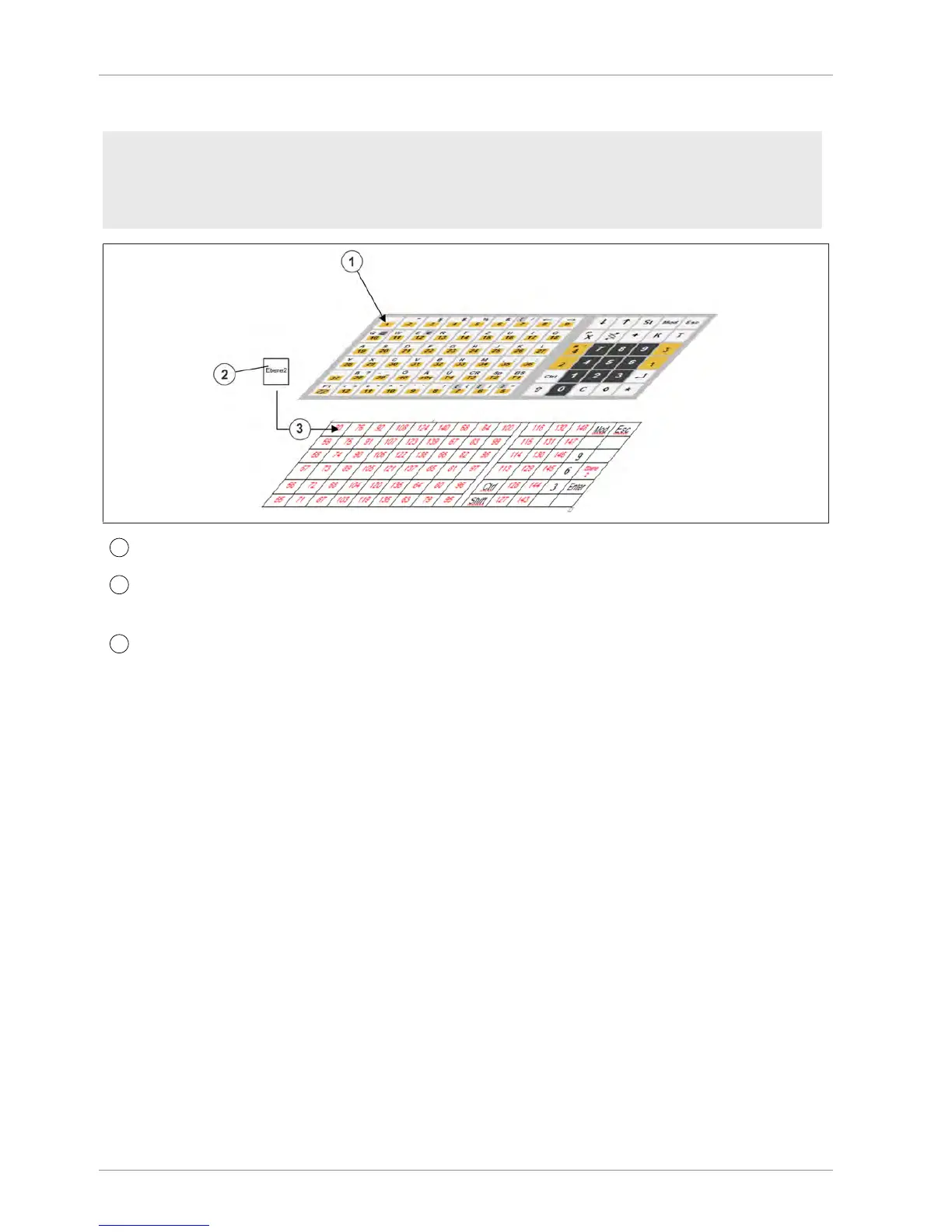
Two keyboard levels
Menu settings
- In the configuration place key<Switching PLU level> to the basic keyboard. Select: 5 3 1
2.
- In the PLU maintenance create the direct PLU keys for level 2. Select: 1 6 1.
1
Keyboard level 1
2
Switch key "PLU level"
Level 2 is activated.
3
Keyboard level 2
5.4 Printer
The models are fitted with linerless or label printers. The printers operate according to the
thermal printing principle. The paper can only be printed on the thermal side.
5.4.1 Printer lid and side cover for SC II 100/200
Printer lid SC II 100/200
Opening

Table of Contents

Related product manuals