12
ICONS & BUTTONS
The console's main display presents user information and prompts that vary depending on the current device
function. The five buttons below the display have variable functions according to device mode. Button
functions are indicated by icons in the display footer, immediately above each button.
CONSOLE DISPLAY ICONS
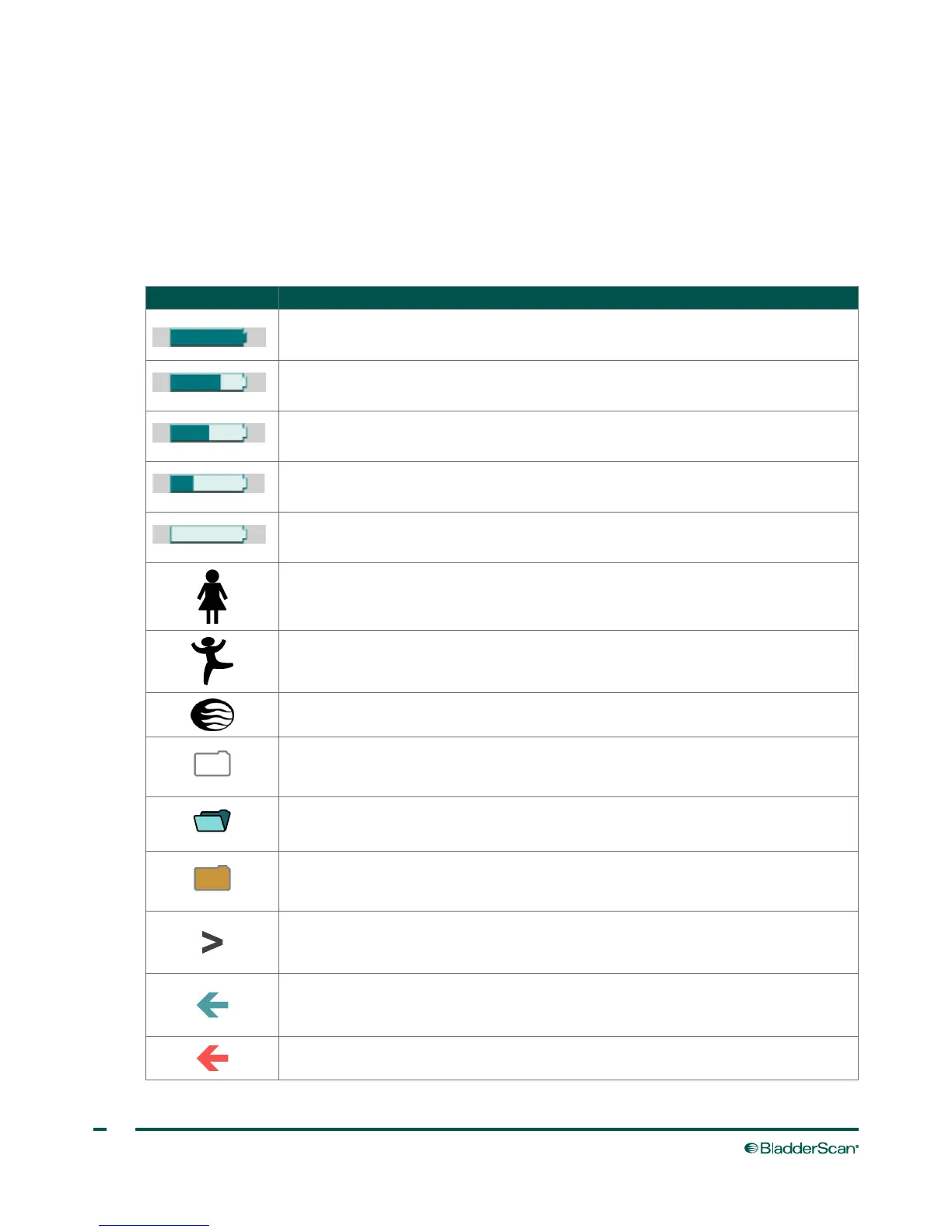
The following icons may appear on the console main display.
ICON PURPOSE
A fully‑charged battery.
A battery 50% to 75% charged.
A battery 25% to 50% charged.
A nearly depleted battery.
A fully discharged battery. Replace immediately.
Scan mode for patients who are female and have not had a hysterectomy.
Scan mode for small patients less than 122 cm (48in) tall and weighing less than 27kg
(60lbs).
Scan mode for all other patients.
A grey‑outlined folder indicates an empty exam.
An open blue folder indicates the currently displayed exam.
An orange folder indicates a saved exam.
The bladder is too large to be contained within the ultrasound field of view
(cone‑shaped area in which the probe transmits ultrasound waves), or the bladder
contains more than 999mL of urine.
The bladder is contained within the ultrasound field of view, but not centered. You
may be able to obtain a more accurate measurement by re‑aiming the probe in the
direction indicated by the arrow.
The bladder is not contained within the ultrasound field of view. You must re‑aim and
re‑scan.



 To Next Page