17
Operations & Maintenance Manual: Introduction
DISPLAY SCREENS
HOME SCREEN
The Home screen appears when the instrument is turned on. It serves as a starting point for all of the main
functions of the device.
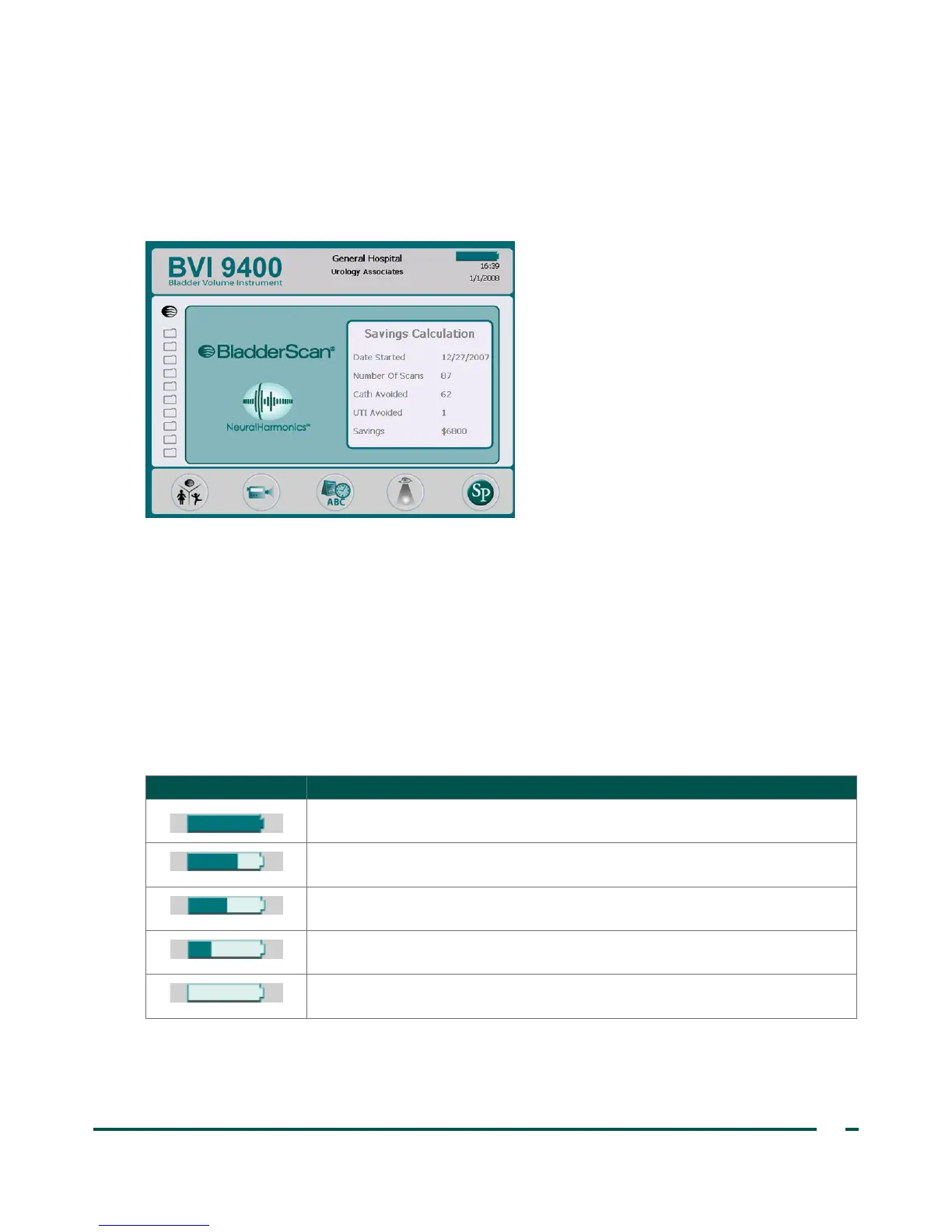
The Home screen displays:
• In the header: Your clinic’s name, the battery status indicator and current date and time.
• In the center panel, left side: A list of saved exam results (10 maximum) saved in chronological order.
Orange folders hold saved exams. Grey‑outlined folders show spaces available to save an exam.
• In the center panel, right side: A cost saving summary. Displays the savings to your organization due to
using the BladderScan BVI9400 rather than catheterization. The values used to calculate the savings
are user‑variable and are entered from the Savings Preferences screen.
• In the footer: Five variable‑function buttons.
Table 5. Battery Power Level
BATTERY ICON POWER LEVEL
Indicates a fully charged battery.
Indicates a battery 50% to 75% charged.
Indicates a battery 25% to 50% charged.
Battery almost depleted.
Replace immediately.



 To Next Page