Home
Blink
Battery Charger
WE-30C
Page 26
Blink WE-30C - Page 26
63 pages
Manual
Save Page as PDF
To Next Page
To Next Page
To Previous Page
To Previous Page
Loading...
22
OM0001_L2_R_W
M
_USAv2.1
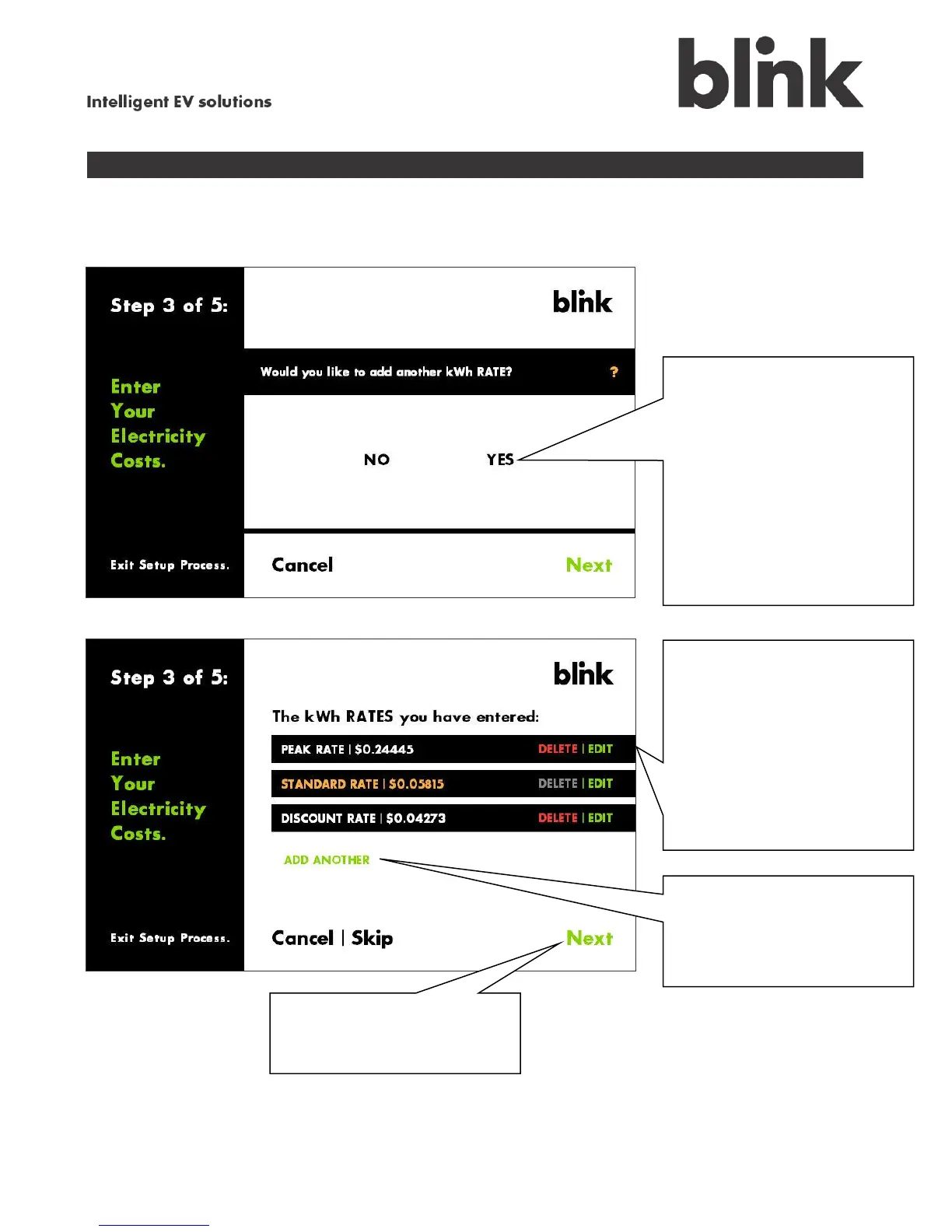
Step 3 (continued)
Touch
YES
to en
ter
another billi
ng rate, or
NO
to
finish entering
rates. If you
chose
YES
, repeat
through
of this sec
tion.
Note that for
multiple-rate
plans, you must
enter at least
two rates. (You
may choose
to do this later
, however.)
Review
t
he rates you
entered.
Touch
DELET
E
to
remove a rate. (You
cannot delete the
Standard Rate.)
Touch
EDIT
to
change a
rate.
To en
ter a new rate,
touch
AD
D
A
NOTHER
then
repeat
through
of this
section.
W
hen you a
re finished
entering rates, touch
Next
.
25
27
Table of Contents
Main Page
Default Chapter
3
Table of Contents
3
Important Safety Instructions
5
Federal Communications Commission (FCC) Statements and Notices
7
Welcome to Blink
8
Blink Features
8
A Closer Look at
9
Your Blink Connector
9
Your Blink Touch Screen
9
More Blink Features
10
Internal Energy Meter
10
Flexible Communications
10
Safety
10
Even more from Your Blink
10
The Blink Network
11
The Blink Portal
11
Setting up the Blink Charger
12
Calibrate the Blink Touch Screen
12
Start the Setup Process
13
Step 1 - Network Setup
14
Select Your Home Network Type
15
Enter Your Password
16
Set up the IP
17
Set up an HTTP Proxy
18
Set up Wi-Fi Manually
20
Step 2 - Time and Date Setup
21
Set the Time, Date, Time Zone, and Daylight Savings
21
Step 3 - Electricity Rate Setup
22
Set up a Single-Rate Plan
23
Set up a Multiple-Rate Plan
24
Step 4 - Schedule Charging Times
27
Schedule the Desired Charging Times
27
Enter the Desired Charging Times
28
Step 5 - Creating a PIN (Optional)
30
Using the Blink Charger
31
When Your Vehicle Is Unplugged
31
When Your Vehicle Is Plugged in
31
Vehicle Is Waiting to Charge
32
Vehicle Is Charging
32
Charging Cancelled
33
Rescheduling a Charge
33
Charging Delayed or Interrupted
34
View Your Charging History
35
Change Your Blink Charger Settings
36
Enter Your Blink PIN
37
Change Your Location
38
Change Your Charge Schedule
38
Change Your Electricity Billing Rates
39
Change the Date and Time Settings
39
Change Your Blink PIN
40
Update Your Network Setup
40
Test Your Network Connection
41
View Information about Your Blink Charging System
41
Adjust Your Display View
42
View Information about the Blink Intranet
42
Creating a New Intranet Password
43
Using the Intranet
44
Charge Schedule
47
Kwh Rate(S)
47
Device Info
48
Date & Time
48
Upload Firmware
49
Change Device PIN
50
Change Intranet Password
50
Get Help with Using Your Blink
51
Power Issues
52
Power Outages
52
Self-Test Fault
54
Critical Error
54
Blink Updates
55
Advanced Settings
56
Set Output Current - Authorized Personnel Only
56
User Maintenance Instructions
59
Related product manuals
Blink IQW2-80U-W1-N1-N-25
37 pages
Blink Wall Mount Charging System
29 pages
Blink IQ 200 Series
37 pages
Blink MQ 200
56 pages
Blink TP-EVPD-30kW
20 pages
Blink SemaConnect US
56 pages
Blink DS Series
92 pages
Blink 6 Series
26 pages
Blink IQW2-80U-M1-R2-N-25
37 pages
Blink HQ 200
52 pages



 To Next Page