OM0001_L2_R_WM_USAv2.1 29
Charging cancelled
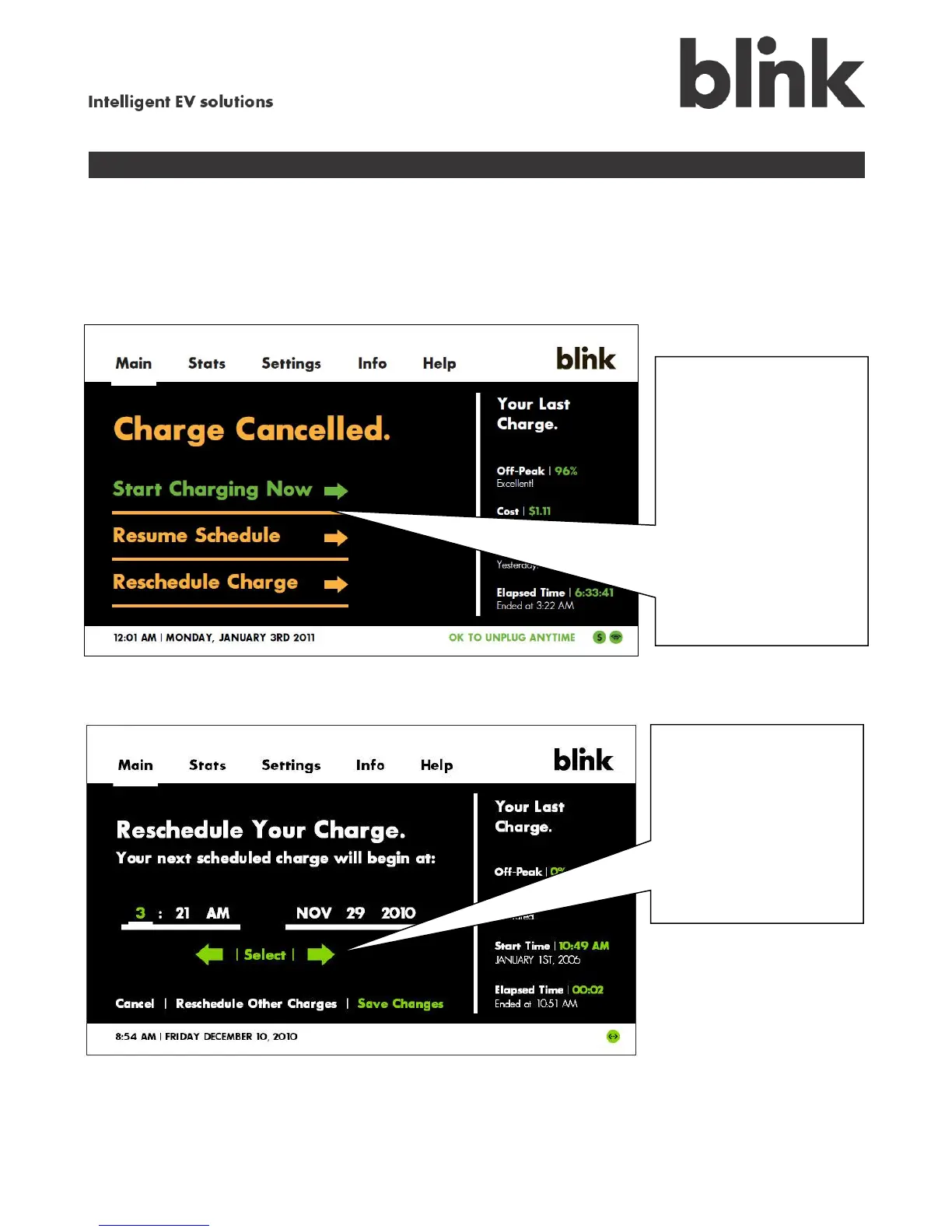
The following screen appears when you cancel a charging session while it is in progress by touching
Stop Charging. Your options are to restart the session where you left off (Start Charging Now or
Resume Schedule) or to schedule this charge to happen at a later time (Reschedule Charge).
Rescheduling a charge only affects the current charging session – it does not affect your normal
charging schedule.
Rescheduling a charge
When you cancel a
charge (by touching
Stop Charging or
unplugging your
vehicle), you can choose
to Start Charging Now,
Resume Schedule, or
Reschedule Charge for
this session only.
(Rescheduling does not
affect the future charge
schedule.)
To reschedule a charge,
touch the green arrows
and Select to enter the
start time and date for
your vehicle’s next
charge. When you are
done, touch Save
Changes.



 To Next Page