14 OM0001_L2_R_WM_USAv2.1
Step 1 (continued)
D. Set up an HTTP Proxy
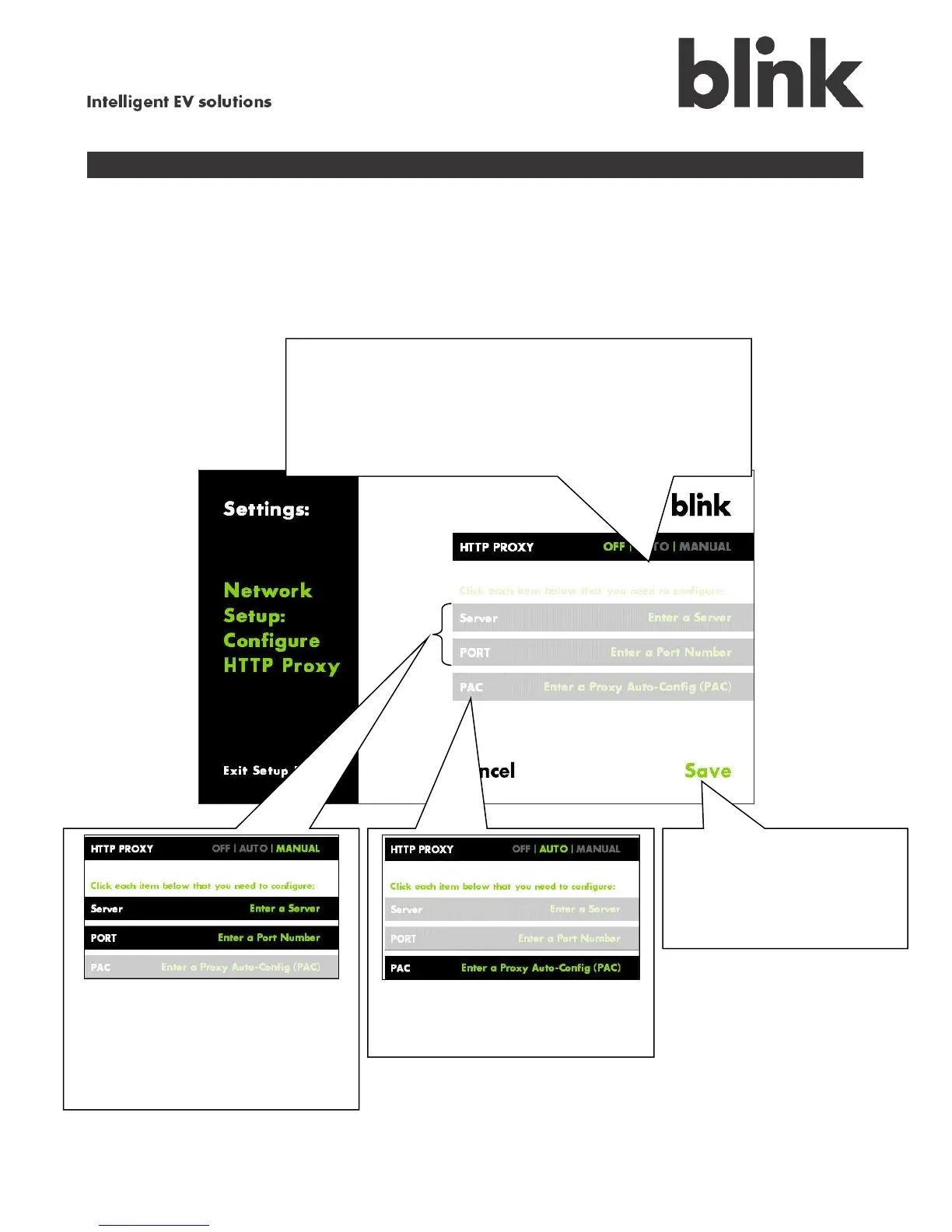
Very few networks require you to set up an HTTP Proxy; this is an advanced option. In those rare
cases that this is necessary, it is generally sufficient to select AUTO, which allows you to enter the URL
and lets the system assign a port. To manually assign both the URL and port, choose MANUAL.
If you chose MANUAL, touch
and enter the Server address (e.g.,
user:password@myproxy.com) and
Port Number.
Once you finish
entering HTTP Proxy
settings, touch Save to
complete setup and connect
to your network.
To set up an HTTP Proxy:
Touch AUTO to enter the server address and let the
system assign the port.
Touch MANUAL to enter the server address and port.
If you chose AUTO, touch
PAC and enter the PAC URL.



 To Next Page